
Virtual Assistant for Small Business: Types, Costs, Perks, Automation
Need a virtual assistant for small businesses? Learn tasks to delegate, costs, hiring models, onboarding, management, security, and AI vs. human VA comparison.
As a small business owner, you may have to wear many hats, like being an administrator, a customer support specialist, a scheduler, a marketer, and a salesperson. Certain tasks can be delegated to a virtual assistant who can make this experience more effective. A virtual assistant is a person who offers services remotely for specific tasks without the need to hire them in the office. In this guide, we'll dig into virtual assistants for business. You'll also find out some practical automation tips and how tools like Enter Pro can help your business create a website easily.
What is a virtual assistant for small business?
A virtual assistant (VA) is a person who can help you with different business tasks remotely without the need to hire a real employee. A small business virtual assistant may be part-time, full-time, hourly, on retainer, and/or per project. Generalist VAs will manage repetitive tasks such as administration, and specialists will be assigned to sales, bookkeeping, marketing, or CRM management. The individual can hire an independent VA or have a managed VA service for extra coordination. Onshore, offshore, and nearshore setups also influence expenses, availability, and time zone coverage – allowing you to align support with business requirements.

Is a virtual assistant right for your small business?
When administrative tasks, lost follow-ups, cluttered inboxes, or sporadic marketing efforts take up precious time, a virtual assistant can be of assistance. When repetitive data work takes the time that is needed to be spent on revenue-generating tasks, consider outsourcing the task to a small business virtual assistant for ongoing support. Prioritize tasks that happen on a regular basis, involve little owner decision-making, physical location, or strategic control. But when workloads are small or involve critical decisions, hiring may not be warranted. If an isolated need exists, outsourcing a one-off project might provide more cost and flexibility control.
What does a virtual assistant for a small business do?
A business virtual assistant manages recurring tasks, helping small business owners focus on growth. Here are the main responsibilities they can handle.

- Administrative support: A business virtual assistant takes care of inboxes, calendars, data entry, and documents. They may additionally plan trips and carry out research, making certain that day-to-day administrative duties are executed properly.
- Customer support: Virtual assistants answer customer emails, answer simple questions in the chat, and provide order updates. They can also track reviews and escalate complicated complaints to the owner.
- Sales assistance: The best Virtual sales Assistant for small businesses conducts research on prospects, updates customer relationship management (CRM) records, and follows up on leads. They can also make sales appointments, which allows owners to have regular communication.
- Marketing support: Virtual assistants schedule social media posts, upload content, and prepare newsletters. They can also help with simple search engine optimization (SEO) efforts, enabling companies to keep up with frequent marketing strategies.
- Finance administration: A business virtual assistant manages expenses, generates invoices, and follows up on payments. They can also produce financial reports, and the owners have the authority to approve and make financial decisions.
- Operations coordination: Virtual assistants document standard operating procedures (SOPs), track tasks, and follow up with vendors. They handle the inner workings of things while the owners are focused on sensitive issues. Specialized assistants can be appropriate for tasks that require industry expertise or specific software knowledge.
What does a virtual assistant for small businesses do? (includes tasks & delegation ladder)
A virtual assistant will handle your routine tasks such as scheduling, emails, research, data entry, and customer enquiries. Do simple things first and then delegate specific roles as your company expands.
Core task categories
| Category | Typical tasks |
|---|---|
| Administrative | Inbox management, calendar, data entry, documents, travel, research |
| Customer support | Email, chat, order updates, reviews, basic routing |
| Sales | Prospect research, CRM updates, lead follow-ups, appointment setting |
| Marketing | Social scheduling, content uploading, newsletters, basic SEO |
| Finance admin | Invoices, expenses, payment reminders, reporting prep |
| Operations | SOP documentation, task tracking, vendor follow-ups, coordination |
10 tasks to delegate first
- Email triage
- Calendar & appointment scheduling
- Data entry & file organization
- CRM updates
- Lead-list research
- Customer-service responses
- Invoice & payment follow-ups
- Social media scheduling
- Document formatting & meeting follow-ups
- SOP & process documentation
The delegation ladder: what to hand off as trust builds

Stage 1 — Repetitive work: Begin with delegating routine tasks with little judgement. These are things like data entry, formatting documents, scheduling, and reminders. Providing clear instructions allows your assistant to do them consistently and independently.
Stage 2 — Communication: After you gain trust, let them take over your inbox, reply to customers, and organise appointments. Provide communication style, response templates, and escalation rules. This allows your assistant to handle common communication without constant supervision.
Stage 3 — Ownership: Hand out regular tasks such as CRM upkeep, follow-up processes, research, and operational duties. Communicate expected results, timing, and parameters of decision-making. Your assistant can then work on these processes with fewer reminders.
Stage 4 — Higher judgment: Take on exception handling, team coordination, process development, and some client-facing duties. Include relevant business context, approval limits, and decision rules. Check key results frequently to build trust and enhance autonomous decision-making.
Why should small businesses hire a virtual assistant?

- Reclaim owner time: Virtual assistants handle repetitive administrative tasks, giving business owners more time for planning, decision-making, and business development.
- Reduce operational workload: Scheduling, email management, and data entry without adding another full-time office worker. This will help maintain manageable operations as responsibilities increase.
- Improve consistency: Virtual assistants follow documented procedures for recurring tasks. This creates repeatable workflows and helps maintain consistent processes across daily business activities.
- Scale support flexibly: Scale up or down virtual assistant hours to meet the fluctuating workload and business priorities. This enables small businesses to set up support without having to hire someone else on staff.
- Access specialized skills: Use virtual assistants with marketing, sales, bookkeeping, CRM management, or administration expertise. Their expertise can be correlated to the particular business needs.
- Reduce owner dependency: Document routine tasks and establish clear instructions for recurring responsibilities. This helps other team members follow established processes when owners become unavailable.
Types of virtual assistant services for small business
Small businesses can choose generalist virtual assistants for routine tasks or specialists for skills like marketing and bookkeeping. Generalists cost less but require more management. Here are the key types of virtual assistant services that you usually encounter for small businesses:
| Model | Best suited for | Main advantage | Main limitation |
|---|---|---|---|
| Freelancer/direct hire | Defined, lower-volume tasks | Lower direct cost | Owner manages relationship |
| VA agency | Businesses wanting vetted talent | Hiring and replacement support | Higher service cost |
| Managed service | Owners wanting less management | Structured support & backup | Usually higher overall cost |
| Specialized VA | Skill-specific workflows | Deeper expertise | Higher rates |
| Offshore VA | High-volume, non-real-time tasks | Significant cost savings | Time-zone & process adjustment |
| Onshore VA | Client-facing, complex tasks | Cultural fit, language | Highest cost |
| Nearshore VA | Balanced budget & time-zone | Good communication cadence | Mid-level pricing |
How much does a small Business Virtual Assistant cost?
The location, expertise, the complexity of the tasks, hours worked, and management requirements are the factors that determine the cost of a virtual assistant for small businesses. Hourly rates are good for one-off jobs; retainers and packages are other ways of budgeting, and project-based pricing is available. Part-time or full-time options ensure regular coverage and higher monthly expenses. The market ranges below are indicative and are subject to change based on provider and location.
| Virtual assistant type | Illustrative cost range (USD) |
|---|---|
| Entry-level VA | $5–$15/hour |
| Experienced VA | $15–$35/hour |
| Specialist VA | $25–$75+/hour |
| Part-time VA | $400–$1,500/month |
| Full-time VA | $1,000–$4,000+/month |
| Monthly retainer or package | $300–$2,000+/month |
| Project-based VA | $100–$2,000+/project |
An in-house employee also involves payroll taxes, benefits, equipment, and recruitment expenses. Therefore, compare total costs, output quality, and time recovered rather than choosing the cheapest hourly rate.
How to choose the best virtual assistant for small business
The selection of the best virtual assistant for a small business is based on workload, tools, and expectations. Evaluate relevant industry experience, software skills, communication, availability, reliability, problem-solving, data security, backup plans, and transparent pricing. A reliable VA listens and follows instructions and recognises unusual situations and escalates issues appropriately. Use a weighted interview scorecard before hiring:
- Relevant experience (20%)
- Tool proficiency (15%)
- Communication (15%)
- Reliability (15%)
- Problem-solving (15%)
- Security practices (10%)
- Availability (10%)
Compare candidates consistently to find someone who fits your daily operations.
How to hire a virtual assistant for a small business?
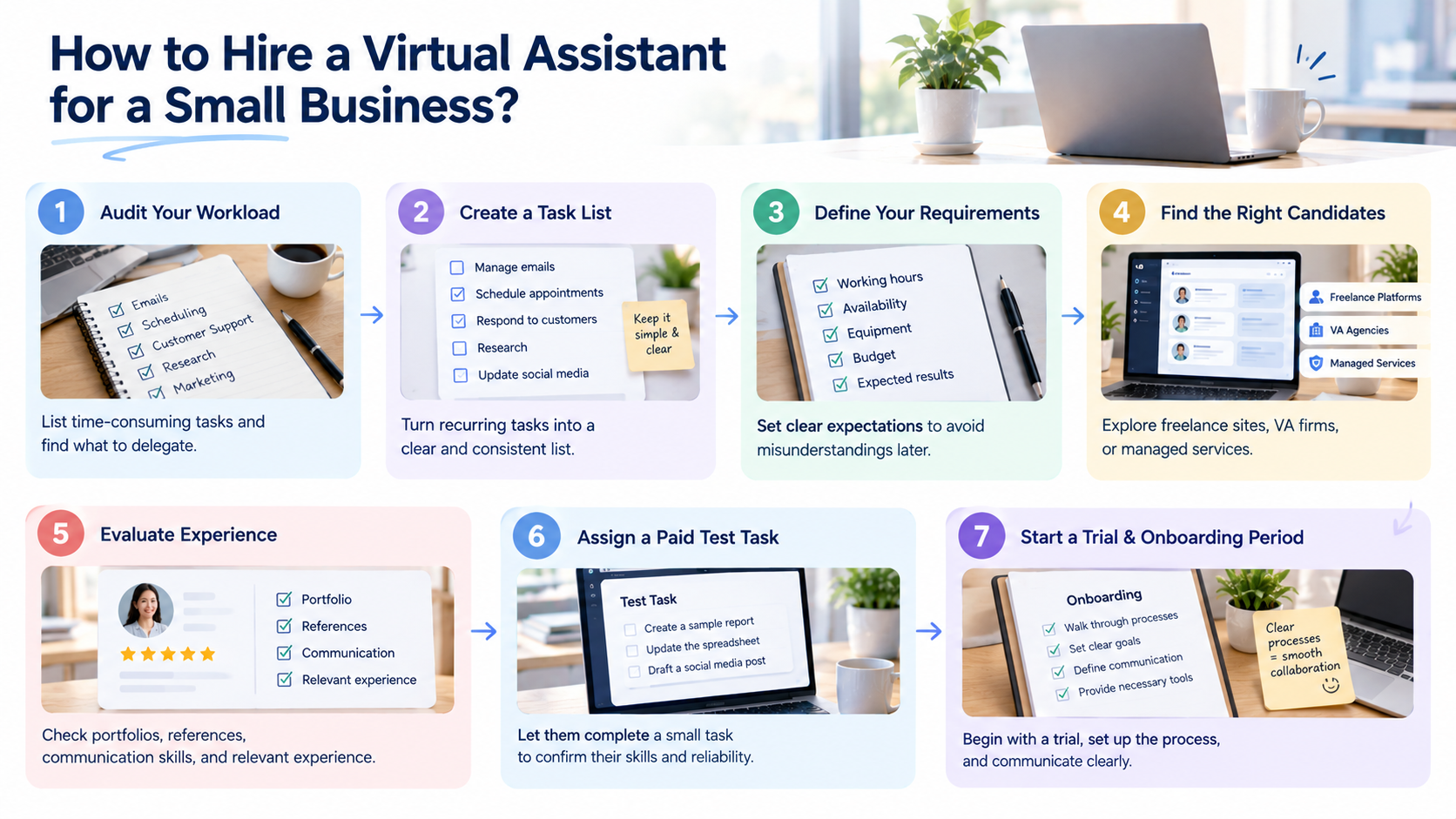
Step 1: Audit your weekly workload
Go over one typical work week and list time-consuming tasks that don't need you to do them. Focus on delegation opportunities that are appropriate.
Step 2: Create a clear task list
Make consistent work a task list, whether administrative work, arranging appointments, responding to customer enquiries, research, or other routine business tasks.
Step 3: Define your requirements
Before reaching out to candidates, define working hours, availability, necessary equipment, budget, and results. It is important to have clear expectations that help to avoid misunderstandings later.
Step 4: Choose where to find candidates
Research freelance websites, virtual assistant firms, or managed services to identify those with the necessary expertise for your company's needs and budget.
Step 5: Evaluate relevant experience
Review portfolios, references, communication skills, and relevant experience before making decisions. Look for evidence that candidates can handle your specific responsibilities reliably.
Step 6: Assign a paid test task
Check portfolios, references, communication skills, and experience prior to making any decisions. Select items that demonstrate candidates' ability to perform your duties competently.
Step 7: Establish a trial and onboarding period
Start with a clear trial period, outline the processes, set expectations, and communication patterns. Don't make vague requests such as "manage my admin"; specific deliverables make better matches.
How to manage a virtual assistant without micromanaging
The key to working effectively with a virtual assistant begins with systems and not with supervision. Daily asynchronous updates can be used for accountability, as well as weekly priority reviews and monthly performance reviews. Identify and create relevant KPIs, QA checklists, and exception logs to monitor progress and resolve recurring issues. Depending on the position, track turnaround time, error rate, response time, CRM accuracy, meetings booked, or consistency in publishing. Feedback should be detailed and specific, rather than general and ambiguous.
Security and confidentiality when working with a virtual assistant
Security and confidentiality should always be priorities of the business when collaborating with a virtual assistant. Role-based access, separate accounts, password managers, and multi-factor authentication should be provided to protect sensitive information. Carefully manage control file permissions and revoke control file access upon the expiration of contracts. Expectations are set through confidentiality agreements and clear data-handling policies. Managed providers can be assured by SOC 2 or ISO 27001 certifications. But certain information, like financial records, customer data, payment details, regulated information, and IP, needs additional care. Requirements are different in different places and sectors.
How VAs can use AI website builders like Enter Pro
Virtual assistants will frequently develop landing pages, activity pages, and portfolios for the client's day-to-day business needs. An AI website builder can help you accomplish these tasks quickly and easily, without the need for a lot of coding or design expertise. Enter Pro lets you explain your needs, produce web pages, and fine-tune designs visually. It is also possible to export source code to customize and deploy. This makes it easier to build a web design for small businesses that can't afford to spend a lot of money. Learn about web design for small businesses and how small business websites help to grow your business.
Build Your Website for Business →
Key features of Enter Pro for virtual assistant solutions
- AI-powered website generation: Enter Pro helps you build websites and virtual assistant solutions through conversational AI. Describe your requirements to generate a starting point for your project.
- Website templates: Explore Enter Pro website templates to find layouts for different project needs. Customize a suitable starting point instead of building every page from scratch.
- Multiple AI models: Enter Pro supports multiple AI models for different development tasks. Explore its new AI models to understand available options for your workflow.
- Visual editor: Refine your website's layout and appearance using the visual editor. Adjust page elements to match your virtual assistant's purpose and presentation requirements.
- One-click deployment: Publish your completed website through a streamlined deployment process. This helps you move from development to a live project without managing every deployment step manually.
Build your virtual assistant website with Enter Pro
Step 1: Define your website requirements
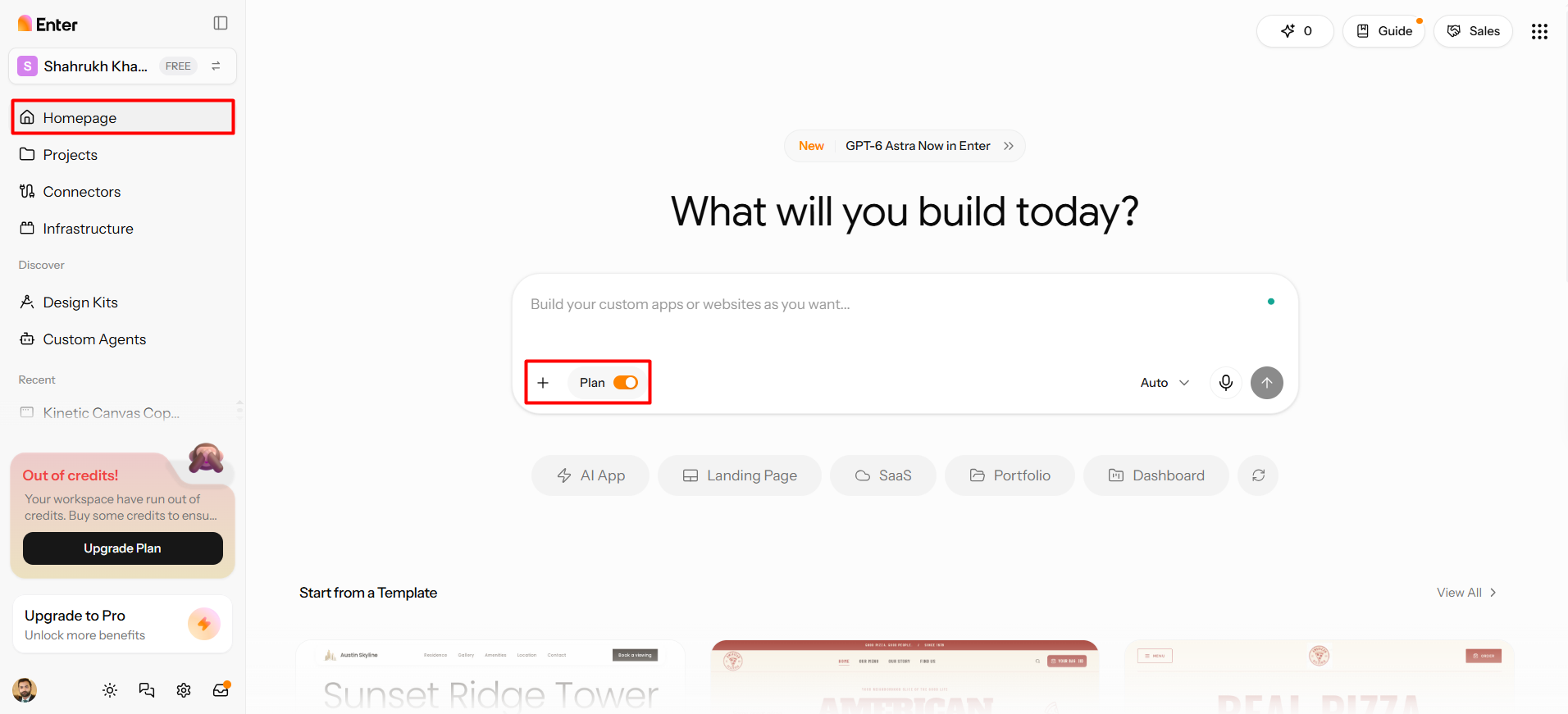
Visit Enter Pro and create an account to enter its development workspace. From the left-hand navigation, open the "Homepage" tab. Then, click "Plan" in the dialog box's bottom-left corner. Select the "+" tab to upload reference images or project files. You can also create new skills or add existing ones to your workflow. Choose an AI model, such as GPT-6 Astra, to start building your website.
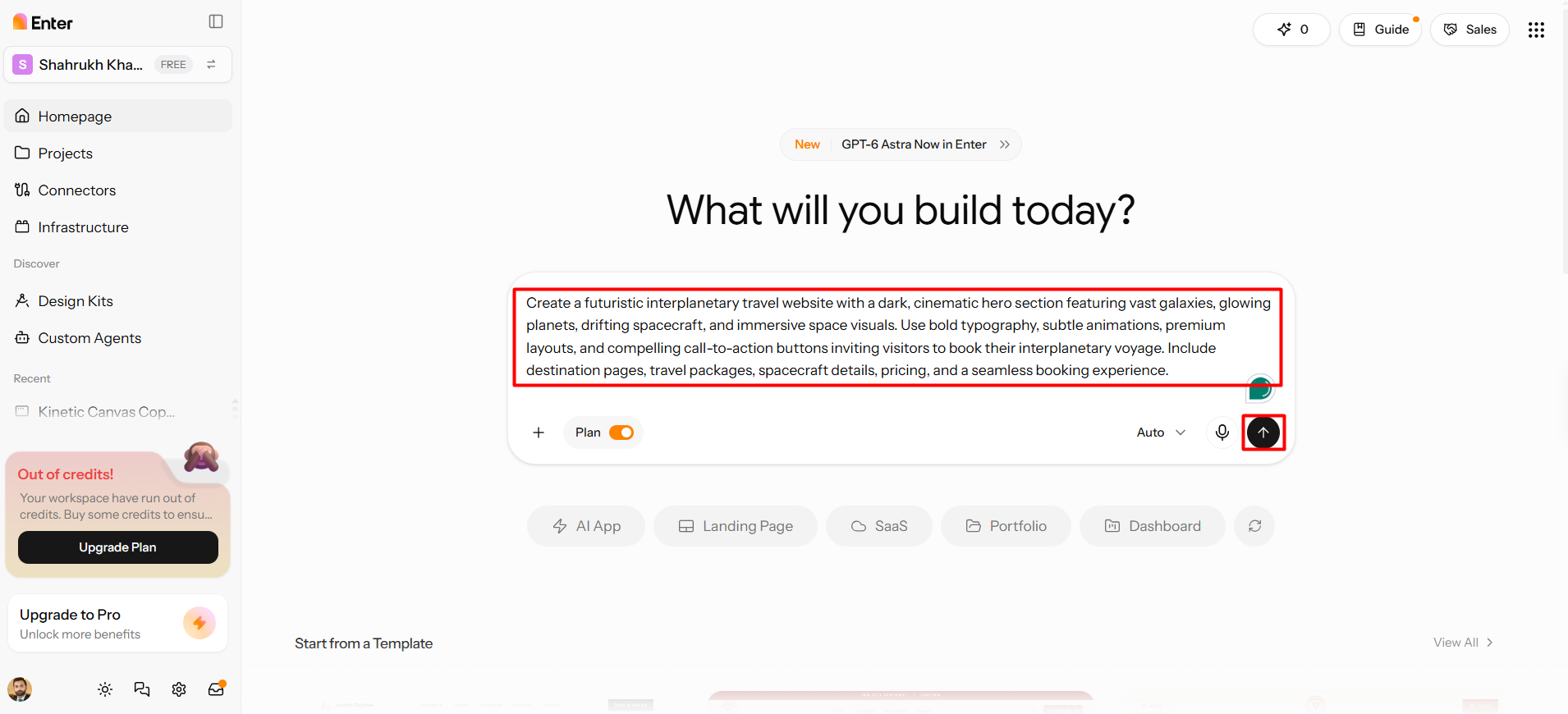
Write a detailed prompt describing your website's purpose, target audience, required pages, desired features, and visual style. Include technical specifications and relevant workflows to clarify your expectations. When your instructions are ready, click "Generate" to create the initial website.
Step 2: Generate and refine your website code
Review the generated website and identify areas that need improvement. Provide instructions in natural language to modify its layout, content, styling, or functionality. For more precise adjustments, use Components and the UI Visual Editor to edit specific sections or interface elements. Repeat this review and refinement process until the website meets your design and functional requirements.
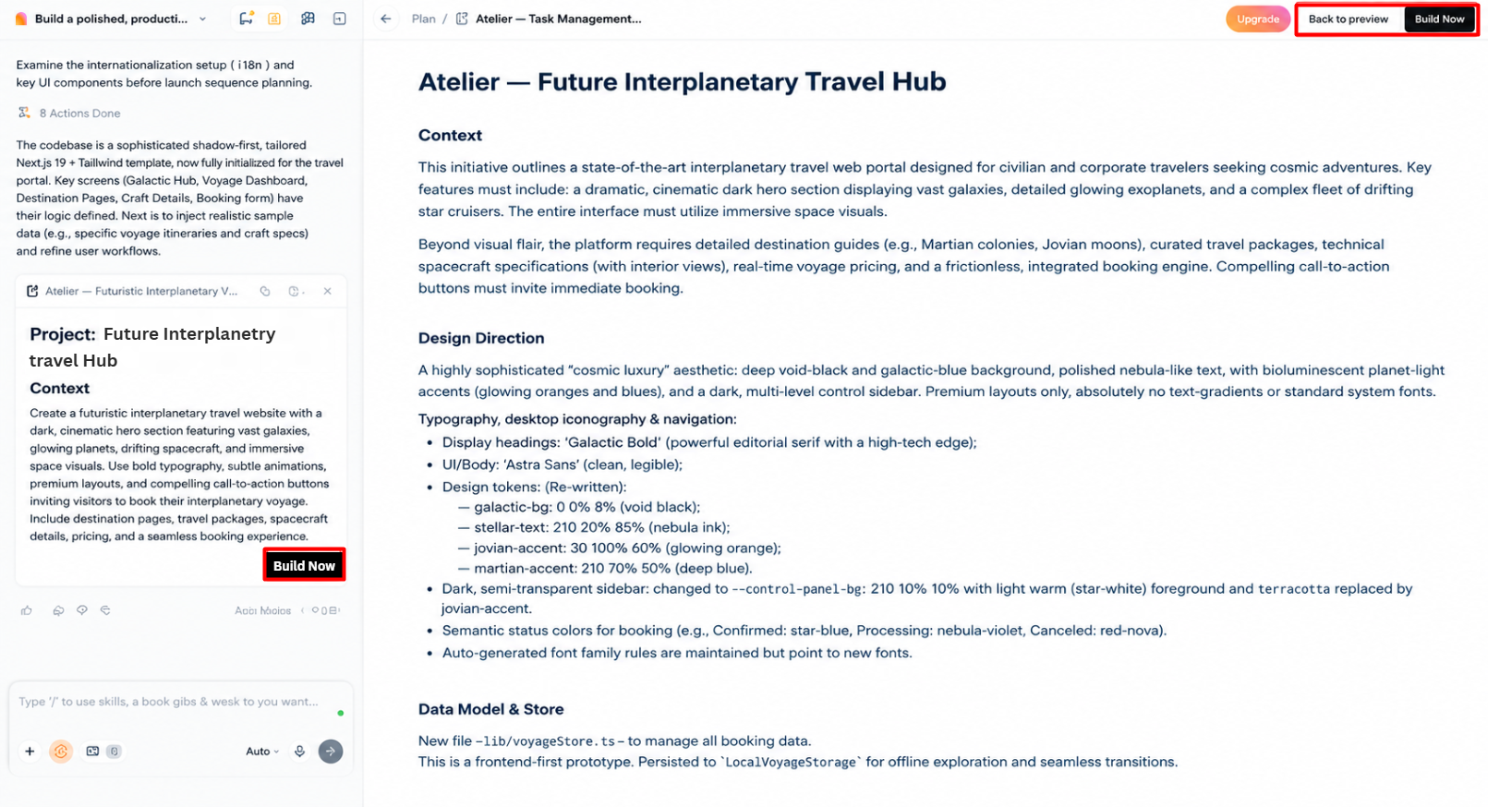
Step 3: Preview and deploy your website
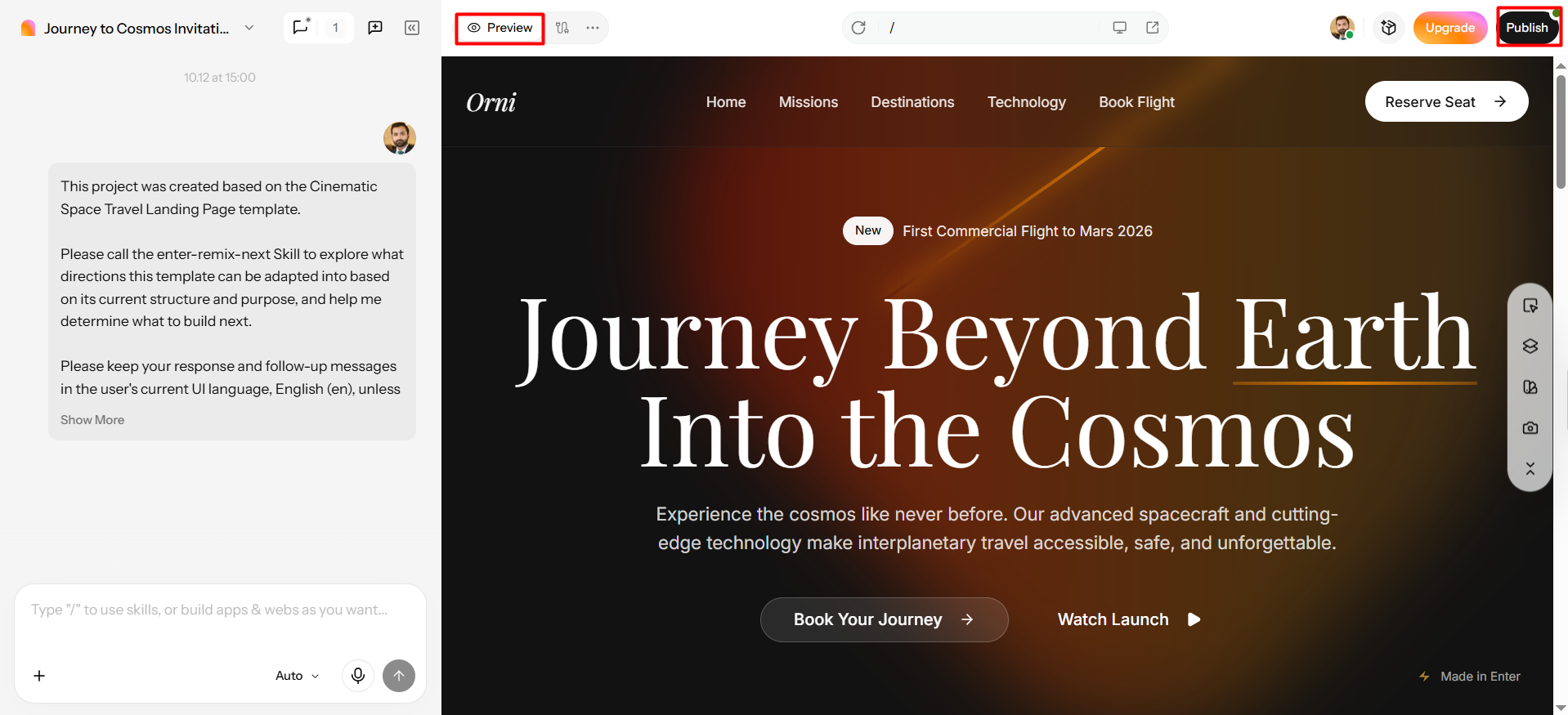
Open the "Preview" tab to test your website's pages, navigation, interactive elements, and overall functionality. If you notice design inconsistencies or technical issues, make further adjustments through the top menu. Test the updated version to confirm everything works as expected. Once satisfied with the final result, select the available "Publish" option to deploy your custom website.
Conclusion
The first step in selecting the ideal virtual assistant for your small business is to determine the repetitive tasks that are taking up precious time. Before delegating the tasks, compare hiring choices, costs, expertise, and security practices. You'll have measurable objectives, feedback, and clear directions to keep things of high quality but with less workload each day. With AI-powered website generation and visual editing, tools like Enter Pro can make building a website a breeze as your business expands. Try it now to build your own site for your business!
FAQs about virtual assistants for small business
Can a virtual assistant for cleaning business manage schedules?
Yes, a virtual assistant can manage cleaning appointments, recurring bookings, and calendar updates. They can coordinate cleaners, assign jobs, and group nearby appointments to reduce travel time. They also handle cancellations, fill vacant slots, and send reminders. These tasks help cleaning businesses maintain organized schedules and improve daily operations.
Can a business virtual assistant manage customer emails?
Yes, a business virtual assistant can organize inboxes, answer routine inquiries, and draft customer responses. They can track follow-ups, update customer records, and create support tickets. Establish clear response guidelines and approval procedures to protect sensitive information. Shared inboxes and documented processes also help maintain consistent customer communication.
Why hire a virtual assistant for small business owners?
Small business owners can hire a virtual assistant to take care of administrative work and allow them to concentrate on expansion. VAs can schedule, provide customer service, enter data, and market. Flexible arrangements mean that they can adjust to different workloads without having to commit to full-time employees. You can also use Enter Pro to build client websites, landing pages, and portfolios.
How can you market a virtual assistant for business?
Firstly, introduce your services to your professional network and request referrals. Use LinkedIn to the best of your ability, engage in freelance marketplaces, and be active within your relevant business communities. Develop a basic portfolio site to highlight your skills, services, and contact information. Enter Pro can help you generate and customize this website using AI. Choosing memorable virtual assistant business names can also help you communicate your niche, establish a professional identity, and make your services easier for potential clients to recognize.
What is the average cost for a virtual assistant?
The price of virtual assistant services will depend on the location, experience, specialization, and work arrangement. The average rate for entry-level assistants is $5-$15 per hour, and for experienced assistants is $15-$35 per hour. Specialists can command an hourly rate between $25 and $75 or higher. Monthly arrangements range from $400–$1,500 part-time to $1,000–$4,000 or more full-time.
Do you need an LLC to be a virtual assistant?
No, it's not always necessary to register an LLC in order to become a virtual assistant. Many freelancers start out as a sole trader and take on clients without establishing a business entity. But an LLC can provide liability protection and growth opportunities for the business. Before selecting a business structure, verify registration, licensing, and tax requirements in the area.