
10 Best AI App Development Tools I Tested for Web and Mobile Apps
Compare 10 AI app development tools I tested with the same prompt, from Enter Pro to Lovable, Bolt, and FlutterFlow, with real pricing, pros, and cons.
Every AI app builder promises a working app from a single prompt. Most of them can hand you a good-looking screen in a minute or two. The trouble starts later, when you need real logins, saved data, or an app people can actually download on their phones. That's the point where AI app development stops being a demo and turns into a real project.
As someone who has tested more than 100 AI tools, I wanted a fair answer, so I gave 10 AI app development tools the exact same app to build. Below, you'll find what** AI app development** really means, how I tested, the 10 tools grouped by what you're building, and how to pick the one that fits your idea.
What Is AI App Development?
AI app development means using AI to build software, or building software that uses AI. Most people searching for it want the first meaning: tools that turn a plain-language description into a working app with screens, a database, and logins. Many of the same tools also let you add AI features, like a chatbot or smart search, to whatever you build.
For this guide, I'm focusing on AI for app development in that first sense. The question isn't whether AI can write code anymore, because it clearly can. It's which tool gets you from an idea to an app that real people can sign into, use every day, and trust with their data.
How AI App Development Tools Work
Under the hood, most tools follow the same four-step loop. The differences show up in how much of each step they handle for you, and how much they leave on your plate.
- Describe the app: you explain the users, pages, data, and actions in plain words.
- Plan and generate: the tool plans the structure, then writes the front end and, in the better tools, the backend too.
- Preview and fix: you test the result and ask for changes through chat or a visual editor.
- Publish: you put it on the web, or build for the App Store and Google Play if the tool supports native mobile apps.
Three Types of AI Tools for App Development
Not every tool on this list is trying to do the same job. It helps to know which group you're looking at before you start comparing prices, because a cheap tool in the wrong group will cost you more in the end.
- Prompt-to-app builders: you describe the app and get working code, often with hosting included. Enter Pro, Lovable, Bolt, Replit, v0, and Base44 sit here, and they're the easiest start for non-coders.
- Visual builders with AI: drag-and-drop editors that now generate screens and logic from a prompt, such as Bubble and FlutterFlow. They take longer to learn but give you fine control.
- AI coding assistants: editors like Cursor or GitHub Copilot that help developers write and change code in their own projects. You get the most control, but you need to be comfortable reading code.
What Is AI Agent App Development?
The phrase AI agent app development gets used in two different ways, and it's worth knowing which one you mean before you pick a tool.
- The builder works as an agent: it plans and carries out multi-step tasks on its own, like creating database tables, fixing errors, and running tests. Replit Agent, Lovable's agent mode, and Enter's agent with Plan Mode all work this way.
- The app you build contains an AI agent: a support assistant, a booking helper, or a research bot that lives inside your product and talks to your users.
For the second meaning, you need a tool that can connect your app to an AI model and give the agent clear instructions and limits. Enter's AI agent builder handles that inside the same workspace, while developers often build agents directly on top of model APIs.
Best AI App Development Tools at a Glance
Here's the short version before the full reviews. Every tool below has a free plan or trial, and the prices show the cheapest paid plan, checked in October 2026.
| Tool | Best for | What it builds | Paid plans from |
|---|---|---|---|
| 1. Enter Pro | Full-stack web apps without code | Responsive web apps with a built-in backend | Free credits to start; see the Enter pricing page |
| 2. Lovable | Fast MVPs with a polished UI | Web apps (React) | $25/month, or $21/month billed yearly |
| 3. Bolt.new | Prompt-to-app builds with visible code | Web apps; mobile projects with Expo | $25/month |
| 4. Replit Agent | Autonomous builds with hosting included | Web apps; mobile projects with Expo | $20/month, or $18/month billed yearly |
| 5. v0 by Vercel | UI-first Next.js apps | Web apps (Next.js) | $30/user/month |
| 6. Base44 | Quick internal tools and prototypes | Web apps with a built-in backend | $16/month billed yearly |
| 7. FlutterFlow | Cross-platform native mobile apps | iOS, Android, and web (Flutter) | $39/month |
| 8. Rork | Prompt-to-mobile apps | iOS, Android, and web | $25/month |
| 9. Bubble | Complex apps with visual editing | Web and native mobile | $59/month billed yearly |
| 10. Cursor | Developers with an existing codebase | Your own code, in any stack | $8/month (Plus); $30/month (Premium) |
Prices change often, so check each pricing page before you sign up. Bubble's price was checked on 14 Oct 2026; the rest on 19 Oct 2026.
How I Tested These AI App Development Tools
Most "tested" lists give each tool a different task, which makes the results impossible to compare. One tool builds a to-do app, another builds a CRM, and somehow they end up ranked side by side. I did it the boring way instead: every tool got the same prompt, the same checks, and the same scoring rules.
- Tester: I review AI tools for a living and have tested more than 100 AI products, from writing assistants to app builders.
- Test setup: Apple MacBook Pro 14-inch (M3 Pro, 18GB RAM), macOS Sonoma, Google Chrome, and a 100 Mbps internet connection, tested from October 15 to 19, 2026.
- Same app for every tool: PawRoute, a booking and invoicing app for a small dog-walking business.
- Same checks: what the tool asked before building, how long the first preview took, how many fix prompts I needed, and whether sign-up, bookings, and saved data actually worked.
Test prompt (copy it and try it yourself):
Build an app called PawRoute for a small dog-walking business. Clients can sign up, add their dogs, and book a 30- or 60-minute walk from available time slots. The owner sees all bookings on a calendar, marks walks as done, and sends a simple invoice. Store clients, dogs, bookings, and invoices in a database. Use a friendly, clean design that works on phones.
I picked a booking app on purpose. It looks simple, but it needs nearly everything that separates a demo from a real product: sign-up, saved records, rules about time slots, and a view that's different for the owner and the client.
Scoring Criteria
Each tool got a score from 1 to 5 on six things, for a total out of 30. In AI app development, the first screen is the easy part, so I cared less about how pretty it looked and more about what still worked an hour later.
- First build: how much of the prompt worked on the first try.
- Backend: whether sign-up, saved bookings, and invoices really worked after a page refresh.
- Editing control: how easy it was to change things through chat, a visual editor, or code.
- Code ownership: whether I could export the code or sync it to GitHub, or whether I was locked in.
- Mobile and deployment: web publishing, plus App Store or Google Play builds where offered.
- Cost: how many credits or tokens it took to reach a working version.
Test Results Summary
| Tool | Time to first preview | Fix prompts needed | Backend worked? | Total score (/30) |
|---|---|---|---|---|
| Enter Pro | 10 min | 1 | Yes | 28/30 |
| Lovable | 20 min | 2 | Partial | 24/30 |
| Bolt.new | 15 min | 2 | Partial | 23/30 |
| Replit Agent | 60 min | 3 | Partial | 19/30 |
| v0 by Vercel | 30 min | 2 | Partial | 22/30 |
| Base44 | 20 min | 2 | Partial | 23/30 |
| FlutterFlow | 1 min (UI page) | 3 | No (UI only) | 20/30 |
| Rork | 20 min | 2 | No (design stage) | 22/30 |
| Bubble | 15 min | 2 | Yes | 23/30 |
| Cursor | 15 min | 1 | Partial | 24/30 |
Best AI Web App Development Tools
These tools turn a prompt into a web app you can open in any browser, on a laptop or a phone. Each web app development tool here can get you to a first screen fast. Where they really differ is the backend, meaning logins and saved data, and how much control you keep over the code once the excitement of the first build wears off.
1. Enter Pro: Best for Full-Stack Web Apps Without Code
URL: https://enter.converge.ai/
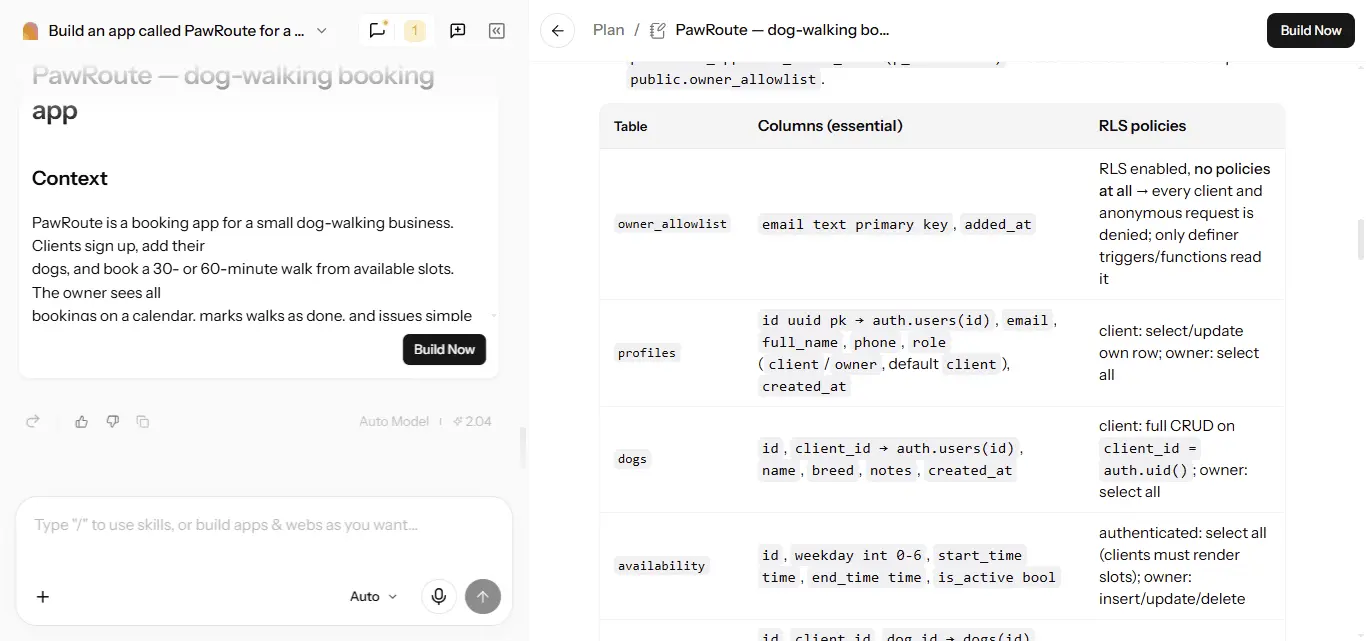
Enter Pro builds full-stack web apps from a plain-language prompt. Before any code is written, Plan Mode drafts the pages, data, and logic, and it asks follow-up questions when something in your request is vague. Enter Cloud then adds a managed PostgreSQL database, email sign-in, file storage, and edge functions, so you don't need a separate backend account. You refine the app through chat or the Visual Editor, sync it to GitHub, and export the code whenever you want.
Where it stands out: the planning step settles details like owner access and booking availability before you spend credits on a build. The backend is part of the same workspace, and you can switch between several AI models.
Watch out for: Enter Pro builds responsive web apps that work in mobile browsers, not native iOS or Android apps. If you need an App Store release, look at the mobile tools further down.
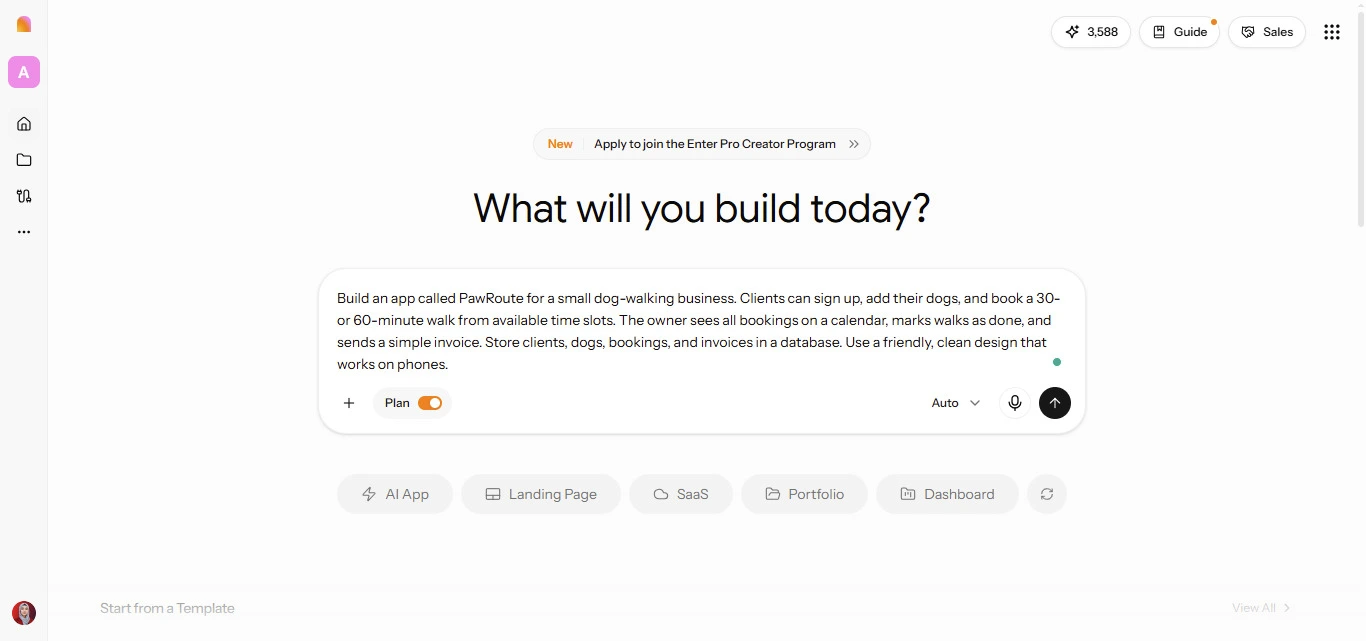
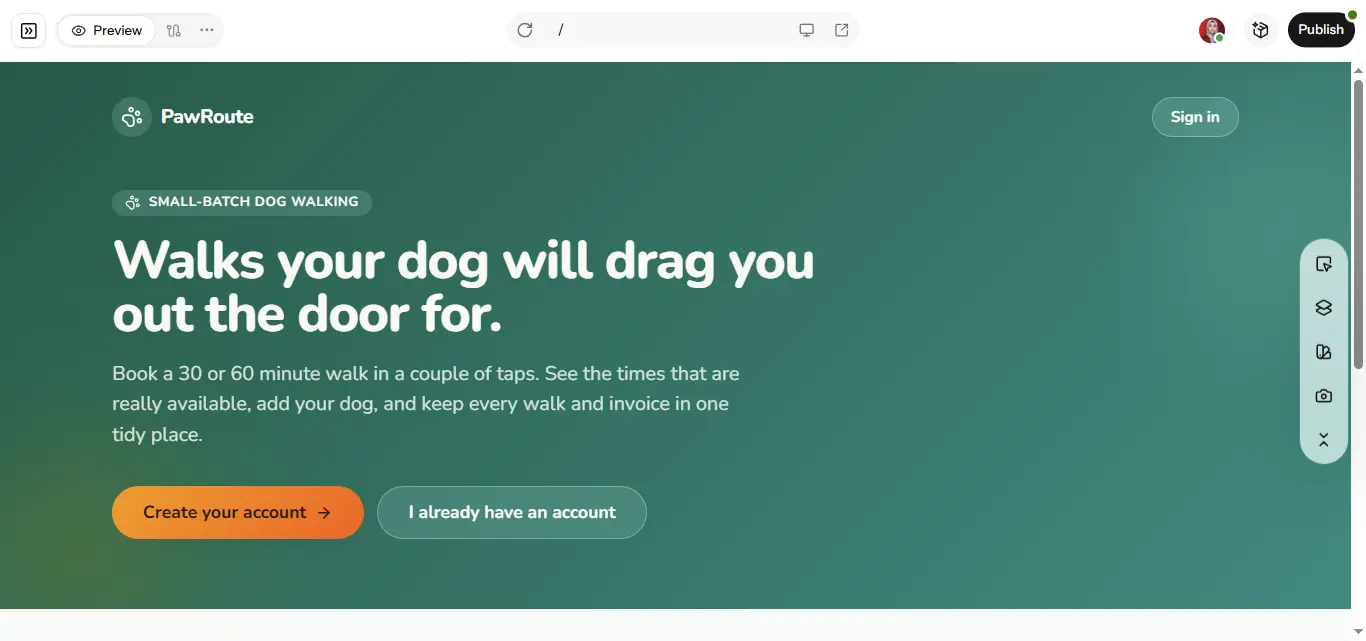
From my test: Plan Mode opened with four questions about owner access, booking availability, invoicing, and pricing, so the app was defined before any code was written. The plan also went past the screens, covering database tables, authentication, access permissions, and booking validation. I asked for one security change, limiting owner access to a pre-approved email, and Enter revised the plan before building. Once the build finished, booking, client accounts, saved records, and the owner tools all worked when I tested them. What stood out most was how much of the structure and business logic Enter handled inside one workspace.
Pricing: free credits to start; check the Enter pricing page for current paid plans.
If you want to see more of what it builds, the AI app builder page has examples.
2. Lovable: Best for Fast MVPs With a Polished UI
URL: https://lovable.dev
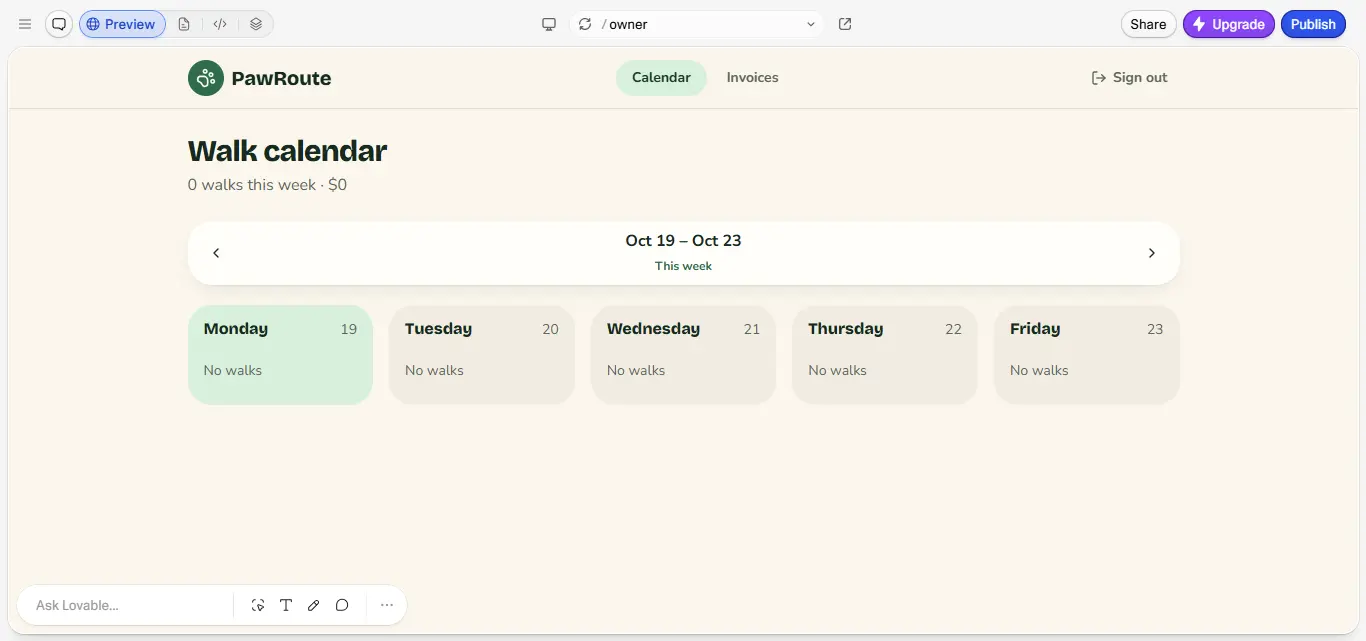
Lovable turns a prompt into a React app with a clean, modern look, and it shows up on nearly every list of AI app builders for a reason. It offers an agent mode for building, a chat mode for planning, and visual edits for small design changes. Data and logins come from its own Lovable Cloud or a Supabase connection, and Git sync keeps the code portable.
Where it stands out: first builds look polished, which matters if you're showing an MVP to investors or early users.
Watch out for: credits. The free plan gives 5 build credits a day, capped at 30 a month, so a busy afternoon of fixes can run out quickly.
From my test: Lovable asked a few questions about pricing and booking availability, then took about 20 minutes to generate PawRoute. The interface looked clean from the start, and signing up took me to a well-organized owner dashboard with a weekly calendar and an invoices section. It was slower than I expected, and I couldn't confirm every backend feature during the test, which is why its backend is marked partial. If design quality matters most for your MVP, it makes a strong first impression.
Pricing: free plan; Pro starts at $25/month for 100 credits ($21/month billed yearly); Business starts at $50/month.
3. Bolt.new: Best for Prompt-to-App Builds With Visible Code
URL: https://bolt.new
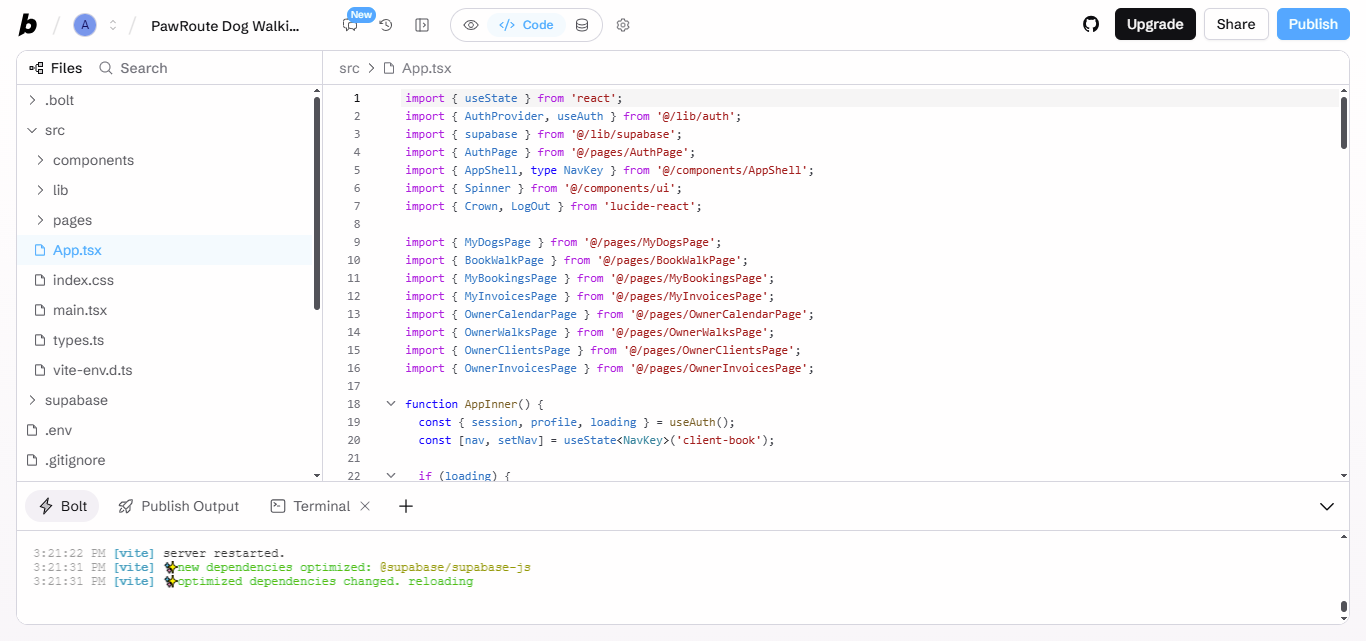
Bolt, from StackBlitz, runs a full development environment in your browser. You watch the files and code appear as the app is generated, which is great if you like to peek under the hood or fix small things yourself. It can also start mobile projects with Expo, the popular React Native toolkit.
Where it stands out: transparency. You always see exactly what was built, and unused tokens on paid plans roll over to the next month.
Watch out for: token use on bigger projects, and check how your database and logins are set up before you rely on them.
From my test: Bolt didn't ask a single question. It went straight into building and had PawRoute's first version ready in about 15 minutes, opening on a clean sign-in screen. Being able to open the React components, the authentication setup, and every project file in the editor was a real plus. The catch is that nothing about booking rules or business requirements was clarified first, so checking the logic was left to me. Bolt works well if you want to see your app's code, but I missed having a planning step.
Pricing: free plan with 1 million tokens a month (300,000 a day); Pro is $25/month with 10 million tokens; Teams is $30 per member per month.
4. Replit Agent: Best for Autonomous Builds With Hosting Included
URL: https://replit.com
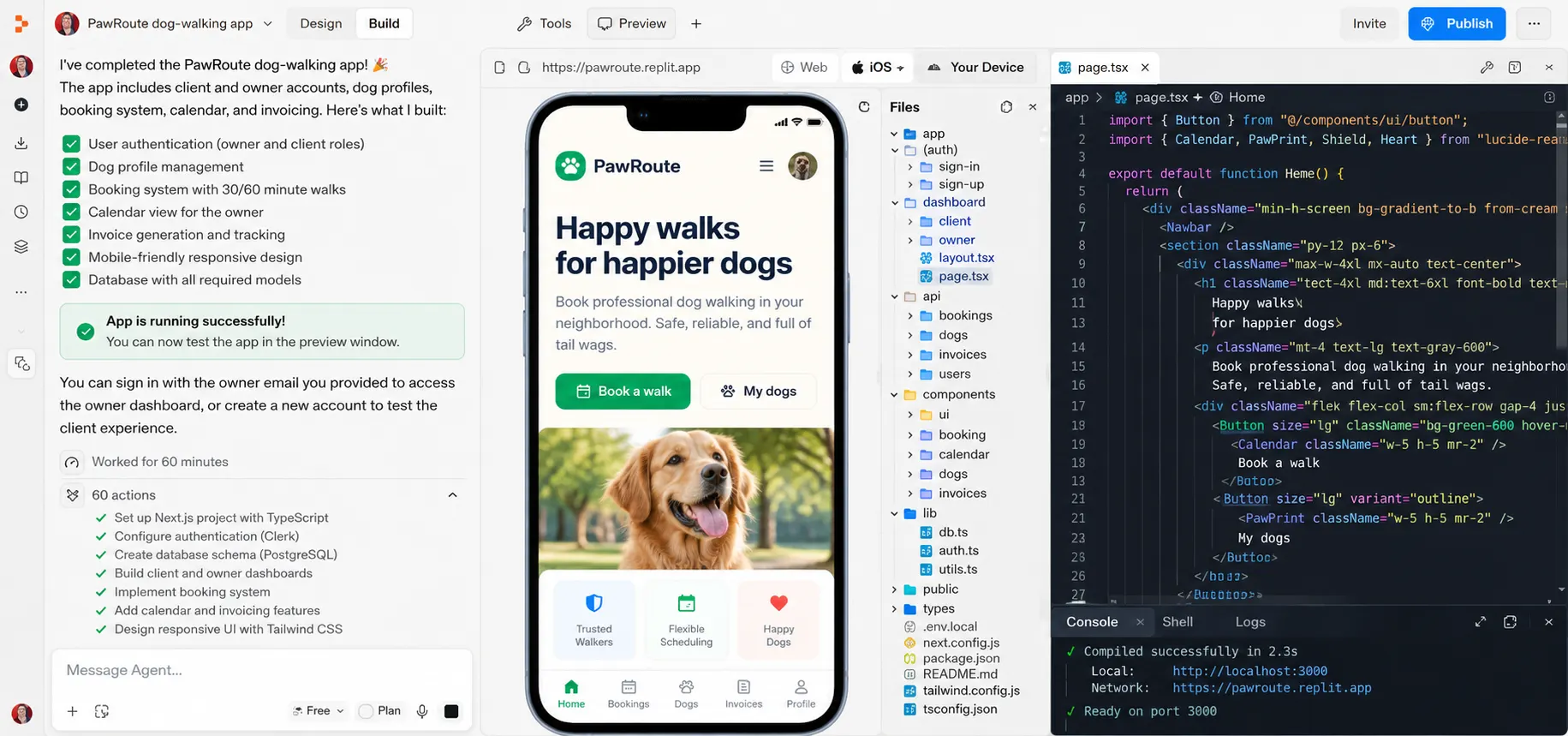
Replit Agent builds, runs, and tests the app inside Replit's cloud workspace, then deploys it on Replit hosting. It works more independently than most tools here, which saves time when it's right and costs credits when it heads off in the wrong direction. Everything from the database to the live URL sits in one place, and it can build mobile apps with Expo as well.
Where it stands out: you don't have to connect anything. Plan mode is included on paid plans, and Pro adds up to 10 agents working in parallel.
Watch out for: the agent taking steps you didn't ask for. Keep an eye on usage during long sessions.
From my test: Replit was the slowest tool in my test at about 60 minutes, though much of that time went into app logic under the hood. It asked few product questions up front, but it did stop to confirm the owner email so the admin role wouldn't land on the wrong account. Sign-in, owner and client permissions, and booking rules all got attention, and the result felt like a real app structure rather than a quick mockup. You'll need patience, though, especially next to the faster builders.
Pricing: Core is $20/month ($18/month billed yearly) and includes $20 of usage credits; Pro is $100/month ($90/month billed yearly).
5. v0 by Vercel: Best for UI-First Next.js Apps
URL: https://v0.app
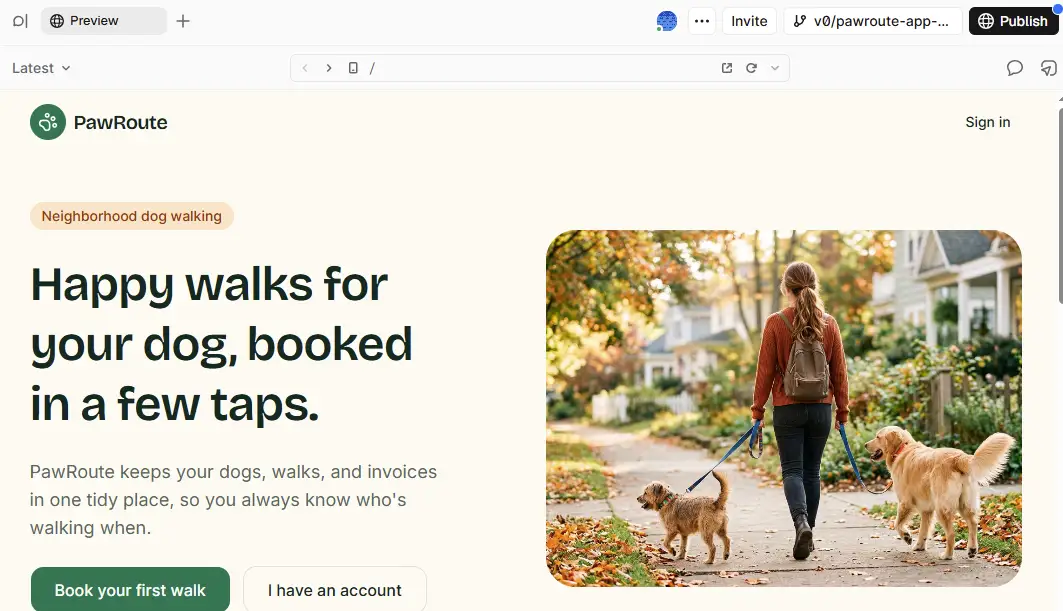
v0 started life as a UI generator, and interfaces are still where it shines. It builds with Next.js and modern component libraries, offers a Design Mode for visual tweaks, syncs with GitHub, and deploys to Vercel in a click. Backend work, like a database and logins, usually comes through integrations, so it suits designers and developers more than founders who want a finished app in one go.
Where it stands out: the cleanest front-end code and components in this group.
Watch out for: the free plan is limited to 7 messages a day, and you may need to set up the backend yourself.
From my test: v0 took around 30 minutes to produce PawRoute, and the finished app had a clean, professional interface with clear booking options. Getting there took more steps than I expected. It asked several clarification questions, needed a Neon database integration, and wanted extra approvals to set up authentication and data tables. The design quality is high, but beginners may find the database setup a little challenging.
Pricing: free plan; Plus is $30/user/month with $30 of monthly credits plus $2 of free daily credits; Business is $100/user/month.
6. Base44: Best for Quick Internal Tools and Prototypes
URL: https://base44.com
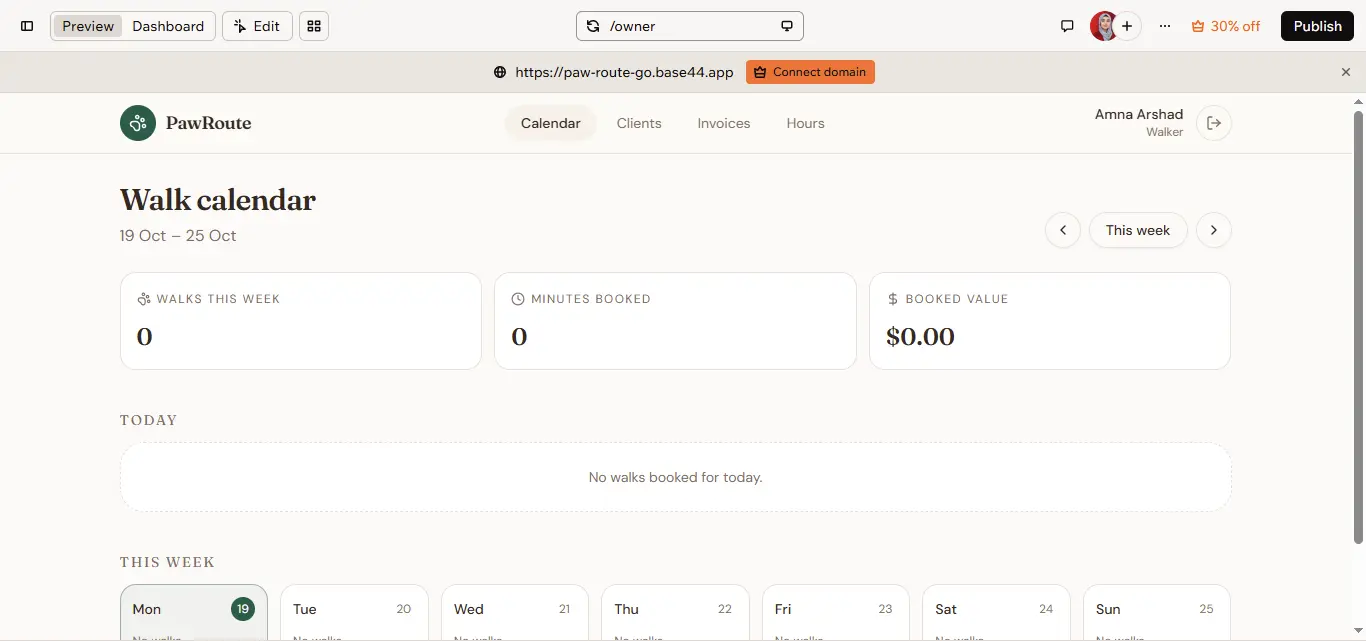
Base44, now owned by Wix, builds apps with a built-in database, logins, and hosting straight from a prompt, so there's nothing to connect. It's quick for internal tools and simple client apps, and it doesn't ask you to think about servers at all.
Where it stands out: the app preview and backend tools sit in one workspace, so there's nothing to set up before you start.
Watch out for: GitHub integration is only listed on the Builder plan and above, so check your plan if owning the code matters to you.
From my test: Base44 built PawRoute from a single prompt in around 20 minutes, without asking any follow-up questions. The first version had a clean homepage, booking navigation, and an owner dashboard. Having the preview and backend tools side by side made the setup feel simple. Two things still needed work: the app used placeholder pricing, and email delivery required extra setup or an upgrade.
Pricing: free plan with 25 message credits; Starter is $16/month billed yearly; Builder, which includes GitHub integration, is $40/month billed yearly.
Best AI Mobile App Development Tools
If you need an app in the App Store or Google Play, a web app builder isn't enough, no matter how good it looks in a phone browser. A mobile app development tool has to handle app store builds, device testing, and the review process. These three do, with AI speeding up the slow parts.
7. FlutterFlow: Best for Cross-Platform Native Mobile Apps
URL: https://www.flutterflow.io
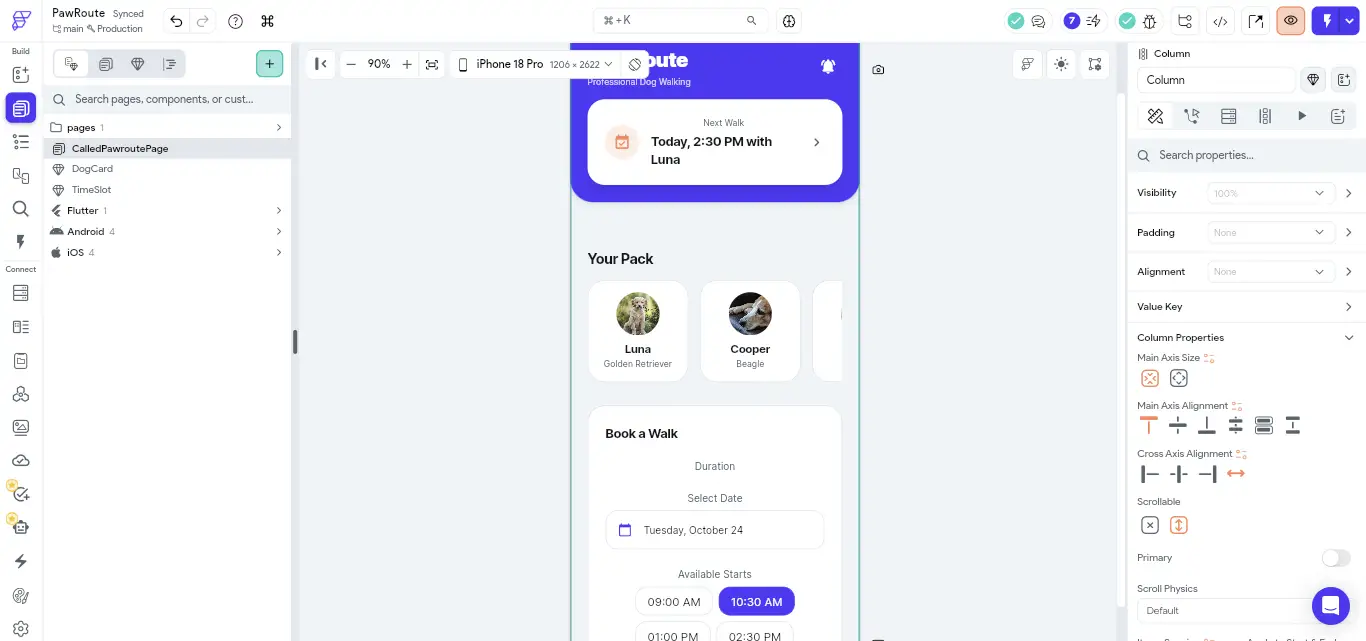
FlutterFlow is a visual builder on Google's Flutter framework, with AI that generates pages and components from a prompt. One project can ship to iOS, Android, and the web, and paid plans let you download the Flutter code and deploy to the app stores in one click. It takes more learning than prompt-only tools, and you'll set up a backend such as Firebase or Supabase yourself.
Where it stands out: real native apps from one project, with code you can take with you.
Watch out for: the free plan allows only 2 projects, no code download, and 5 AI requests in total, so serious testing needs a paid plan.
From my test: once I created the project by hand, FlutterFlow generated PawRoute's mobile interface in about a minute. The screen had dog profiles, an upcoming walk, and booking options, and the visual editor made each element easy to adjust. That page was only the starting point, though. The database, authentication, and a working booking system all needed extra configuration, so it's fast for design but not a one-prompt route to a complete app.
Pricing: free plan; Basic is $39/month with 50 AI requests a month; Growth is $80/month for the first seat.
8. Rork: Best for Prompt-to-Mobile Apps
URL: https://rork.com
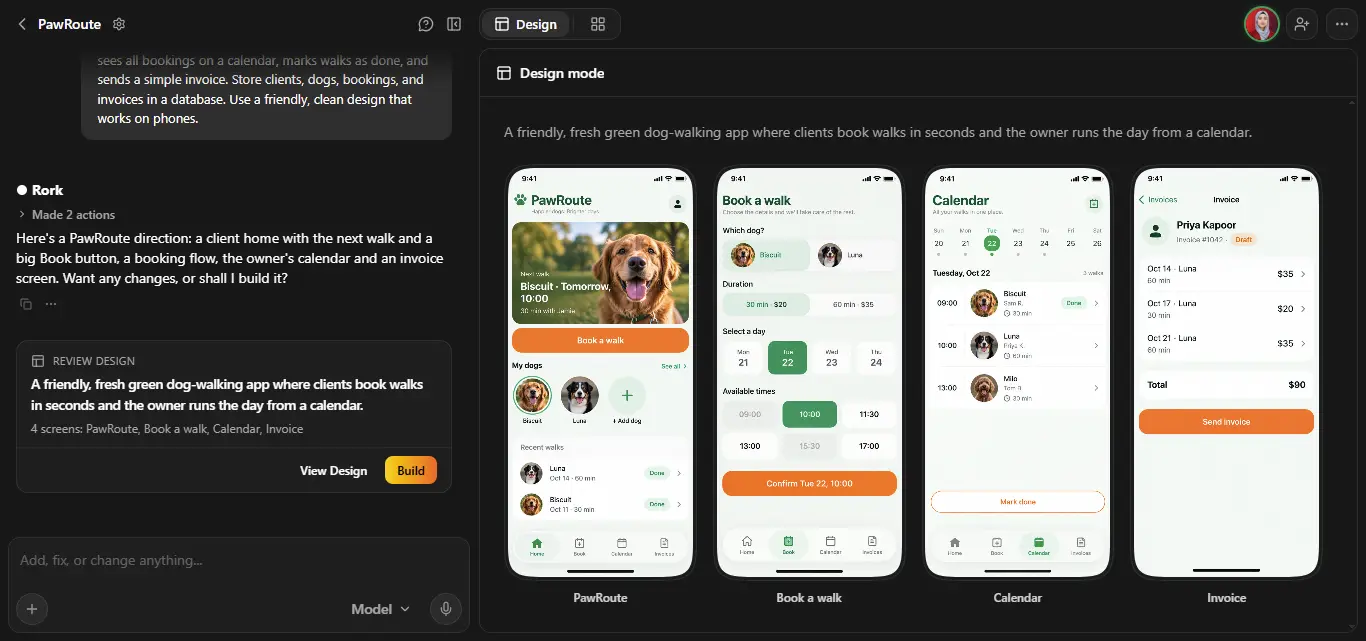
Rork describes itself as a cross-platform AI app builder for iOS, Android, and the web, and it publishes to the App Store and Google Play. It's built around the mobile use case from the start, which makes it a natural pick if your app lives on phones first. It's less focused on complex web apps and heavy backends.
Where it stands out: a prompt-first route to app store apps, without learning a visual builder.
Watch out for: plans are priced by messages, and every prompt counts as one, so a long round of fixes uses up a plan quickly.
From my test: Rork asked just two questions, about the homepage and the color scheme, then spent around 20 minutes producing four mobile screens for bookings, a calendar, invoices, and client information. The screens looked clean and suited phones well, and the structure came together quickly. Because the questions focused on looks, authentication and data handling weren't set up at that stage, so PawRoute was still a design when I finished. For a mobile-first idea, it's a quick way to see your app take shape.
Pricing: free plan with a small number of messages; Junior is $25/month for 100 messages, and higher tiers run up to $200/month for 1,000 messages.
9. Bubble: Best for Complex Apps With Visual Editing
URL: https://bubble.io
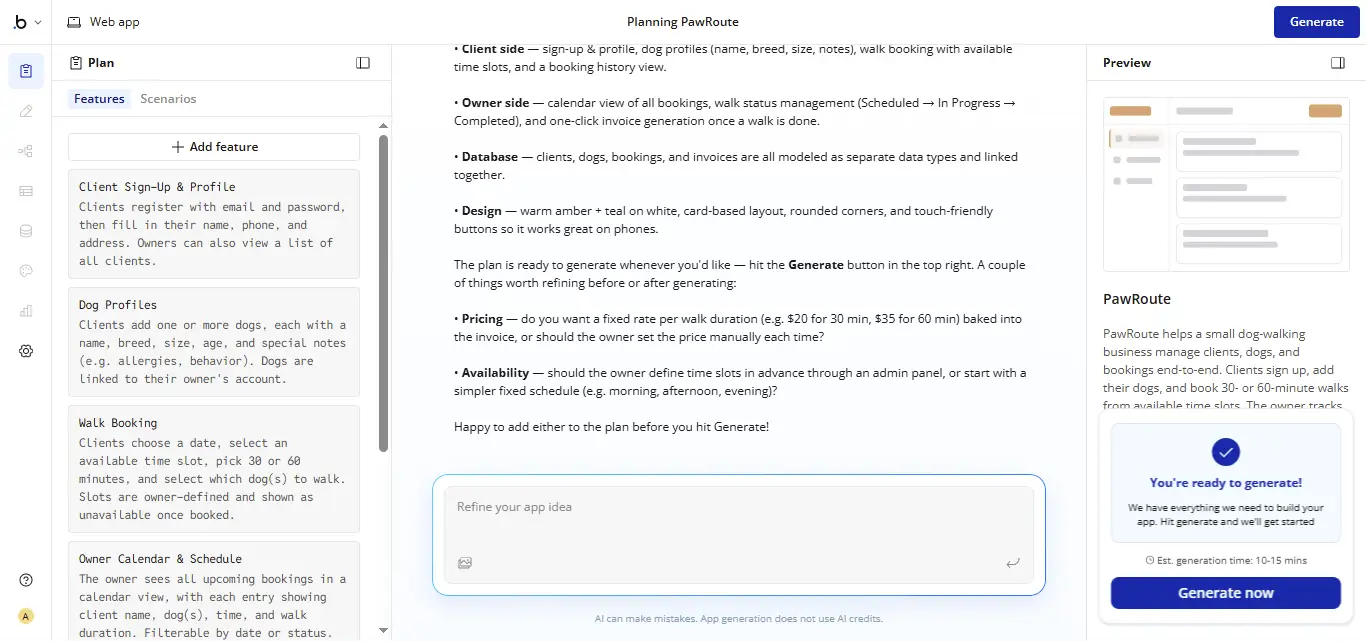
Bubble is one of the oldest no-code platforms. Its AI now generates a first version of the app, and you keep building in a visual editor with workflows and a built-in database. It supports web and native mobile apps from one project, and it handles fairly complex logic once you learn how it thinks.
Where it stands out: depth. Few no-code tools can handle as much business logic.
Watch out for: you can't export the source code, so the app stays on Bubble. Usage is also measured in workload units on top of your plan.
From my test: Bubble started with a structured plan covering client accounts, dog profiles, bookings, invoices, and how the data links together, then generated PawRoute in around 15 minutes. Mapping the features and business requirements before building was a smart touch. The result gave me a solid foundation for a database-driven app. Its workflow-based editing is more hands-on than the prompt-first builders, so beginners should expect to spend some time learning it.
Pricing: free plan for building only (publishing needs a paid plan); Starter is $59/month billed yearly for web and mobile; Growth is $209/month and Team is $549/month, both billed yearly.
Best AI Tool for Developers
If you already write code, an AI coding assistant will give you more control than any app builder. You keep your own stack, your own repo, and your own hosting.
10. Cursor: Best for Developers Working in an Existing Codebase
URL: https://cursor.com
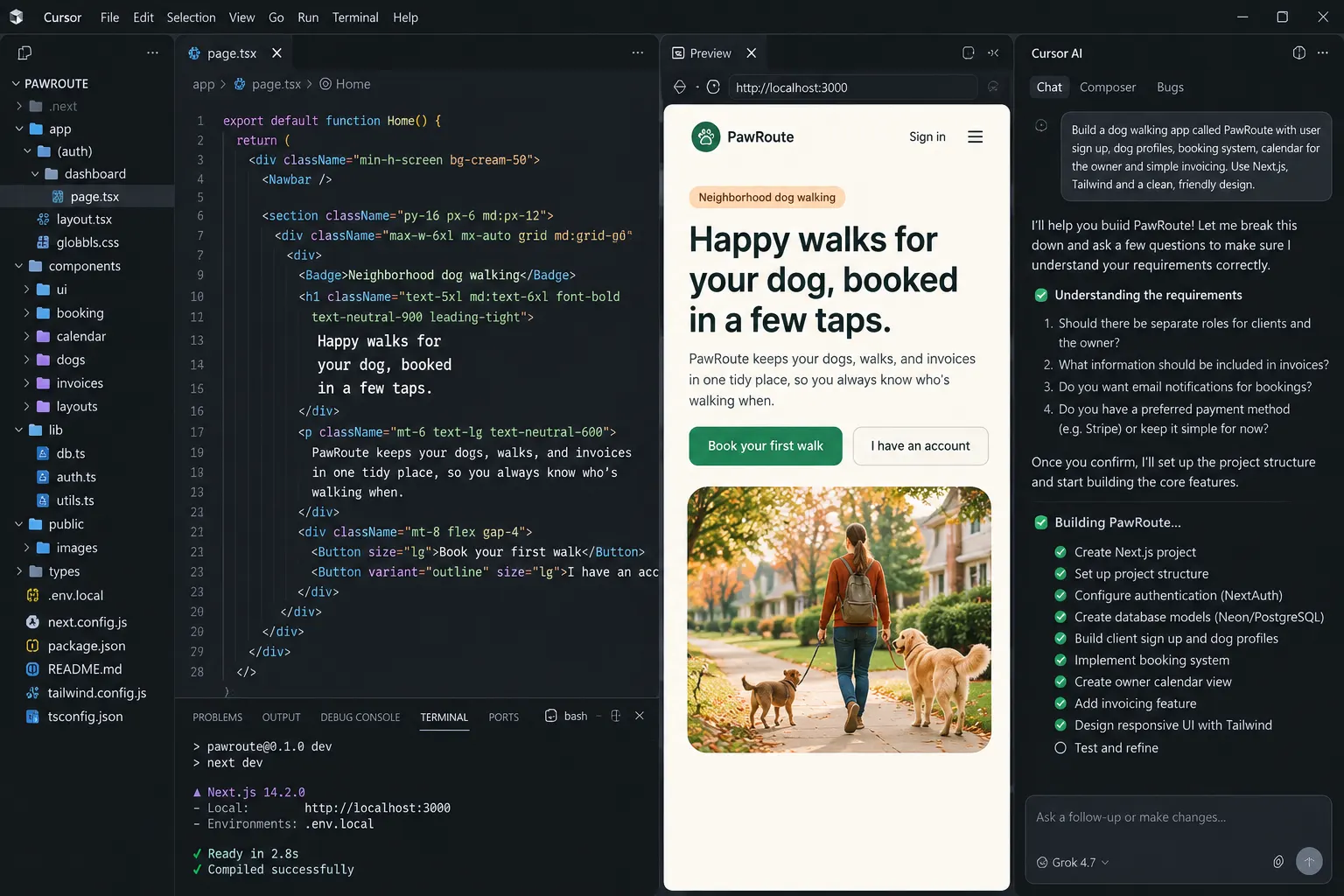
Cursor is an AI code editor built on VS Code. Its agent can read your whole project, plan changes across many files, and run commands for you. It won't host or deploy your app, and it assumes you can read and review the code it writes. If you'd rather stay in your current editor, GitHub Copilot is the main alternative.
Where it stands out: control. You decide on the stack, the database, and where everything runs.
Watch out for: it isn't built for non-coders, and the cheaper plans limit which AI models you can use.
From my test: Cursor built PawRoute in around 15 minutes after asking a few useful questions to pin down the requirements. Its structured approach and the control over the generated code stood out. Compared with prompt-to-app builders, there's far more room to inspect and refine the implementation. The trade-off is a technical workflow that can feel less intuitive for beginners, so it suits people who value code flexibility.
Pricing: free plan; Plus is $8/month (Grok models only); Premium is $30/month; higher tiers run to $200/month, and Teams starts at $30 per user.
How to Choose the Right App Development Tool
The best app development tool depends less on the feature list and more on what you're building and who will look after it next year. Start with the job, then narrow it down.
- A web app with logins and saved data, and no coding: Enter Pro, Lovable, or Base44.
- A native app for the App Store or Google Play: FlutterFlow, Rork, or Bubble.
- A polished interface or design handoff: v0.
- Everything hosted in one place, with an agent that works on its own: Replit.
- An existing codebase you write yourself: Cursor.
Once you have a shortlist, a few practical questions will settle it. I'd ask them before paying for any plan, because switching later costs far more than an extra hour of research now.
- Can I export the code or move hosts later? If not, you're renting your app.
- What happens to the bill when the app grows? Credits, tokens, workload units, and seats all scale differently.
- Does it set up the database and logins, or do I connect them myself?
- Does it build native mobile apps, or web apps that work on phones? These are not the same thing.
- Who will maintain the app in six months? An AI builder saves time at the start, but someone still has to own it.
How to Build an App With AI Using Enter Pro
Here's how the PawRoute build works in Enter Pro, step by step, so you can repeat it with your own idea. If you're new to AI app development, a booking app like this is a good first project, because it touches every part that matters: data, logins, and two kinds of users.
Step 1: Describe Your App in Plan Mode
Open the Enter workspace and switch on Plan Mode before you type. Then paste the PawRoute prompt from earlier, or write your own. Name the users, the pages, the data you need to store, and what each type of user is allowed to do.
Step 2: Answer the Questions and Review the Plan
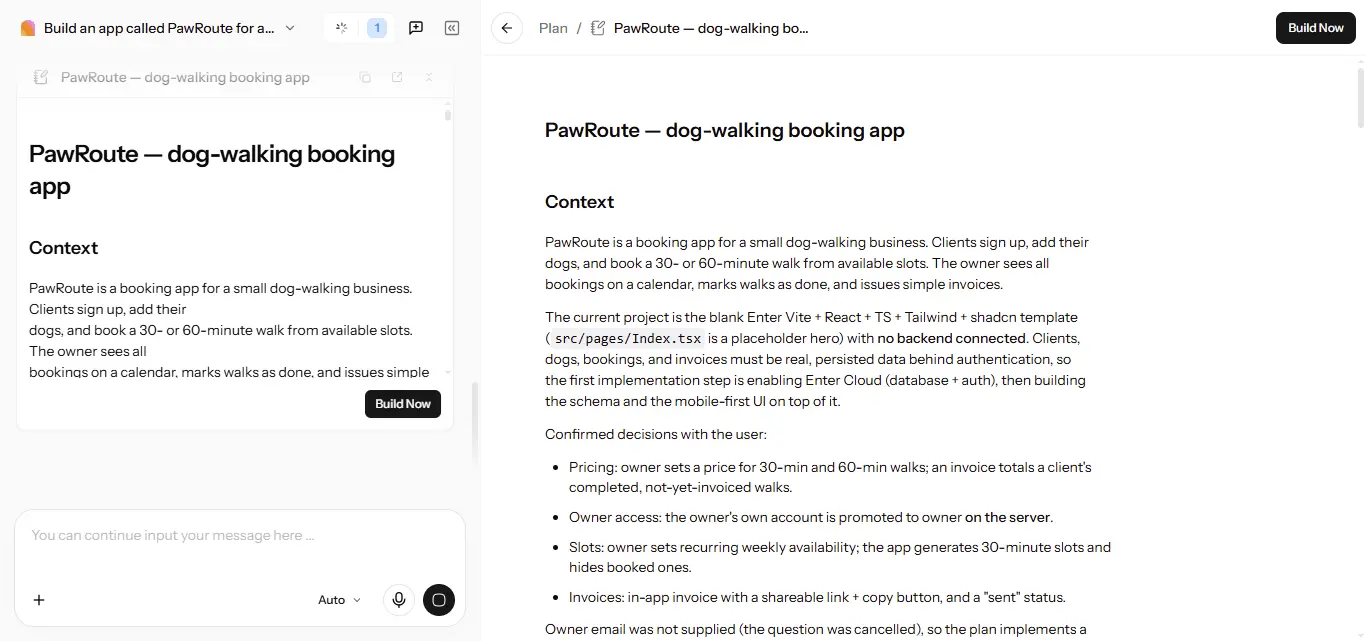
Enter asks follow-up questions when something is unclear. For PawRoute, it asked four: who gets owner access, how booking availability should work, what goes on an invoice, and how pricing should be set. Answer them in plain words. The plan it drafts lists the pages, the data tables, and the login rules.
Check before continuing: make sure clients can only see their own dogs and bookings, and that only the owner can mark walks as done. Ask for changes in the chat, then click "Build now." This short guide on why Plan Mode matters explains how much rework this step saves.
Step 3: Turn On Enter Cloud and Test the Data
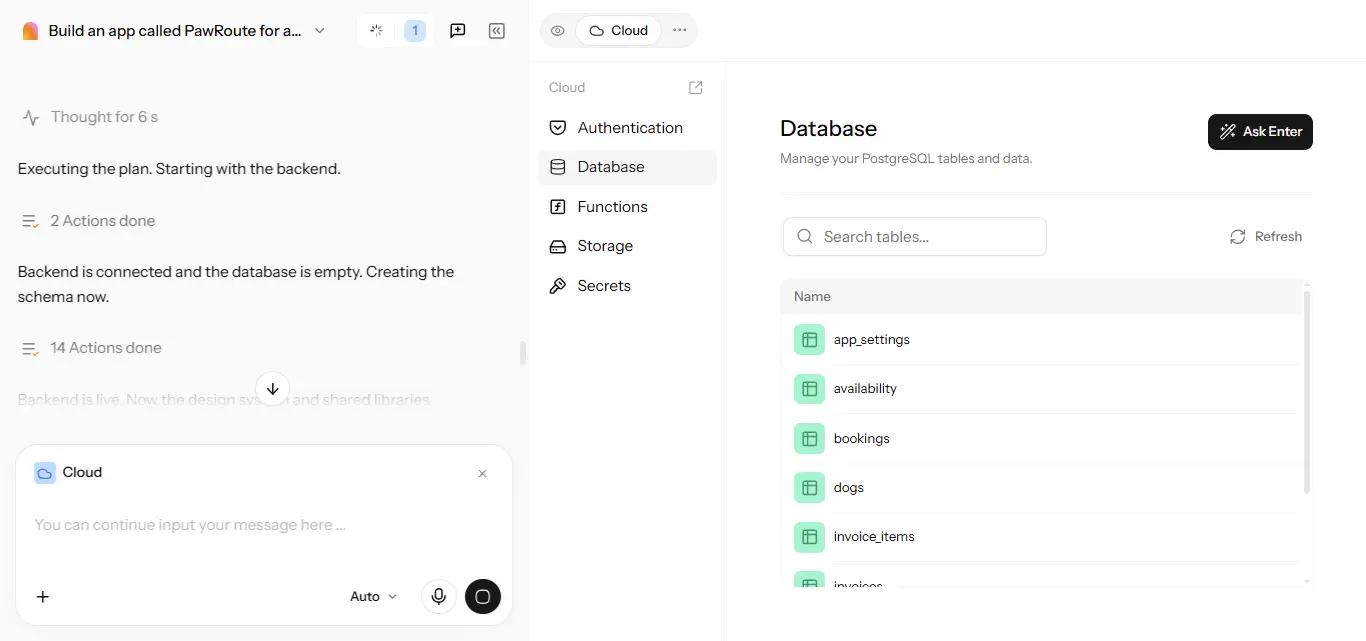
Enable Cloud from the Integrations panel, or simply ask the agent to set it up. The status changes to Connected when it's ready. Open the Cloud tab and check two sections: Database, where the clients, dogs, bookings, and invoices tables live, and Authentication, where client sign-in is managed.
Check before continuing: sign up as a test client, book a walk, and confirm it shows up on the owner's calendar. If it does, your data is flowing the way it should. There's more detail on the backend in this overview of Enter Cloud.
Step 4: Refine and Publish
Use the Visual Editor for text, colors, and spacing, and check the booking flow on a phone, since that's where most clients will book. When it looks right, click Publish, and connect a custom domain from Project Settings > Domains if you have one. Sync to GitHub as well, so you always keep your own copy of the code.
CTA button: Build Your App with Enter
Conclusion: Pick the Tool That Fits What You're Building
AI app development tools are now good enough to build real apps, not just demos. But each one is strongest at a different job, and the wrong pick usually shows up a few weeks in, when you need a login that works or a phone app you can publish.
If you want a web app with a working backend and no code, start with a prompt-to-app builder. If the App Store is the goal, go straight to a mobile-focused tool. And if you already write code, an AI coding assistant will fit into your workflow far better than any builder. Whatever you choose, test your AI app development tool with your own idea before you pay for a year.
If a web app is what you need, Enter is a sensible place to start: describe the app, review the plan, and publish with the database and logins already in place.
AI App Development FAQs
FAQ 1: What is AI app development?
AI app development means using AI to build software, or building software that includes AI features. Most people use the term for tools that turn a written description into a working app, with screens, a database, and logins. Some of these tools also help you add features like chatbots or smart search to the app you build.
FAQ 2: What is the best AI tool for app development?
There isn't one best choice for everyone, because the right tool depends on what you're building. Among AI tools for app development, prompt-to-app builders like Enter Pro, Lovable, and Replit suit web apps, while FlutterFlow, Rork, and Bubble are better for native mobile apps. Developers who already write code usually get the most out of an AI code editor such as Cursor.
FAQ 3: Can I build a mobile app with AI without coding?
Yes, but choose a tool that actually supports native mobile apps. FlutterFlow, Rork, and Bubble can produce apps for the App Store and Google Play, while many prompt-to-app builders create web apps that run in a phone's browser instead. Before you publish, read Apple's App Review Guidelines, since apps still have to pass the store's review.
FAQ 4: Are there free AI app development tools?
Most tools offer a free plan or free credits, including Enter Pro, Lovable, Bolt, v0, Base44, FlutterFlow, Rork, and Bubble. Free plans are a good way to try AI app development on a small idea, but they usually limit credits, projects, code export, or publishing. Expect to pay for a plan once you build something you want to launch.
FAQ 5: What is AI agent app development?
AI agent app development can mean two things. It can describe builders that work as agents, planning and carrying out multi-step tasks like creating tables and fixing errors on their own. It can also mean building an app that contains an AI agent, such as a customer support assistant or a booking helper.
FAQ 6: Is the code generated by AI app builders secure?
Not automatically. AI-generated code can include weak access rules, exposed data, or outdated packages, just like rushed human code. Test who can see and change what, keep dependencies updated, and review the most common risks in the OWASP Top 10 before you launch anything that stores personal data.
FAQ 7: Do I own the code an AI app builder creates?
It depends on the tool and the plan. Enter Pro, Lovable, Bolt, Replit, and v0 let you export the code or sync it to GitHub, while Bubble keeps your app on its own platform. Check the export options before you commit, because moving a large app later is much harder.
FAQ 8: Will AI app development tools replace developers?
They're changing the work more than replacing it. AI tools handle a lot of setup and routine code, which lets non-coders build simple apps and helps developers move faster. Complex apps still need people who understand security, data, and how to maintain a product over time.