
GPT-5.2 Explained: Features, Benchmarks, Pricing, and Use Cases
Explore GPT-5.2 Instant, Thinking, Pro, and Codex, including pricing, benchmarks, access, limitations, and how it compares with Gemini 3 for developers in 2026.
Figure 1. GPT-5.2 evaluated across quality, speed, cost, and control
I selected GPT‑5.2 Pro in Enter Pro to build a project-brief reviewer that turns app ideas into requirements and acceptance checks. The captures show the setup and review output; completed-request verification remains an open step.
That practical case gives this guide a concrete reference point. I separate the official benchmark results from what the application visibly did, then examine the model family’s capabilities, pricing, and limits. You should identify the exact variant before applying an observation to Instant, Thinking, Pro, or Codex.
OpenAI introduced the family on December 11, 2025 as a release for professional work and long-running agents. Its launch report supplies the official benchmark and pricing baseline. I use that report alongside current routing information, critical independent experience, and community reports because no single source captures both controlled performance and day-to-day friction.
People searching for Chat GPT 5.2 often mean the whole December 2025 family, but the distinction between the ChatGPT modes and API model IDs matters. A test of Instant does not establish the behavior, price, or latency of Thinking, Pro, or the coding-specialized model.
GPT-5.2 at a Glance
As of October 9, 2026, OpenAI lists GPT‑5.2 and GPT‑5.2 Pro as previous-generation options. Existing projects may value their known behavior and pinned snapshots, while a new build should compare the current recommended models against the same acceptance criteria.
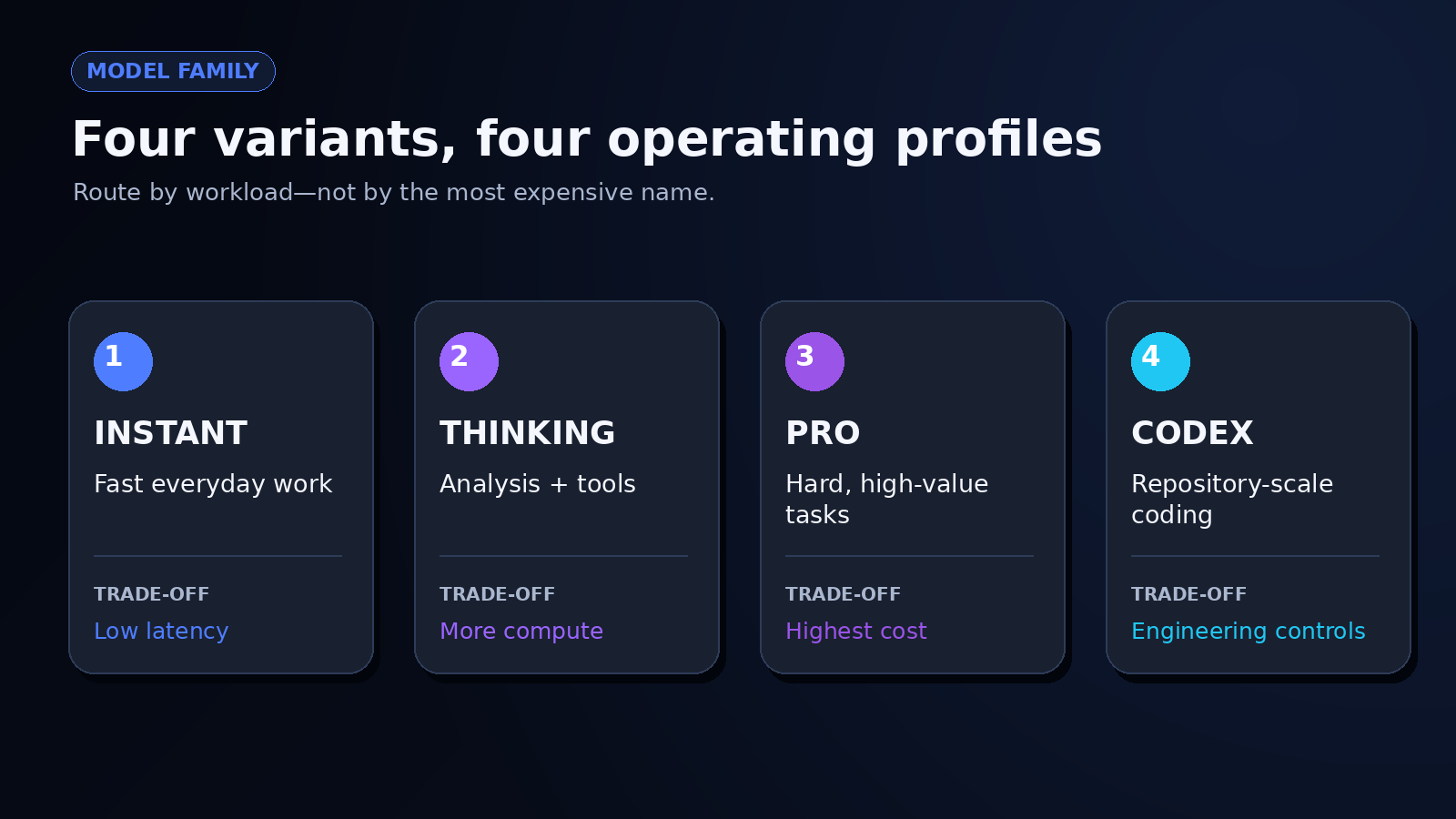
Figure 2. Instant, Thinking, Pro, and Codex mapped to workload types
| Specification | GPT-5.2 | GPT-5.2 Pro |
|---|---|---|
| Current position | Previous flagship | Previous Pro model |
| Context window | 400,000 tokens | 400,000 tokens |
| Maximum output | 128,000 tokens | 128,000 tokens |
| Knowledge cutoff | August 31, 2025 | August 31, 2025 |
| Modalities | Text input/output; image input | Text input/output; image input |
| Reasoning effort | none, low, medium, high, xhigh | medium, high, xhigh |
| API price per 1M tokens | $1.75 input; $0.175 cached; $14 output | $21 input; $168 output |
| Structured outputs | Supported | Not supported |
| Fine-tuning | Not supported | Not supported |
| Snapshot | gpt-5.2-2025-12-11 | gpt-5.2-pro-2025-12-11 |
Current Status, Context, and Modalities
The 400,000-token context window and 128,000-token output ceiling are unusually large, but capacity is not recall. If you place contracts, logs, screenshots, and requirements into one request, you still need a retrieval test: seed facts at different positions, ask questions that require combining them, and record what the model misses. I would not infer reliable long-document reasoning from the context number alone.
The models accept images and produce text; they do not accept audio or video as native inputs. That makes them useful for charts, interface screenshots, diagrams, and scanned documents, provided you verify spatial details and extracted values. A blurry label or unusual chart scale can turn a confident explanation into a plausible error.
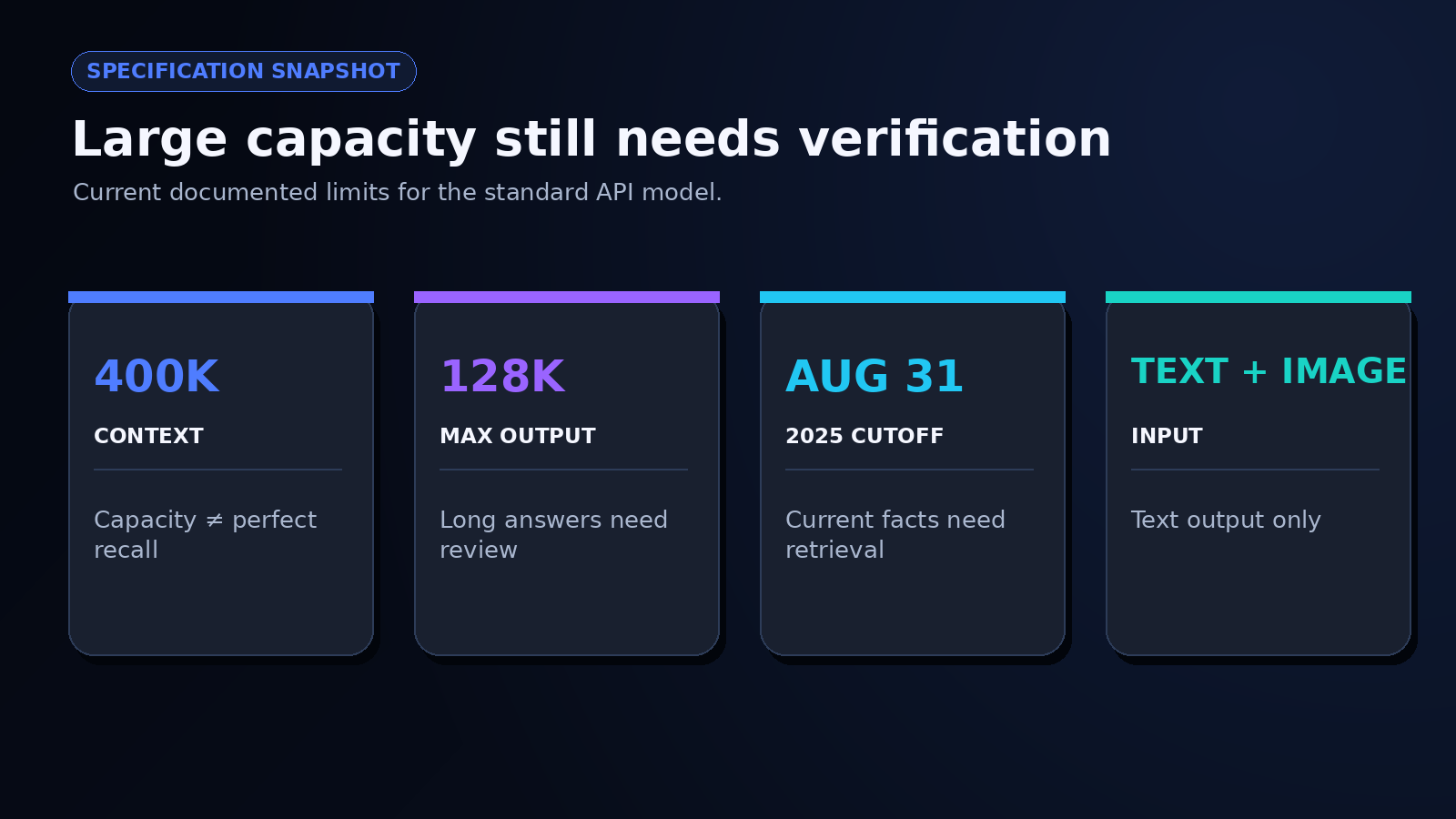
Figure 3. context, output, modalities, cutoff, and snapshots
API Pricing and Access
The standard API model costs $1.75 per million input tokens, $0.175 per million cached input tokens, and $14 per million output tokens. GPT 5.2 Pro costs $21 input and $168 output. Reasoning tokens, retries, tool calls, and human correction affect the cost of an accepted result. When using an integration platform, check its billing units separately before comparing them with OpenAI’s dollar rates.
You can see current provider routing and availability on OpenRouter’s GPT‑5.2 page. I would calculate cost per completed task, not cost per request. A cheaper response that fails validation twice can cost more than a higher-priced response that passes on the first run.
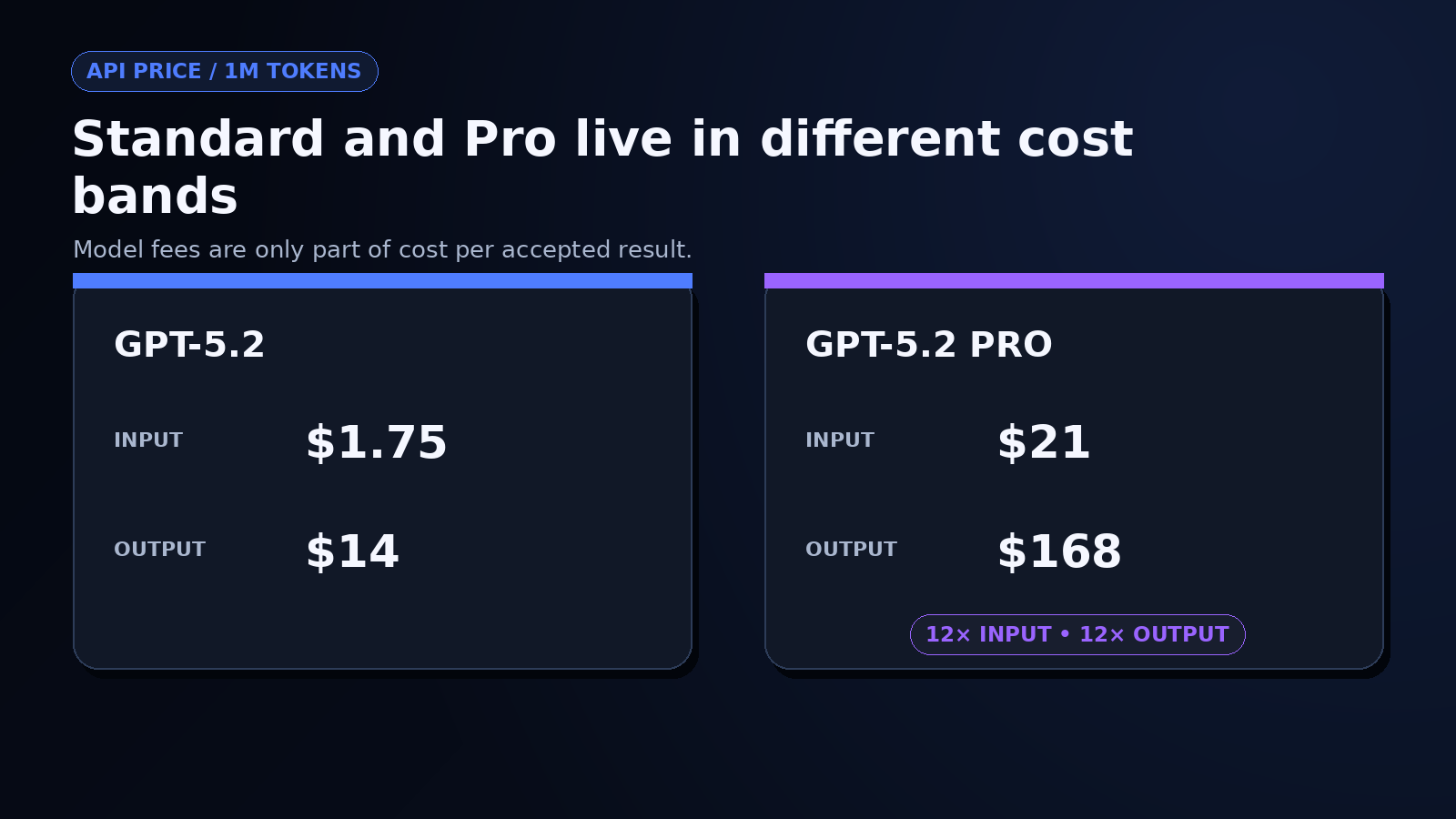
Figure 4. standard versus Pro cost per million tokens
What Changed in the OpenAI GPT-5.2 Release?
The OpenAI GPT-5.2 release was aimed at work that continues beyond one answer: building artifacts, inspecting long documents, using tools, writing and reviewing code, reasoning over images, and completing multi-step professional tasks. It also separated fast chat, deeper reasoning, and high-compute work more clearly than a single model label suggests.
Instant, Thinking, and Pro Target Different Workloads
Instant prioritized everyday questions, explanation, translation, and quick drafting. Thinking targeted analysis, coding, files, planning, and tool use. Pro spent more computation on difficult problems where a longer wait and a much higher API bill could be justified.
| Mode or model | Practical fit | Main trade-off |
|---|---|---|
| Instant | Routine questions and latency-sensitive work | Less deliberation on hard multi-step tasks |
| Thinking | Analysis, coding, long files, and tool-driven workflows | More latency and token use |
| Pro | Difficult tasks where incremental quality has high value | Very high cost; responses may take minutes |
I would route by risk rather than prestige. A classification step may need a fast model with a strict schema. A financial-model review may justify deeper reasoning. If you send every request to Pro, you hide which tasks actually benefit from the extra compute and make cost control much harder.
Professional Work and Tool Use Were Central to the Launch
OpenAI emphasized spreadsheets, presentations, front-end work, code review, document analysis, science, mathematics, and tool calling. In a vendor-run evaluation of de-identified ChatGPT queries, response-level errors were reported as 30% relatively less common than with GPT‑5.1 Thinking. The release also notes that models performed the error grading, so I read that number as directional evidence rather than an independent guarantee.
The practical improvement is not “the model knows everything.” It is a greater chance that a well-specified task survives several steps without losing its structure. You still need observable checkpoints: which tool ran, what data it received, what it changed, and how the workflow recovered after a failed call.
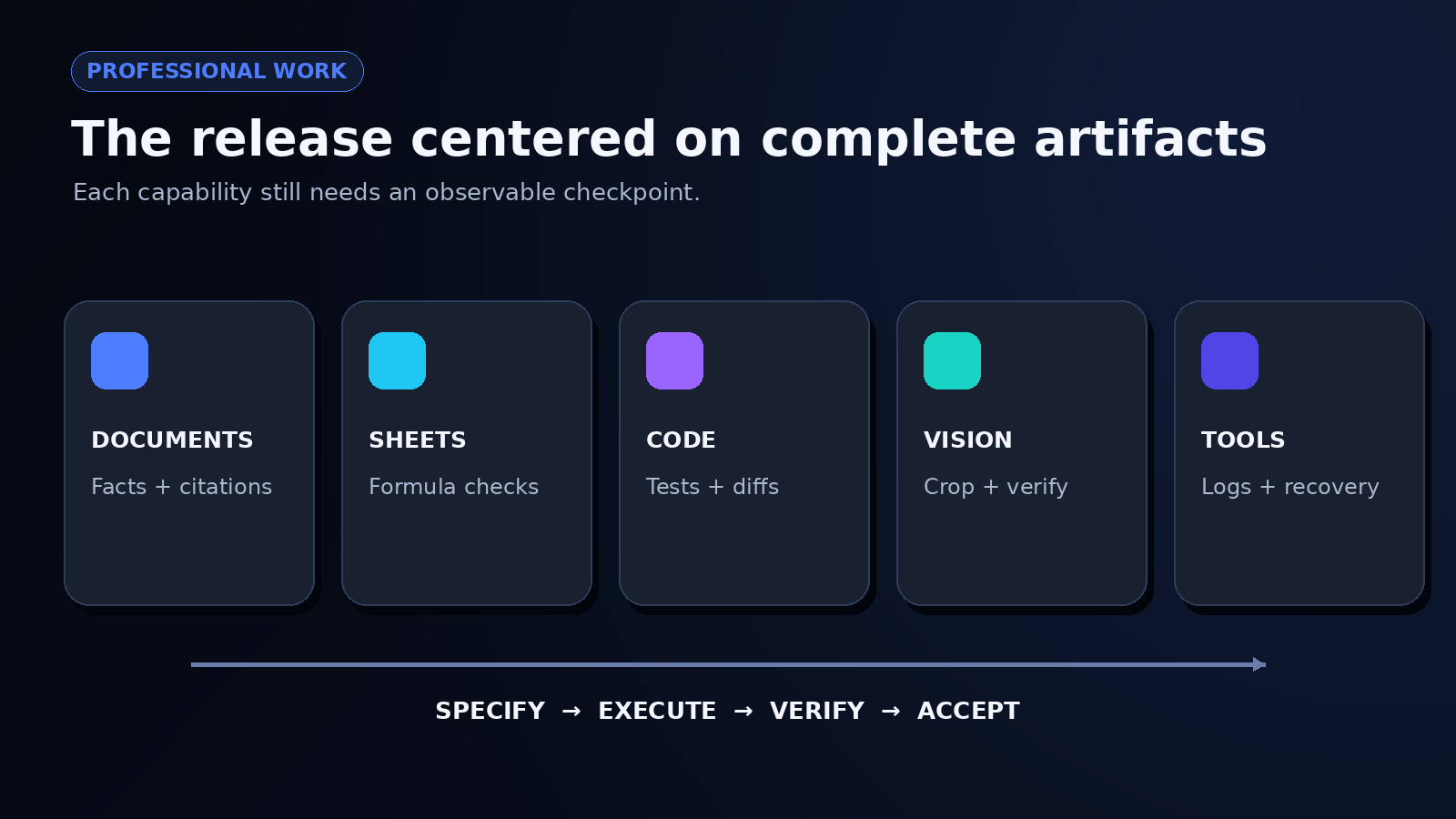
Figure 5. spreadsheet, code, document, image, and tool-call panels
Launch Benchmarks Showed Broad but Uneven Strengths
| Benchmark | GPT-5.2 Thinking | What it measures |
|---|---|---|
| GDPval wins or ties | 70.9% | Well-specified professional tasks across 44 occupations |
| SWE-Bench Pro public | 55.6% | Multi-language software-engineering tasks |
| SWE-bench Verified | 80.0% | Verified Python repository tasks |
| GPQA Diamond | 92.4% | Graduate-level science questions without tools |
| AIME 2025 | 100.0% | Competition mathematics without tools |
| ARC-AGI-2 Verified | 52.9% | Novel abstract-reasoning tasks |
The spread is the useful part. It shows strong results without implying uniform mastery. An 80% score on verified Python issues does not predict your pass rate on a TypeScript monorepo with custom deployment rules. Likewise, a science benchmark does not establish reliable legal or medical judgment.
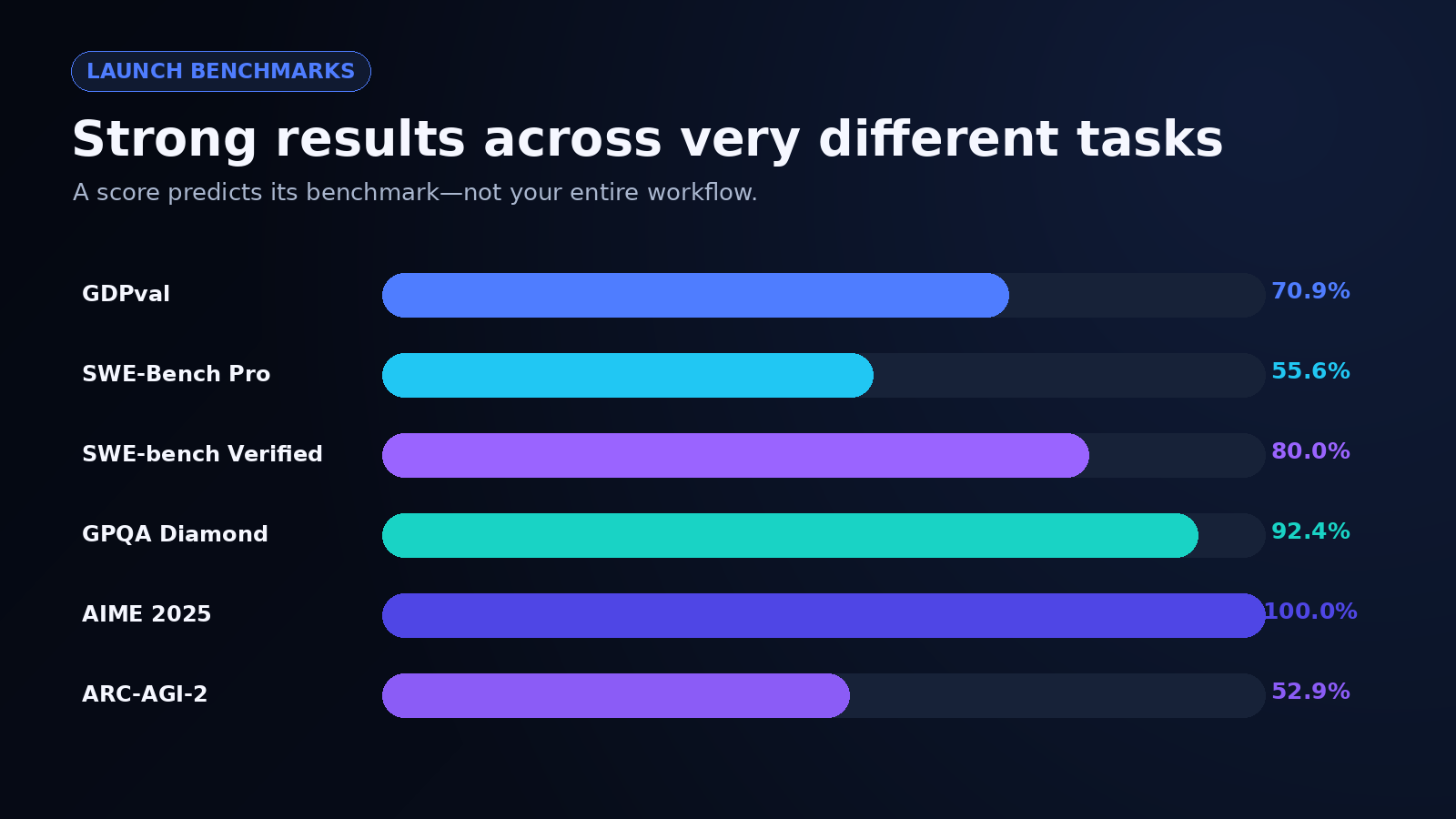
Figure 6. six launch scores with task categories
Read GPT-5.2 Benchmarks Alongside Its Limitations
Public scores compress many choices into one number: prompt format, tools, reasoning effort, test selection, grader behavior, and retry policy. Your production workflow adds data quality, permissions, latency limits, and human review. I find benchmarks most useful for choosing what to test—not for skipping the test.
What My App Review Actually Showed
The project-brief reviewer displayed the submitted instructions under “Project summary” and “Essential requirements” while the response was still streaming. The input asked for implementation checks, but the visible result organized that request as a brief. It did not report completed code inspection or test outcomes.
The separate session view had no logged requests or usage, leaving response time, routing, and cost unverified. Complete a request with a constrained brief to finish the check.
Benchmark Scores Are Not Production Guarantees
Start with 20 to 50 representative tasks and define acceptance before running them. For code, that may include test pass rate, diff size, security findings, and rollback safety. For document work, it may include factual accuracy, citation coverage, calculation errors, and editing time. Run the same set more than once because variance matters.
Then measure cost per accepted result. Suppose one model costs $0.18 per run and passes 60% of cases, while another costs $0.28 and passes 90%. Before human correction, their expected costs per accepted result are $0.30 and about $0.31. Once you price review time, the second may be clearly cheaper—or not. The arithmetic forces the decision back onto your workflow.
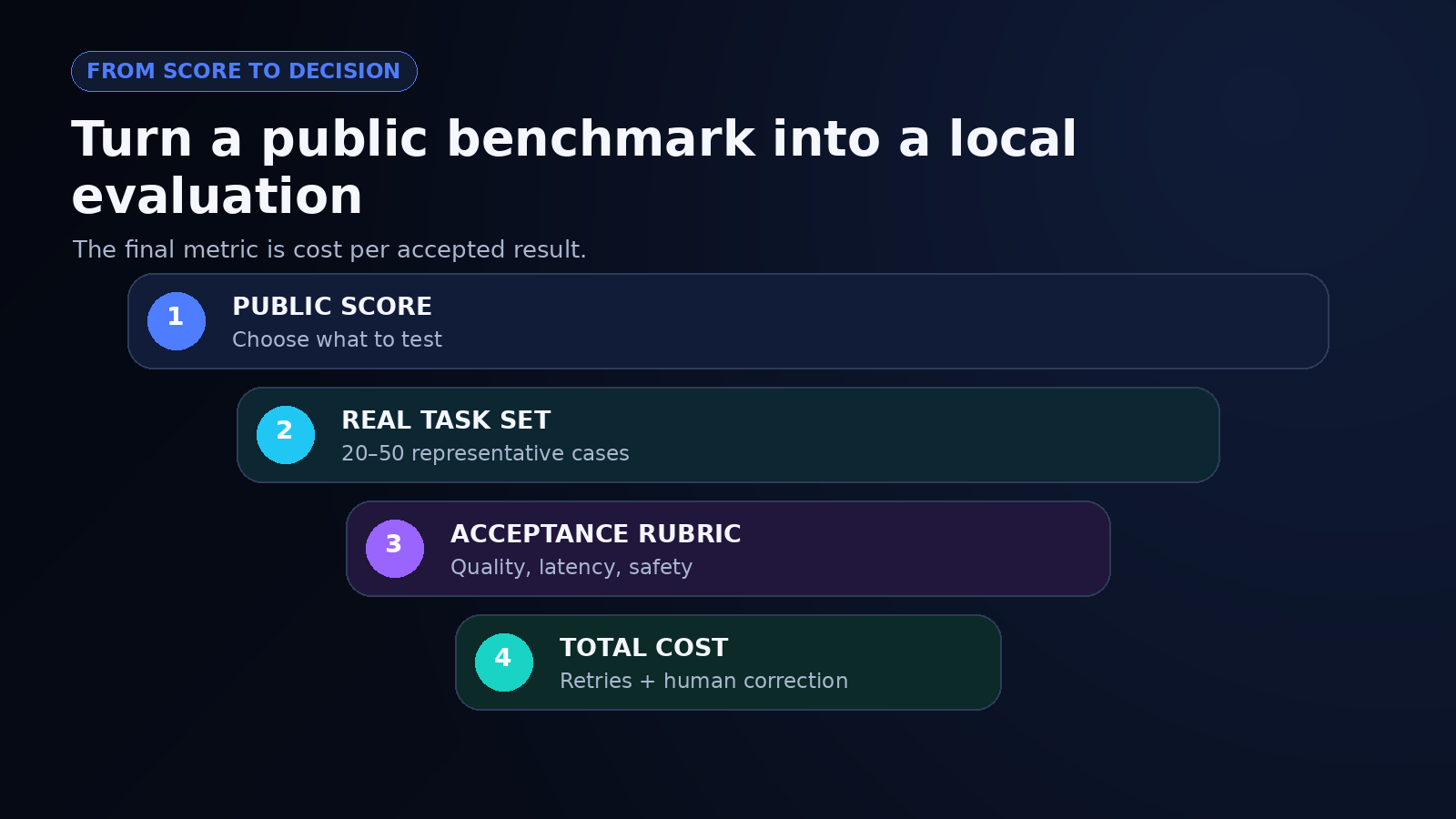
Figure 7. benchmark score to representative tasks to accepted-result cost
Long Context and Image Input Still Require Verification
A long context window can reduce chunking, but it also makes omissions harder to notice. I would test retrieval from the beginning, middle, and end of a file set; require quotations or record identifiers for critical facts; and rerun calculations outside the model. For images, crop the relevant region and provide the question explicitly instead of expecting the model to infer what matters.
Independent criticism can also expose failure modes that a launch post will not foreground. One hands-on critique describes disappointing outputs in the author’s tasks. That does not disprove the benchmark results; it shows why your prompt, workload, and acceptance bar must be reproduced directly.
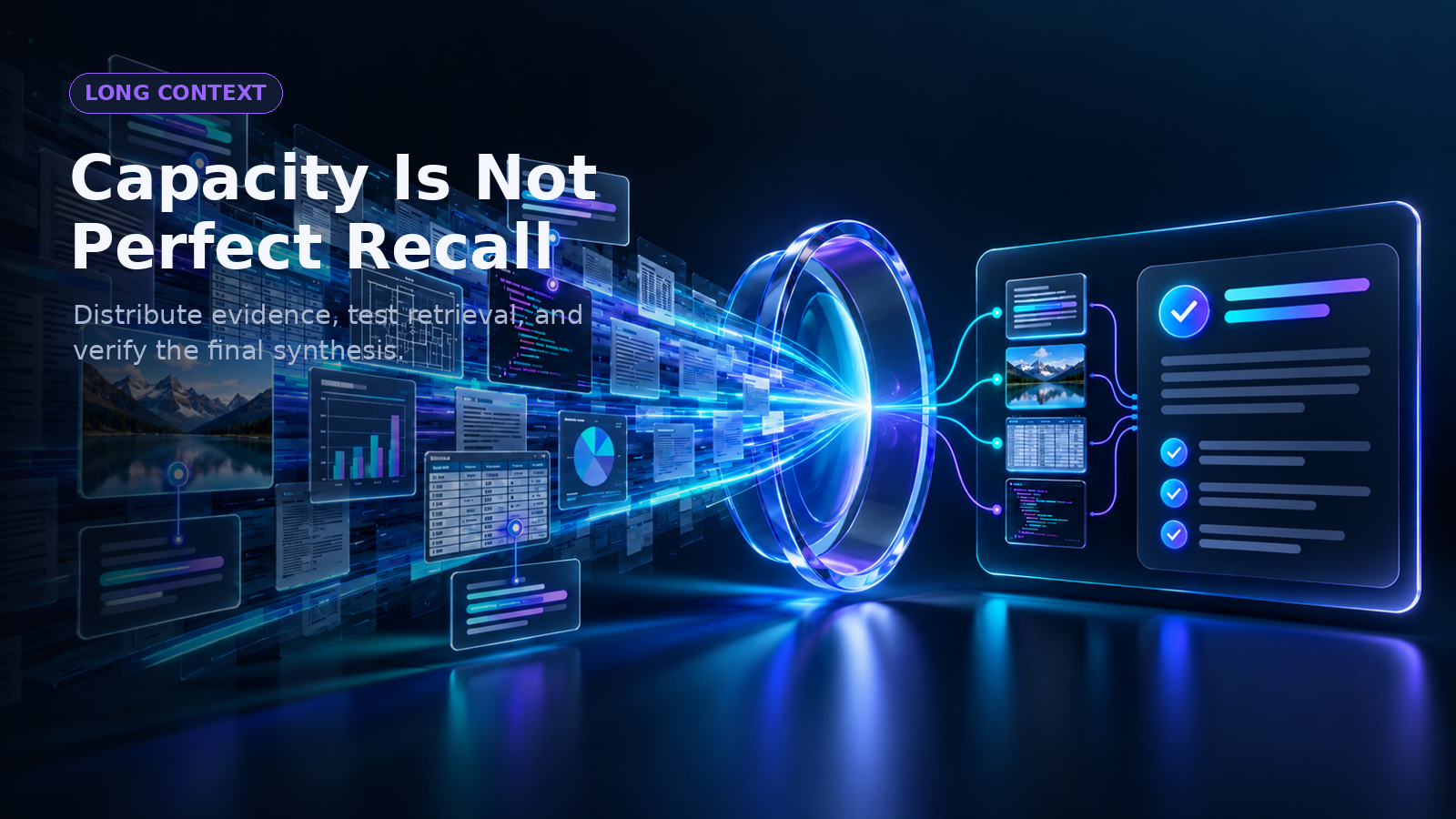
Figure 8. evidence distributed through a 400K-token document stream
High-Stakes Work Needs Domain Safeguards
The August 31, 2025 knowledge cutoff means current facts require retrieval. The models can still invent sources, overlook requirements, misread screenshots, or generate unsafe code. They also do not support fine-tuning, so teams that need deeply customized behavior must rely on prompting, retrieval, tools, validation, or another model.
You should separate assistance from authority. A model can summarize a contract, flag a suspicious transaction, or propose a patch. A qualified person or deterministic control should make the legal, medical, financial, security, and production decision. Log the evidence and keep a clear path to reject or roll back the output.
What Is GPT-5.2-Codex and How Should Developers Use It?
GPT 5.2 Codex is the coding-specialized member of the family, designed for longer software-engineering work rather than isolated autocomplete. The useful distinction is workflow depth: understanding a repository, planning a change, editing several files, running tools, inspecting failures, and revising the patch.
Best-Fit Coding Tasks
Good candidates include repository exploration, feature implementation, bug repair, refactoring, test creation, code review, and migrations with explicit acceptance criteria. I would give the model the smallest coherent goal that still includes the real dependency boundary. An artificially tiny prompt can produce a clean local diff that fails the surrounding system.
You can evaluate GPT 5.2 Codex with a repeatable repository set: known issues, hidden tests, linting, dependency policy, security checks, and a maximum acceptable diff. Record the number of tool calls, corrections, and reviewer interventions. A patch is not successful merely because it compiles.
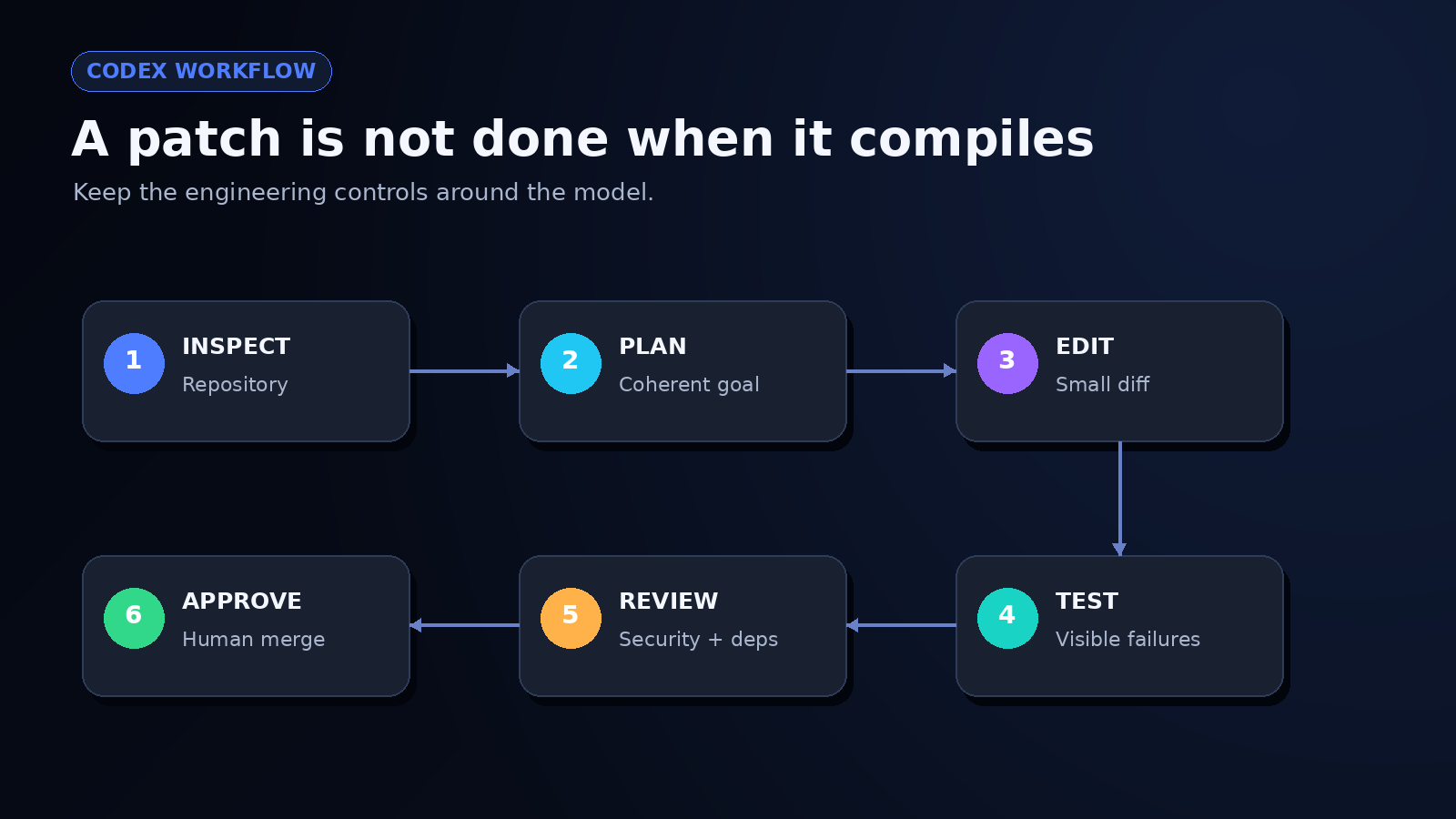
Figure 9. inspect, plan, edit, test, review, and approve
Production Guardrails Still Apply
Keep changes small enough to review, pin the model snapshot when reproducibility matters, and restrict tools to the least privilege required. Run repository tests, dependency scanning, secret detection, static analysis, and human diff review. If the agent can deploy, delete data, or rotate credentials, place those actions behind explicit approval.
I also prefer a failure budget: define how many retries, minutes, or tokens a task may consume before it returns to a human. Without that boundary, an agent can look productive while looping through increasingly speculative fixes.
GPT-5.2 vs Gemini 3 Depends on the Exact Task
GPT-5.2 vs Gemini 3: Explains that the better AI model depends on the task, such as coding, reasoning, writing, or research.
The honest answer to “GPT 5.2 vs Gemini 3” is a test design, not a universal winner. Exact variants, dates, tools, context sizes, reasoning settings, and pricing must be recorded. Otherwise, a comparison can quietly give one model search, code execution, or a larger time budget.
| Decision factor | Question to test |
|---|---|
| Output quality | Which model passes your task rubric more often? |
| Coding | Which produces the higher test-pass rate with smaller, safer diffs? |
| Long context | Which retrieves and combines facts from your files more accurately? |
| Tool use | Which completes the workflow with recoverable failures and usable logs? |
| Latency | What are median and 95th-percentile response times? |
| Cost | What is the total cost per accepted result after retries and correction? |
| Governance | Which data, retention, region, and audit controls fit your use case? |
Run the Same Head-to-Head Evaluation
Give both models the same prompts, source files, tools, time budget, and scoring rubric. Randomize task order and hide the model name from reviewers where possible. Repeat representative cases rather than selecting one beautiful answer. Community reactions in the GPT‑5.2 launch discussion are useful for discovering complaints to test, but they are not controlled comparisons.
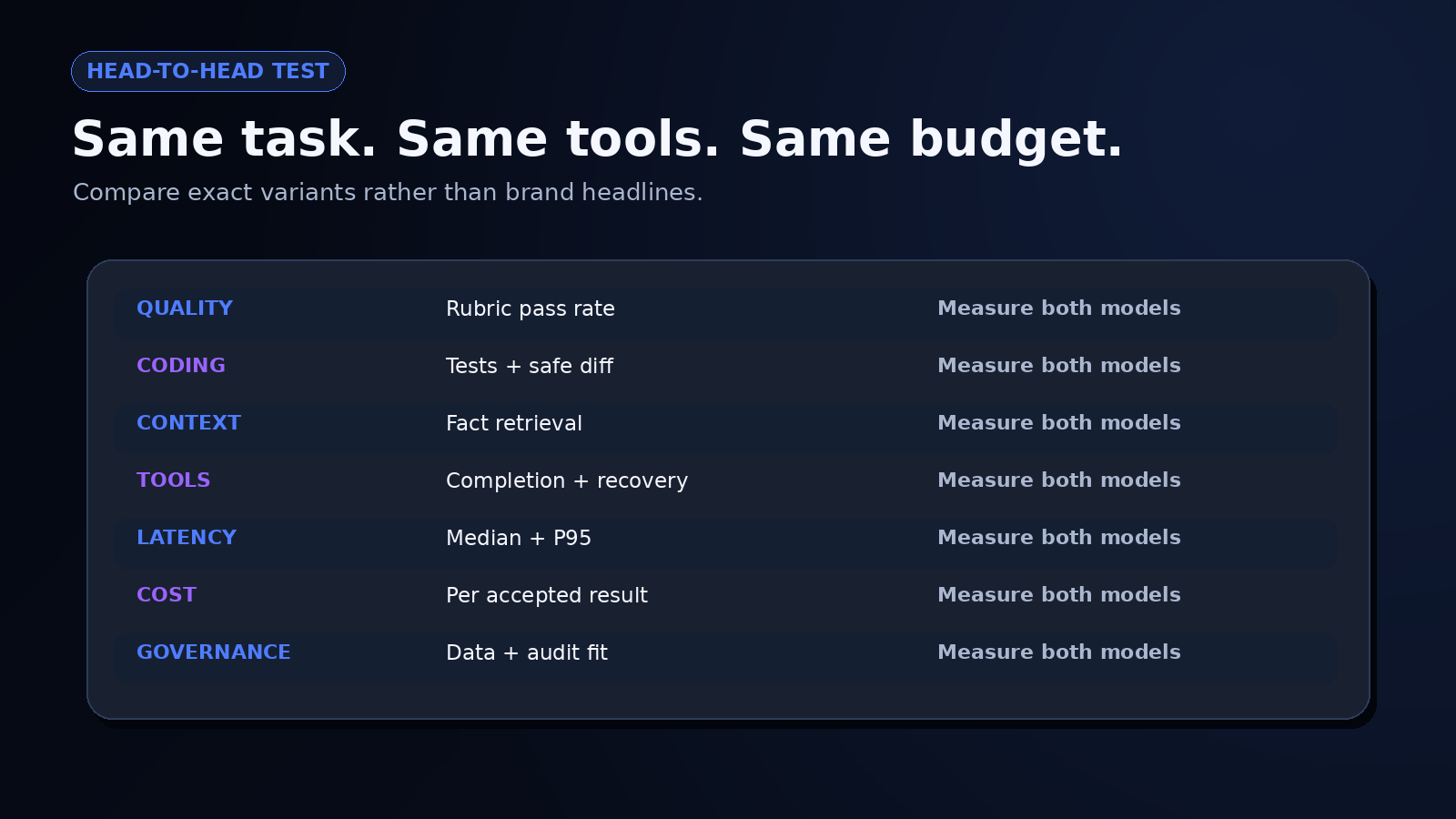
Figure 10. quality, coding, context, tools, latency, cost, and governance
Choose the Lower-Risk Workflow, Not the Better Headline
Your winner may differ by step. One model might plan well, another might generate cleaner code, and a smaller option may handle classification at a fraction of the cost. The right architecture can route work rather than force one model to do everything.
For a GPT 5.2 vs Gemini 3 evaluation, I would choose the simplest model mix that meets the quality threshold and remains observable when it fails. Every additional provider or fallback adds routing logic, evaluation work, privacy review, and incident complexity. Model diversity is useful when it reduces a measured risk.
Build a GPT‑5.2 Pro App in Enter Pro
I used Enter Pro’s AI app builder to create an AI project-brief reviewer with GPT‑5.2 Pro selected as its integration. The aim was to turn a rough app idea into requirements, missing information, priorities, and acceptance checks.
Select GPT‑5.2 Pro and Read the Rates
I located GPT‑5.2 Pro in the model catalogue and opened its details. The panel displayed an Integrate button and rates of** 2.1 credits per 1,000 input tokens** and** 16.8 credits per 1,000 output tokens**. These are the captured platform rates.
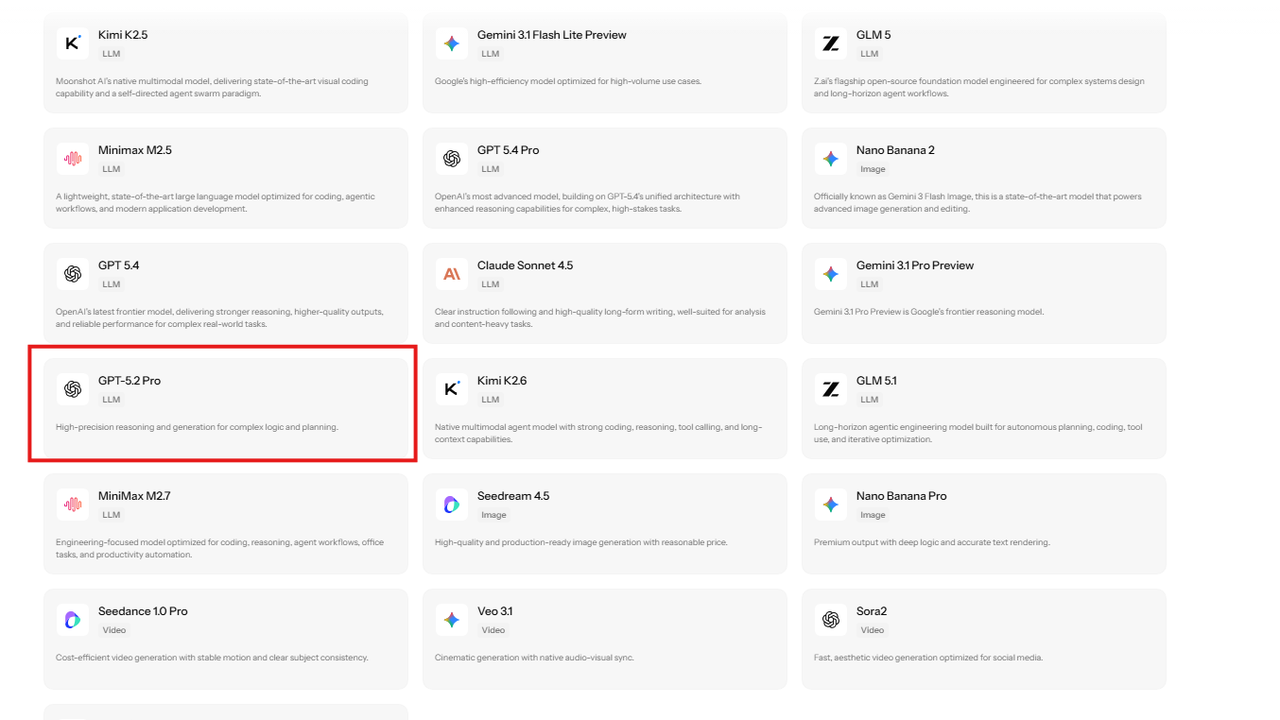
Figure 11. GPT‑5.2 Pro appears in the model catalogue among other available integrations.
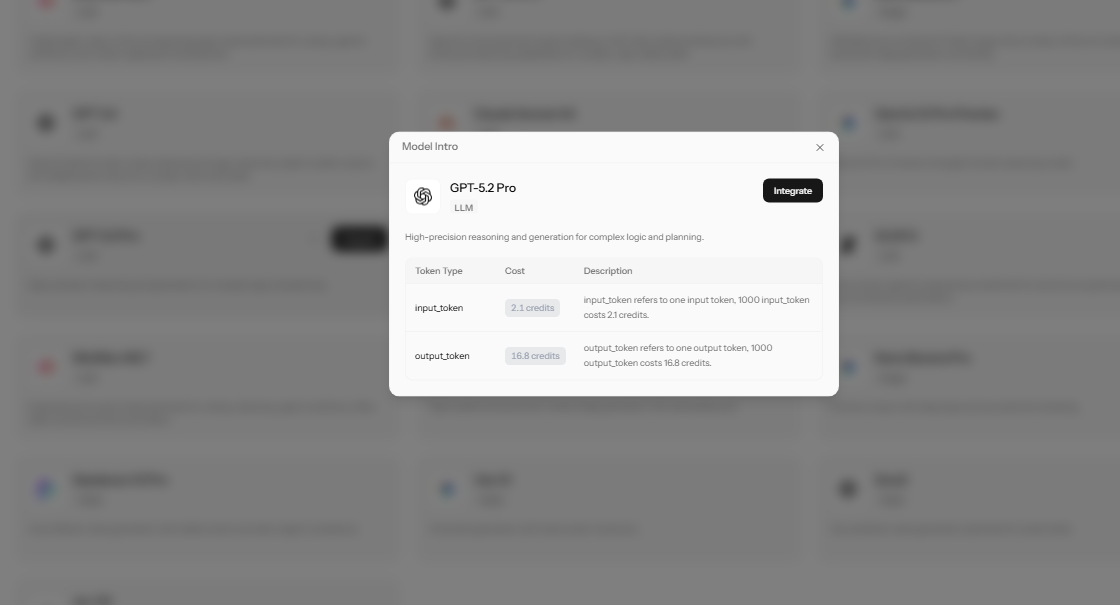
Figure 12. The GPT‑5.2 Pro details panel displays the Integrate control and credit rates.
Attach the Model and Describe the App
The project request had the GPT‑5.2 Pro chip attached. I asked for a large brief field, a Review Brief button, and responses arranged into five sections: project summary, essential requirements, contradictions and missing information, implementation priorities, and acceptance checks. The request also called for genuine loading and error states.
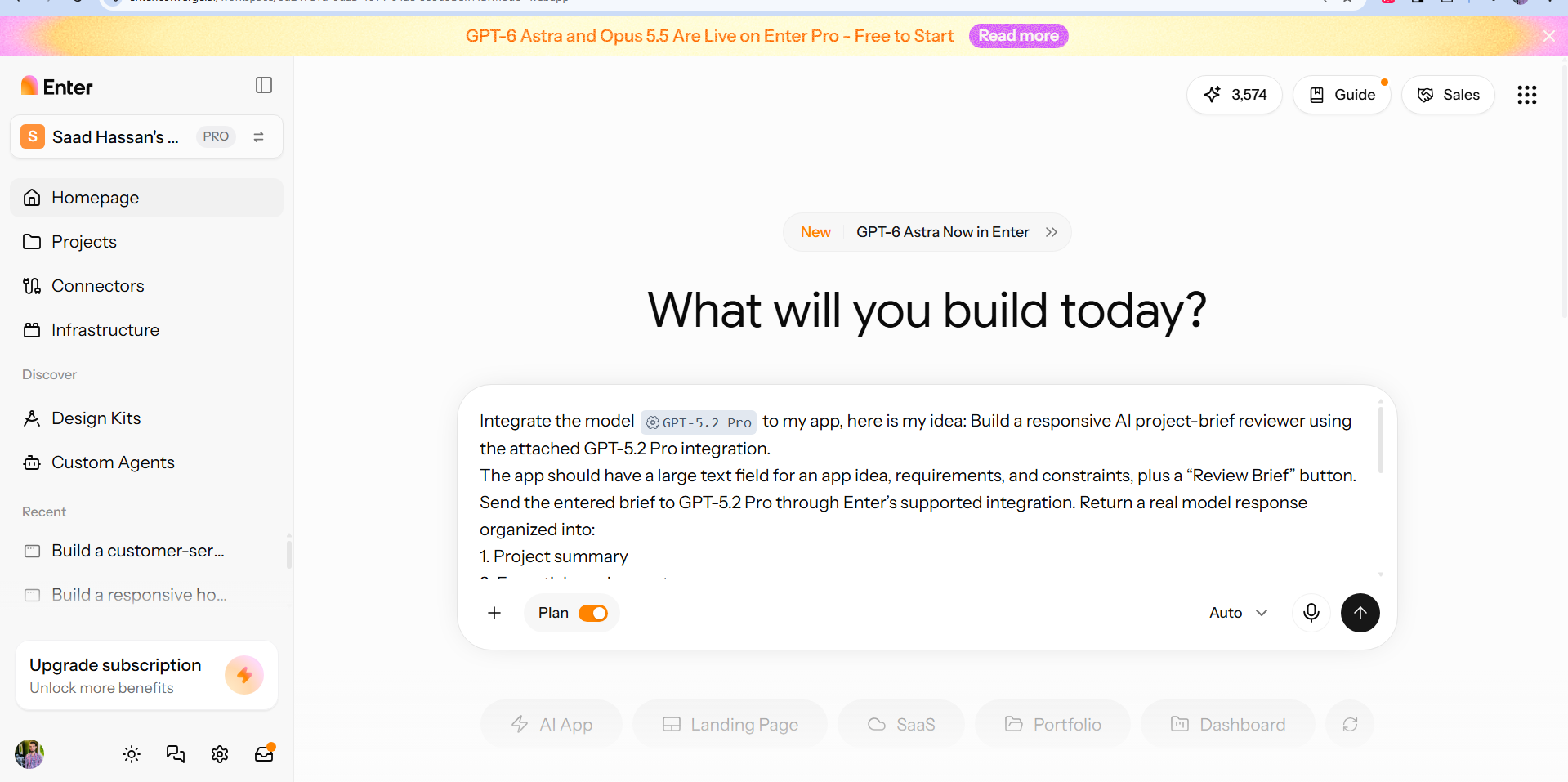
Figure 13. The project prompt attaches GPT‑5.2 Pro and specifies the reviewer’s purpose and response structure.
Inspect the Build Plan
Enter generated a plan for a Vite, React, and Tailwind interface with a backend function handling the AI request. It specified streaming results, plain English text, and no saved review history. Keeping the private credential on the backend was part of the plan. This capture records the proposed implementation.
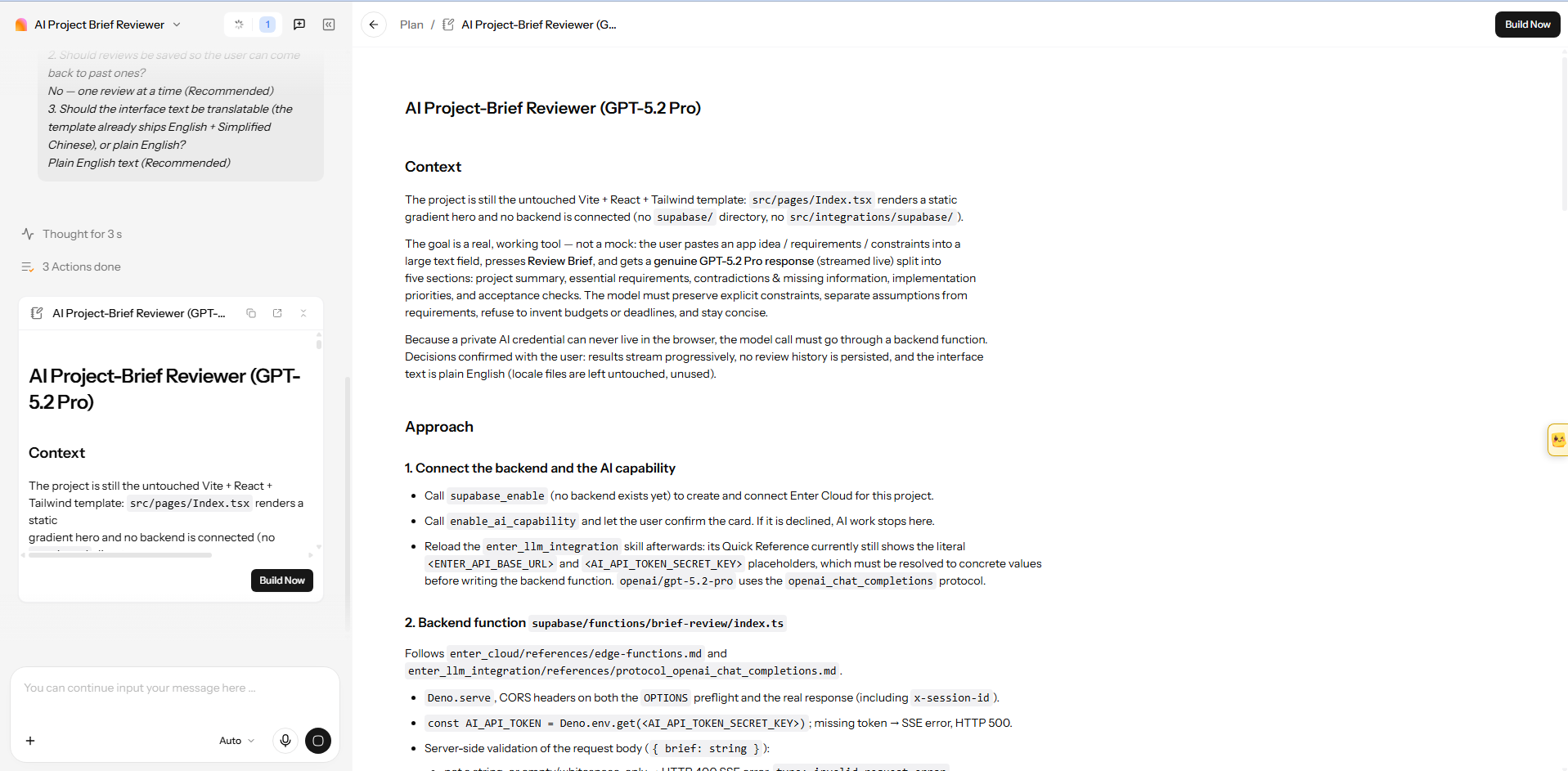
Figure 14. The build plan describes the interface, backend request, streaming output, and credential handling.
Examine the Visible Review
The reviewer displayed a brief field beside its response panels. In the captured attempt, I entered the implementation-check request into that field. The response restated its requirements under the requested headings, while Streaming review and** Reviewing** remained visible. This demonstrated response organization, with completion and correctness still to check.
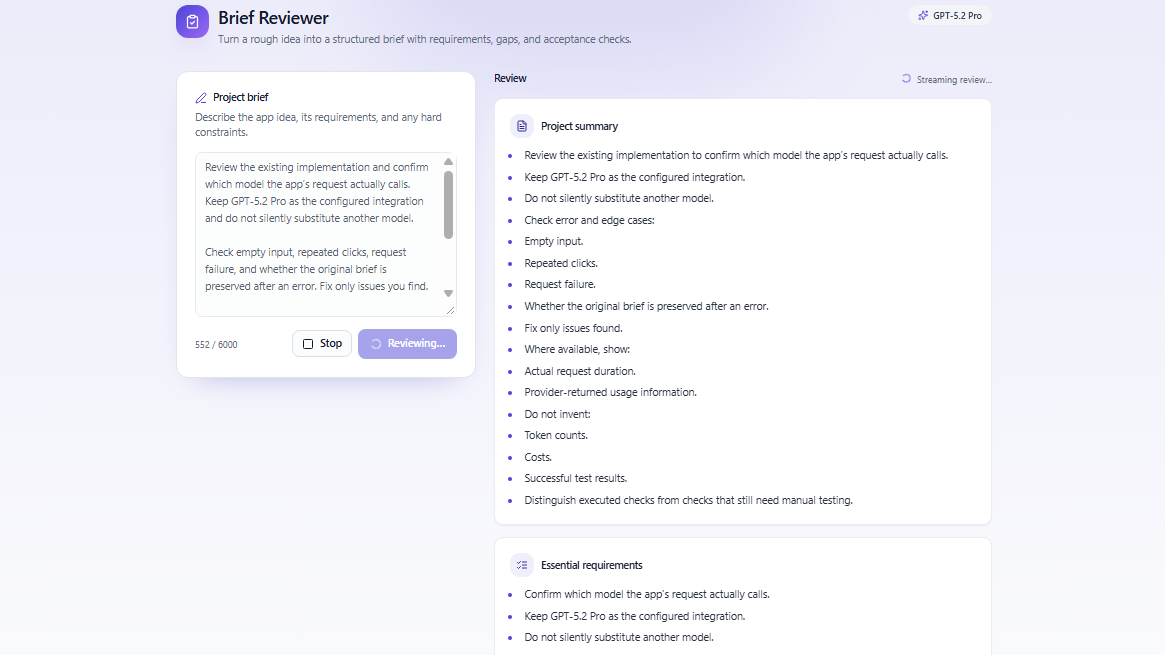
Figure 15. Review text appears under the requested headings while the interface still indicates an active response.
For a reasoning check, use the appointment brief with three technicians, 45-minute jobs, a 30-minute travel buffer, 9 a.m.–5 p.m. hours, no overlaps, and a 12-hour rescheduling rule. Then add “allow two simultaneous appointments per technician” and inspect whether the completed response flags the conflict. That result is not in these captures.
Check the Request Record and Credit Usage
The additional status view labelled the integration GPT‑5.2 Pro, the provider Enter AI, and the protocol Responses API. Its session contained no requests, zero input and output tokens, and zero consumed usage. Those values cannot establish the earlier response’s duration, actual routing, or charge.
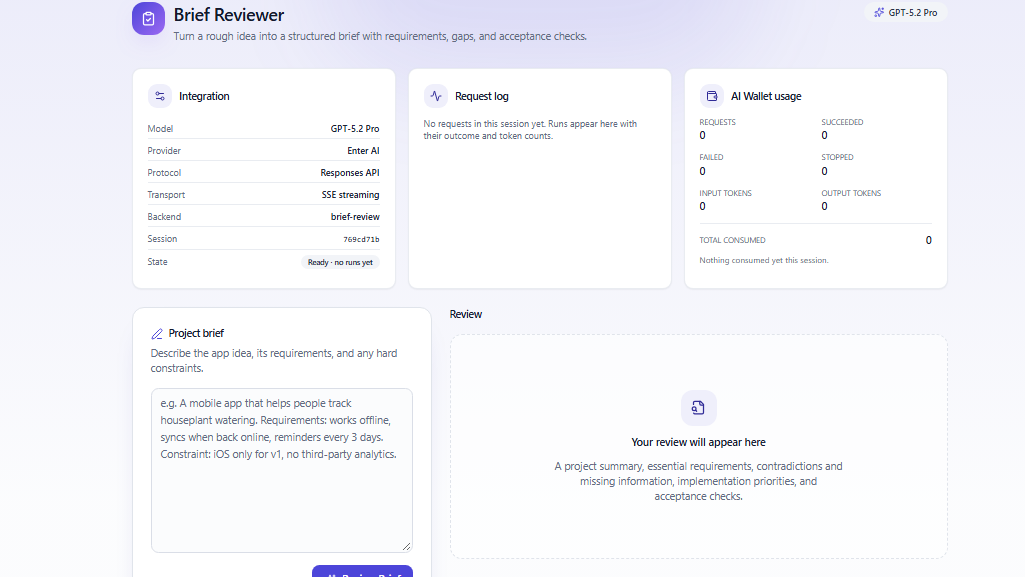
Figure 16. The integration and usage panels show a ready session with no recorded requests or consumption.
At the displayed rates, an illustrative 1,000 input tokens plus 500 billed output tokens would equal 10.5 credits. This is an estimate, not observed spending. To compare costs, use completed requests, billed usage, retries, and the proportion of reviews that meet your acceptance criteria.
Enter keeps the selected model and app brief in one project. Build your GPT‑5.2 Pro app in Enter Pro and verify the integration before publishing.
Final Take: Evaluate GPT‑5.2 Through a Working Task
GPT‑5.2’s practical value depends on task quality and acceptable cost. The reviewer project connects Pro selection with an app interface and organized review text. A finished response, verified constraints, and a completed request record are still needed to judge reliability and cost-effectiveness.
Choose the least expensive model that meets your acceptance threshold, repeat important cases, and keep a recovery path for errors. You can use Enter Pro to build and refine a GPT‑5.2 Pro app, then verify its integration before expanding it.
FAQ About Chat Gpt 5.2
When Was GPT-5.2 Released?
OpenAI announced it on December 11, 2025. The API models and ChatGPT variants began rolling out at launch, although access and recommended alternatives have changed since then.
Is GPT-5.2 Still the Newest OpenAI Model?
No. As of October 9, 2026, OpenAI documents it as a previous-generation model. People searching for Chat GPT 5.2 should distinguish ChatGPT picker access from API or third-party integration access. Check the exact variant and current availability before starting a project.
What Is the GPT-5.2 Context Window?
The documented context window is 400,000 tokens, with a maximum output of 128,000 tokens. You should still test retrieval and reasoning across your actual long documents.
How Much Does the GPT-5.2 API Cost?
The standard API rate is $1.75 per million input tokens, $0.175 per million cached input tokens, and $14 per million output tokens. Tool charges, reasoning, retries, and review add to the task cost.
How Can I Build a GPT‑5.2 Pro App With Enter Pro?
Select GPT‑5.2 Pro from the model catalogue, attach the integration, and describe the feature your app needs. For a project-brief reviewer, specify the required inputs and review format. Inspect the generated implementation, then verify a completed request to confirm the model connection works.
How Can I Check GPT‑5.2 Pro Usage in Enter Pro?
Check the integration’s request and usage panels after running a representative task. Confirm that the request appears, then inspect input tokens, output tokens, and consumed credits. Include retries and longer responses when estimating costs, using the platform’s current rates.
What Is GPT-5.2 Pro?
GPT 5.2 Pro is a higher-compute reasoning model for difficult professional tasks. Its official API rates are $21 per million input tokens and $168 per million output tokens, and some requests can take several minutes.
Does GPT-5.2 Support Images?
Yes. It accepts image input and produces text output. Audio and video are not listed as supported native inputs, so those formats require a separate processing step.
Is GPT-5.2 Better Than Gemini 3?
There is no universal answer. Test the exact variants with the same prompts, files, tools, budget, and rubric, then compare accepted-result quality, latency, cost, governance, and recovery from failure.
Can GPT-5.2 Generate Production-Ready Code?
It can generate strong code, but production readiness comes from the whole engineering process: tests, diff review, dependency and security checks, restricted tools, staging, monitoring, and rollback. The model cannot replace those controls.