
Ultimate Guide on How to Code a Website from Scratch
Learn how to code a website from scratch using HTML and CSS. Discover traditional methods and how modern AI agents like Enter Pro can speed up your workflow.
Welcome to the ultimate guide on how to code a website in 2026. Whether you are an aspiring developer eager to master the foundational mechanics of HTML, CSS, and JavaScript, or a founder looking to launch a digital product instantly using an AI dev agent like Enter Pro, you are in the right place. In this comprehensive resource, we will break down the traditional step-by-step manual coding process, and then reveal how to leverage cutting-edge AI tools to build, edit, and deploy professional-grade websites seamlessly.
Method 1: The Traditional Way to Build a Website
If you want to understand the exact mechanics of the web and learn how to build a website from scratch with code, starting with manual development is the best approach. This involves writing the raw HTML, CSS, and JavaScript that web browsers translate into visual pages.
- Master the Basics: HTML, CSS, and JavaScript
To create a website using code, you need to understand the three core languages of the web:
-
HTML (HyperText Markup Language): This provides the structural skeleton of your site. If you are figuring out how to code a website in HTML, you will start by creating a basic document boilerplate. You use specific markup tags to define elements—for instance, using to for headings, for paragraphs, for images, and for clickable links. Everything your user reads or sees is wrapped inside the tags of your document.
-
CSS (Cascading Style Sheets): This handles the styling, colors, and layouts. While HTML puts the raw content on the screen, CSS makes it look professional. You will use CSS rules to dictate fonts, spacing (margins and padding), background colors, and responsive designs (like Flexbox or Grid) that adapt to mobile screens.
-
JavaScript: This adds interactivity and complex logic. JavaScript transforms a static, read-only page into a dynamic experience. You will use it to build features like drop-down menus, image sliders, form validations, and pop-ups.
- Set Up Your Code Editor
To start writing your code, you will need a specialized software environment. Standard word processors (like Microsoft Word) add hidden formatting that breaks code, so a dedicated plain-text code editor is mandatory.
-
Download an Editor: Visual Studio Code (VS Code) is the industry standard and completely free. Sublime Text is another fast, lightweight alternative.
-
Create Your Files: Create a new folder on your computer and open it inside your editor. Here, create your .html files (like index.html for your homepage) and your .css files (like style.css).
-
Link and Preview: You link your design rules to your structure by adding a tag in your HTML's section. To see your progress, simply double-click your index.html file to open and preview it locally in your standard web browser (like Chrome or Safari).
- Choose Hosting and a Domain
Once you learn how to code a website locally on your computer and have your files ready, you need a place to put them so the public can access them on the internet.
-
Get a Domain Name: This is your digital address (e.g., www.yourbrand.com). You can register one through providers like Namecheap or GoDaddy.
-
Purchase Web Hosting: Hosting acts as the digital server space where your raw code files live.
-
Deploy Your Files: You will use an FTP (File Transfer Protocol) client like FileZilla, or the built-in file manager from your hosting provider, to upload your HTML, CSS, and JavaScript files to the live server. Alternatively, for simple static sites (just HTML/CSS/JS), you can use free, developer-friendly deployment platforms like GitHub Pages or Netlify to push your site live instantly.
- Expand with Backend Logic (Optional)
While HTML, CSS, and JavaScript handle the "frontend" (what users see and interact with), complex websites like online stores or social networks require a "backend" to function. The backend acts as the invisible engine operating on your server.
-
Server-Side Languages: If you want to process user sign-ups, handle secure payments, or manage complex business rules, you will use backend languages like Node.js, Python, PHP, or Ruby. These languages process requests securely away from the user's browser.
-
Databases: To store and retrieve dynamic information—such as user profiles, product catalogs, or chat messages—you need a database. Relational databases like PostgreSQL or MySQL, and NoSQL databases like MongoDB, organize and save this data permanently.
-
The Connection: In a traditional build, you write API (Application Programming Interface) code to connect your frontend HTML/JS to your backend database, ensuring that when a user clicks a button, the correct data is fetched and displayed.
*Note: *Setting up this entire full-stack architecture manually can take months, which is why many creators now turn to AI dev agents to handle the backend automatically.
Method 2: How to Create a Website Using Code with Enter Pro
Writing every line of code manually can be time-consuming. If you want professional results without the steep learning curve, you can use Enter Pro, a No-Code AI Dev Agent. Enter Pro acts as your virtual technical co-founder, allowing you to generate full-stack applications using natural language while still giving you 100% code ownership.
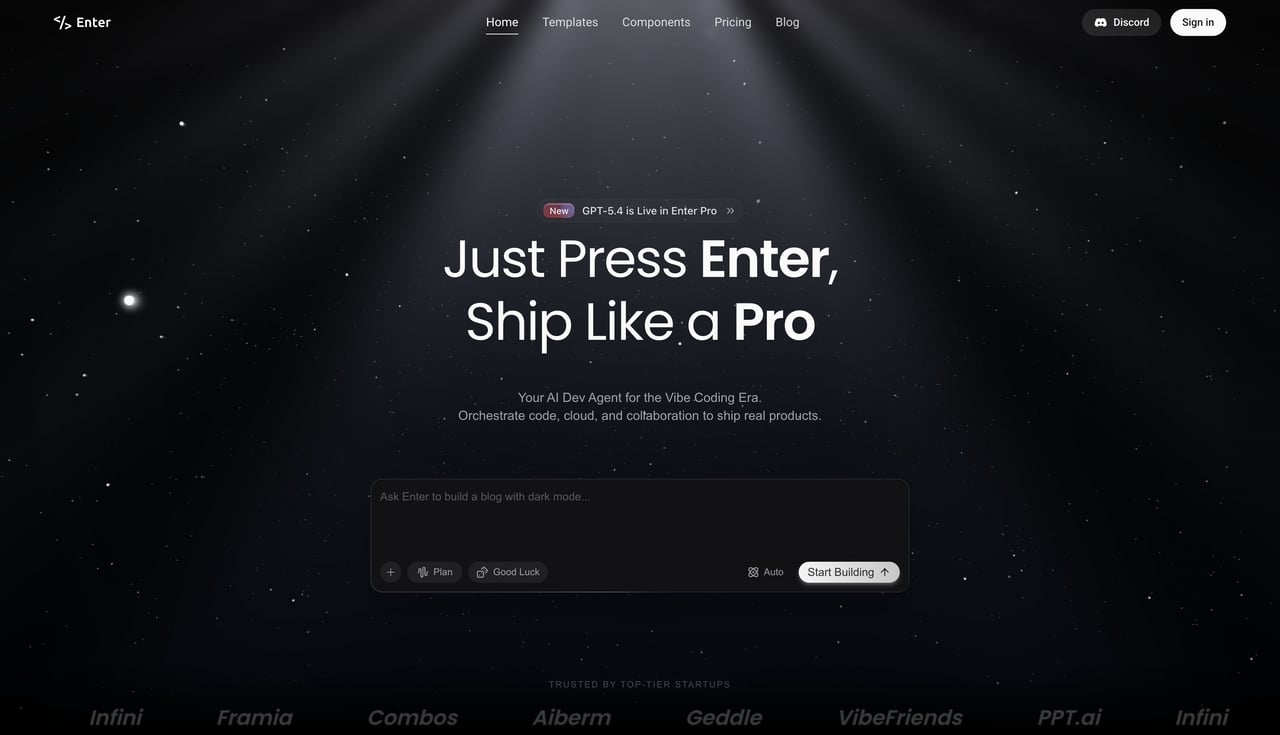
How to Use Enter Pro
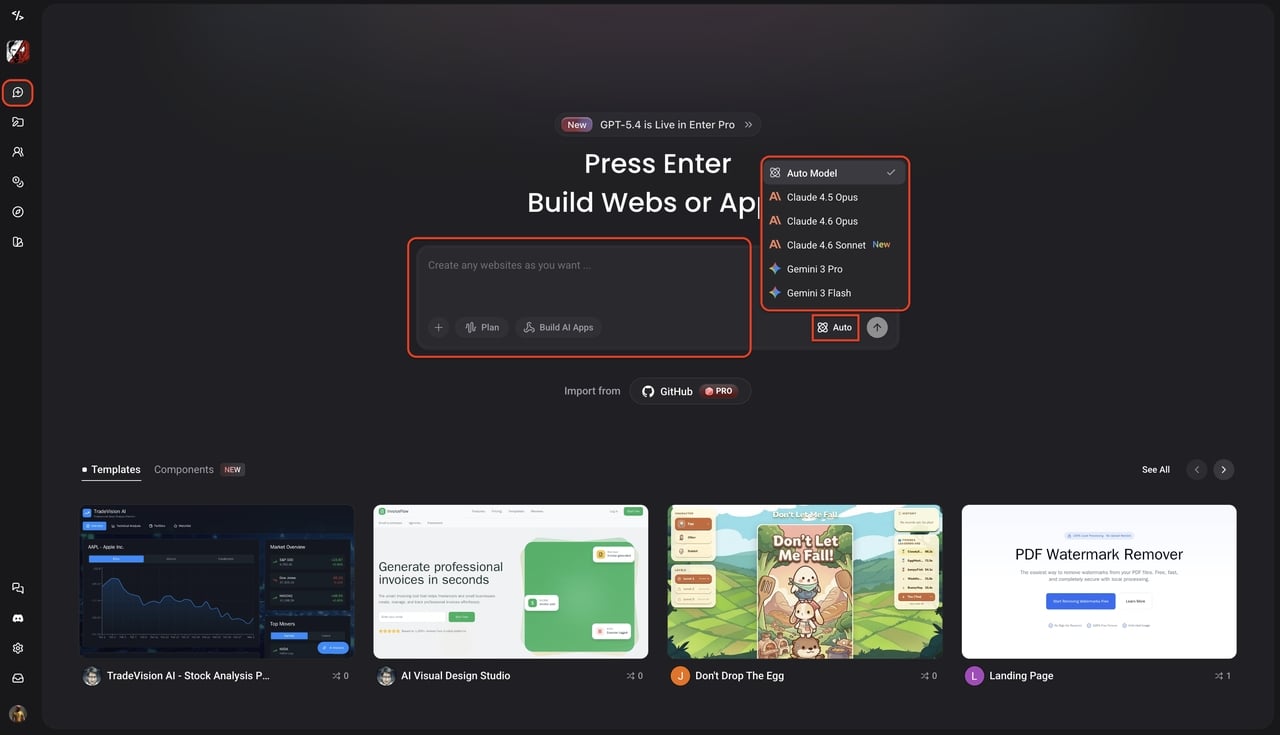
- Step 1: Access the workspace
Log in to Enter Pro and open the main chat queue to start a new project. Click the model dropdown menu to select your preferred AI brain, such as Claude or Gemini. This flexibility ensures you always have the smartest AI powering your specific coding tasks.
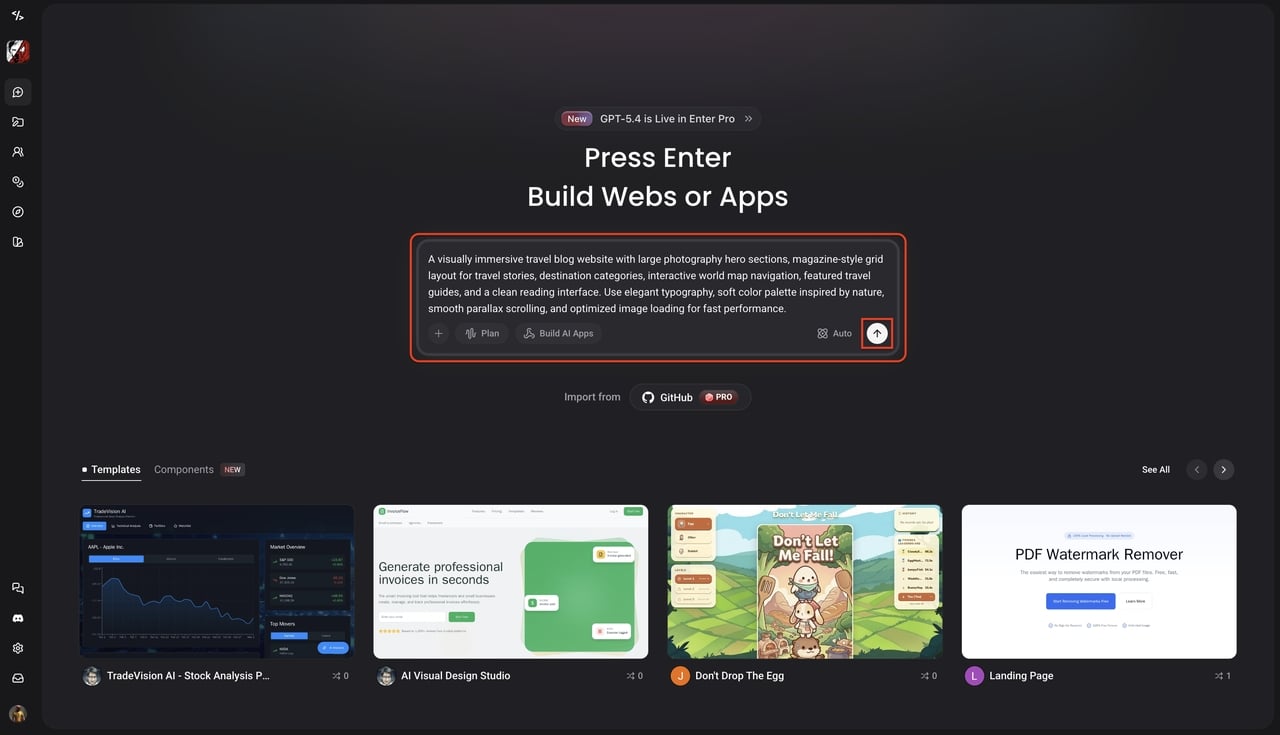
- Step 2: Enter your prompt
Describe the website or app you want to build using everyday, natural language in the chat interface. Include clear details about your layout, color scheme, and desired features to help the AI understand your exact vision. Finally, hit the send arrow and watch as the agent generates your entire website in real-time.
- Step 3: Refine with the visual editor
To refine your design, click the "Select to Edit" icon near the top right corner and select any canvas element to open its floating toolbar. This menu provides specific tools: Edit Link for URLs or anchors, Edit Text Style for fonts and alignment, Edit Layout for padding and margins, Edit Style for backgrounds and borders, and** Delete** to remove the element.

Pro Tip: For ultimate control, click the "Go To Code" icon located right beside the Delete button to instantly view and manually edit the underlying code for that specific element.
- Step 4: Deploy/ Publish and export
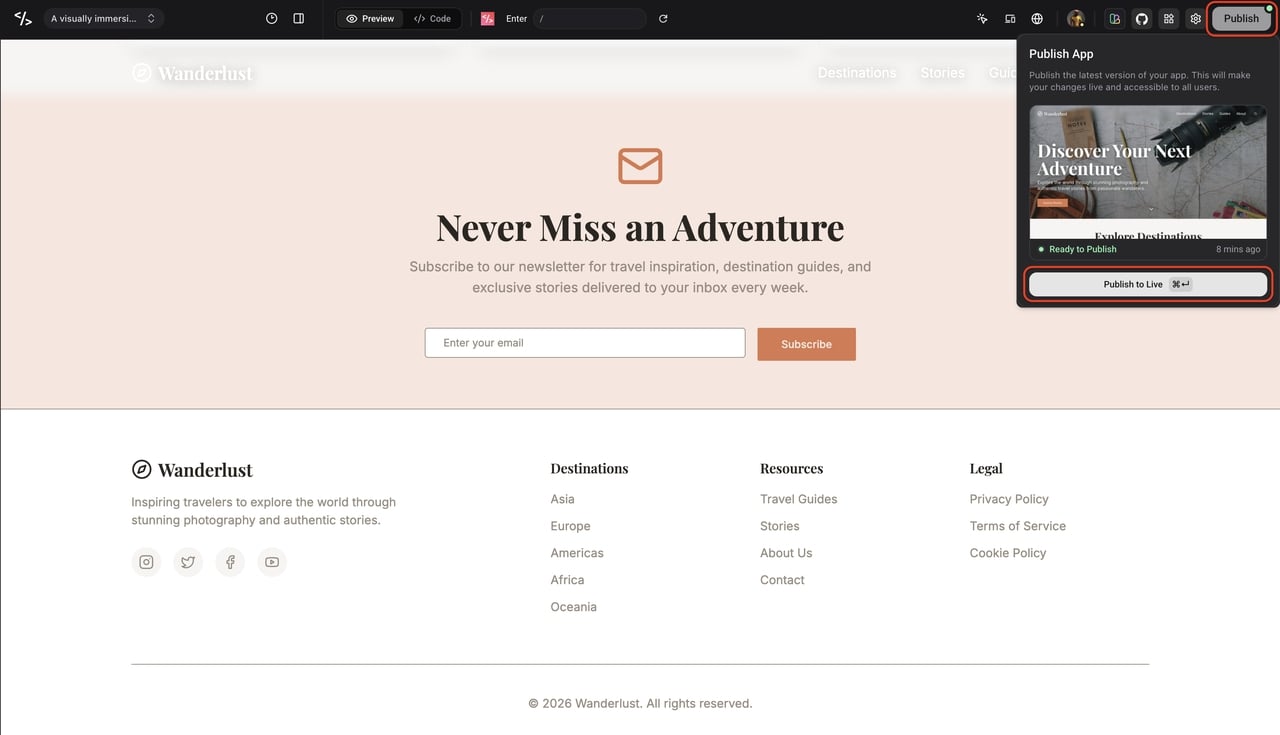
Review your finished website and click the "Publish" button located in the top right corner of the screen. Select "Publish to Live" from the dropdown menu to instantly launch your project onto the internet for the world to see. If you prefer to host it yourself, you can easily export the full source code directly to your computer.
Key Features of Enter Pro
-
**Professional Apps from Scratch: **Whether you are a PM (Product Manager), designer, or founder, Enter Pro operates as a powerful AI website builder that turns your words into deployed applications. Build professional-grade apps with backend logic and deploy with one click. Your idea goes live in minutes without requiring any coding experience.
-
Model Freedom: Never suffer from FOMO (Fear Of Missing Out). Switch instantly between Claude 4.6 Sonnet (New), Gemini 3 Pro, and other cutting-edge models. This ensures you always have the smartest, best-in-class brain powering your code.
-
Production-Ready Integrations: Build real businesses, not just demos. Enter Pro seamlessly integrates with Stripe, Supabase, Google Analytics, and more. From your very first prompt, your app is ready for users, payments, and growth.
-
100% Code Ownership: You own exactly what you build without any vendor lock-in. Export your full source code at any time and deploy it to your own servers. Enter Pro serves as your launchpad, not your cage.
How to Edit Code on a Website
Whether you coded your site manually in a code editor or used an AI agent to generate the files, you will eventually need to make updates, fix bugs, or refresh the design.
-
Using Browser Dev Tools: If you just want to see how to edit the code of a website temporarily (for example, to test a new brand color or adjust a font size before making it official), right-click any page and select "Inspect." This opens the Chrome DevTools (or Firefox Developer Tools), allowing you to tweak HTML and CSS in real-time. These changes only happen in your browser and will disappear once you refresh the page.
-
**Editing Live Code: **To make permanent changes and truly understand how to edit code on a website, you must open your original source files (.html, .css, .js) in your code editor, make the necessary syntax adjustments, save them, and re-upload the files to your web server via FTP or GitHub. If you use Enter Pro, the workflow is much faster: you can simply use the Visual Editor to click and edit elements on the canvas, and the platform automatically updates the underlying code repository for you.
FAQs
- What is the best language to learn to code a website?
HTML and CSS are the foundational languages required to build the structure and visual style of any web page. JavaScript is typically learned next, as it is the standard language used to add interactivity and complex logic to web browsers.
- Can I build a website from scratch without knowing how to code?
Yes. While traditional manual programming requires learning specific syntax, you can easily discover how to build a website from scratch using modern Enter Pro AI development agents. These tools interpret your natural language prompts or visual actions and generate the underlying code for you automatically.
- How long does it take to code a website?
Coding a basic site manually can take a few days to several weeks, depending on your skill level, the complexity of the design, and the required backend logic. Using AI generation tools can reduce this development time to a matter of minutes.
Conclusion
Mastering how to code a website is one of the most empowering skills in the modern digital landscape. Learning HTML, CSS, and JavaScript provides an invaluable foundation for web development, giving you absolute control over your digital projects. Understanding raw syntax is crucial for deep customization, managing backend logic, and complex troubleshooting. However, coding every single line manually from scratch can be incredibly time-consuming and often leads to developer burnout. For a much faster workflow, modern AI dev agents like** **Enter Pro handle the heavy lifting, letting you deploy full-stack applications instantly without losing code ownership. Whether you prefer the traditional manual route or the AI-assisted path, the key is simply taking that first step. Evaluate your goals, pick the approach that best fits your timeline, bring your ideas to life, and start your coding journey today!