AI Agents for HR: Create Scalable HR Tools for Your Team

Create custom HR tools to automate workflows, improve hiring, and streamline onboarding.

How Enter Pro Helps You Build HR Apps Fast

Prompt-Based Generation

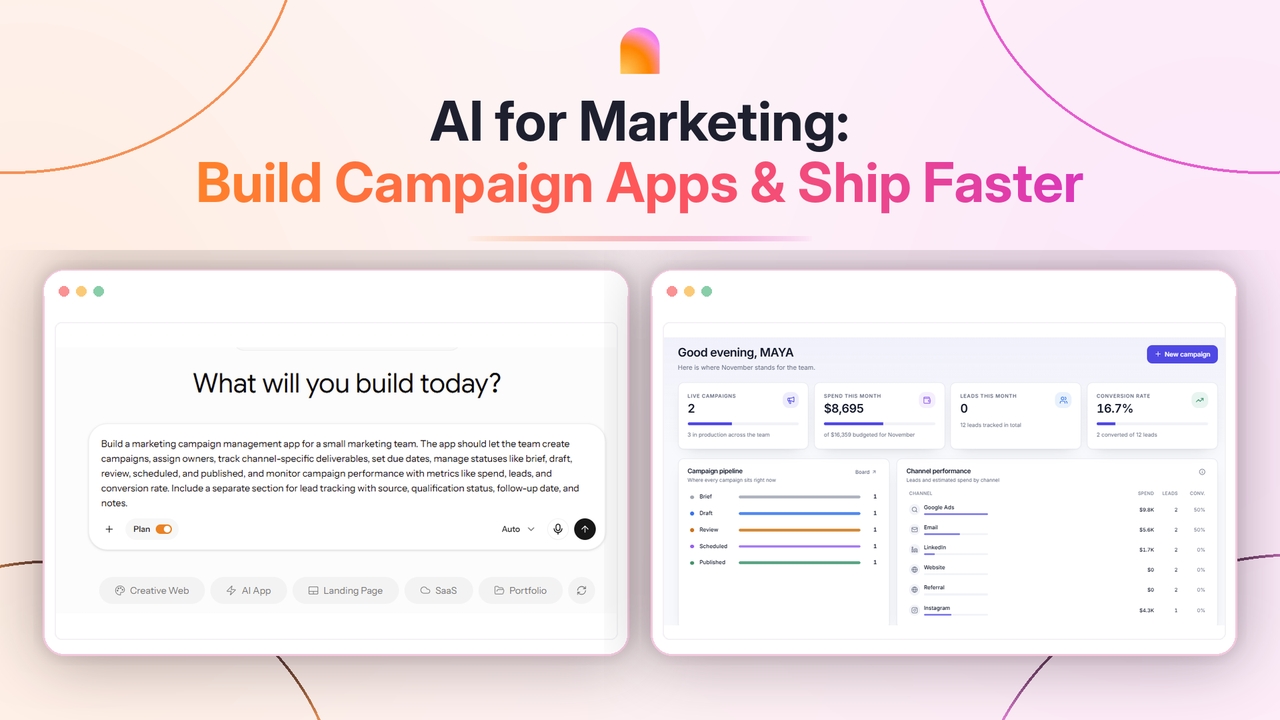
Enter Pro enables prompt-based code generation , thus saving your manual effort. You can describe the prompt related to the desired HR application, and AI creates whatever you need, whether an app, dashboard, or survey.

Start for free
Prompt-Based Generation
Backend Support

Backend Support

Enter Pro offers seamless backend support to make your app fully functional. Instead of relying on external infrastructure or tool sprawl, you get database management, authentication, and workflow handling in one place.

Try Enter now

Quick Deployment

With quick backend support and seamless integrations, Enter Pro enables quick app deployment in just a click. This allows teams to quickly test, iterate, and scale their applications without long development cycles or delays.

Start for free
Quick Deployment

How to Build AI Agents for HR with Enter Pro?

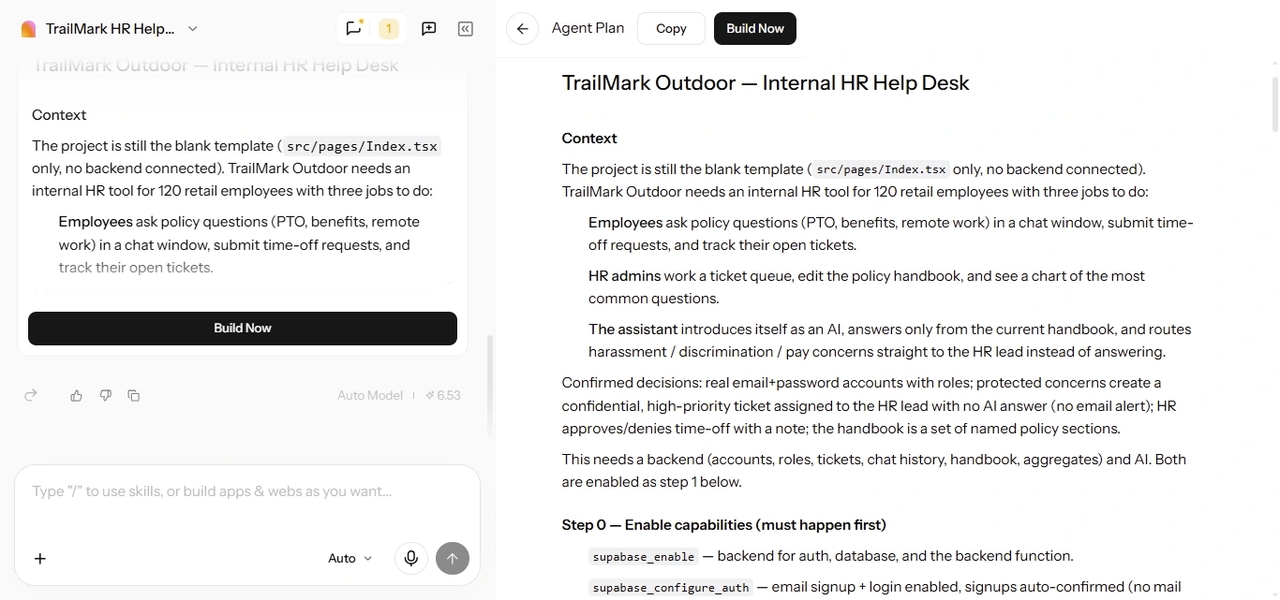
Enter Pro turns a plain-language brief into working AI agents for HR software, with no code involved. You describe the tool, answer a few questions, approve a plan, and Enter builds it. The steps below follow a sample company, TrailMark Outdoor, a 120-person outdoor gear retailer with an HR team of three.

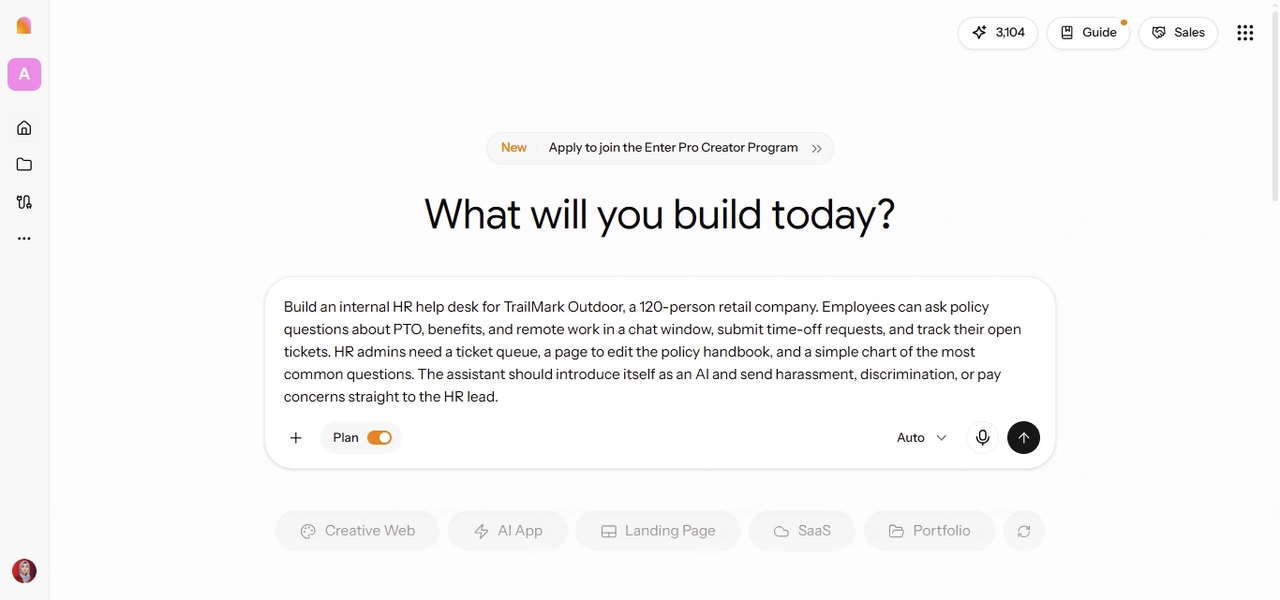
Enter Pro Plan Mode showing a prompt to create an AI HR help desk for TrailMark Outdoor employees.

Describe Your HR Agent's Purpose and Users

Open the Enter workspace, switch on Plan Mode, and type what your HR agent should do and who will use it. You don't need a full spec. A few lines on the main task, the people involved, and the data it needs are enough to start. For TrailMark, the biggest drain on the HR team was repeat questions about time off and benefits. So the first agent is an internal help desk. Example prompt: Build an internal HR help desk for TrailMark Outdoor, a 120-person retail company. Employees can ask policy questions about PTO, benefits, and remote work in a chat window, submit time-off requests, and track their open tickets. HR admins need a ticket queue, a page to edit the policy handbook, and a simple chart of the most common questions. The assistant should introduce itself as an AI and send harassment, discrimination, or pay concerns straight to the HR lead.
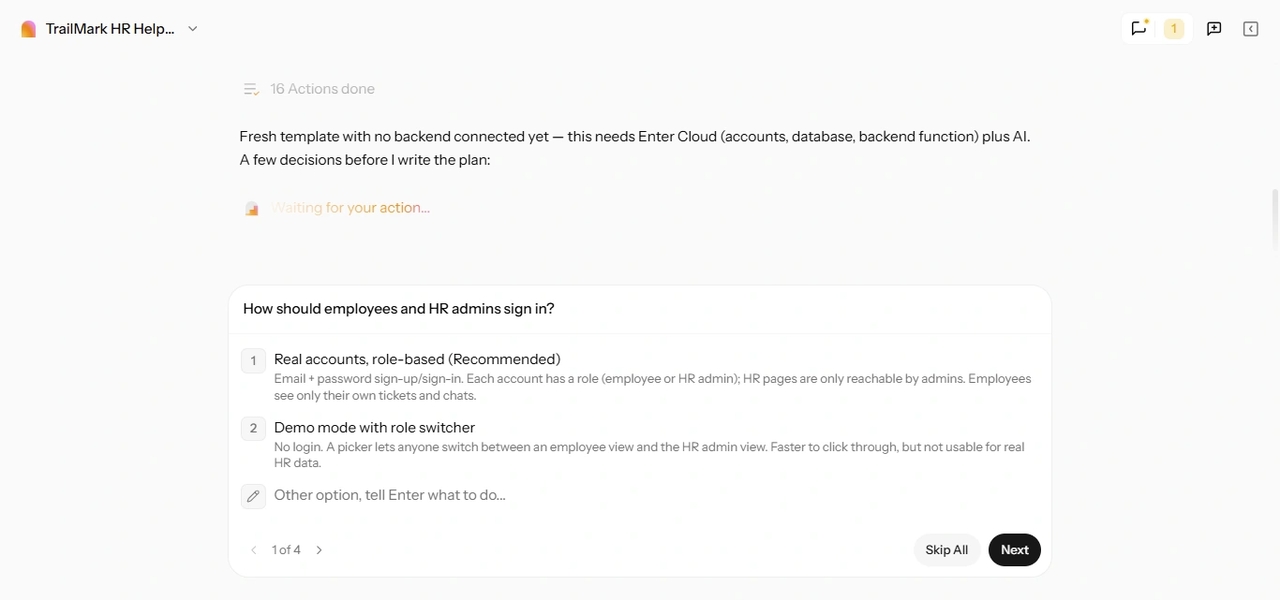
Enter Pro Plan Mode asking follow-up questions about employee authentication and HR admin roles before building an AI HR help desk.

Answer Follow-Up Questions to Define Policies and Roles

Enter Pro then asks follow-up questions to fill the gaps in your brief. For an HR tool, expect questions about user roles, which policies the agent should answer from, how approvals work, and what should happen when the agent doesn't know an answer. Answer in plain words. If you're unsure about something, ask Enter to pick a sensible default you can change later. The one thing worth settling now is your escalation list, meaning the topics that must always go to a person. Writing it down at this stage keeps the agent from guessing on sensitive cases.

Enter Pro Plan Mode asking follow-up questions about employee authentication and HR admin roles before building an AI HR help desk.

Answer Follow-Up Questions to Define Policies and Roles

Enter Pro then asks follow-up questions to fill the gaps in your brief. For an HR tool, expect questions about user roles, which policies the agent should answer from, how approvals work, and what should happen when the agent doesn't know an answer. Answer in plain words. If you're unsure about something, ask Enter to pick a sensible default you can change later. The one thing worth settling now is your escalation list, meaning the topics that must always go to a person. Writing it down at this stage keeps the agent from guessing on sensitive cases.

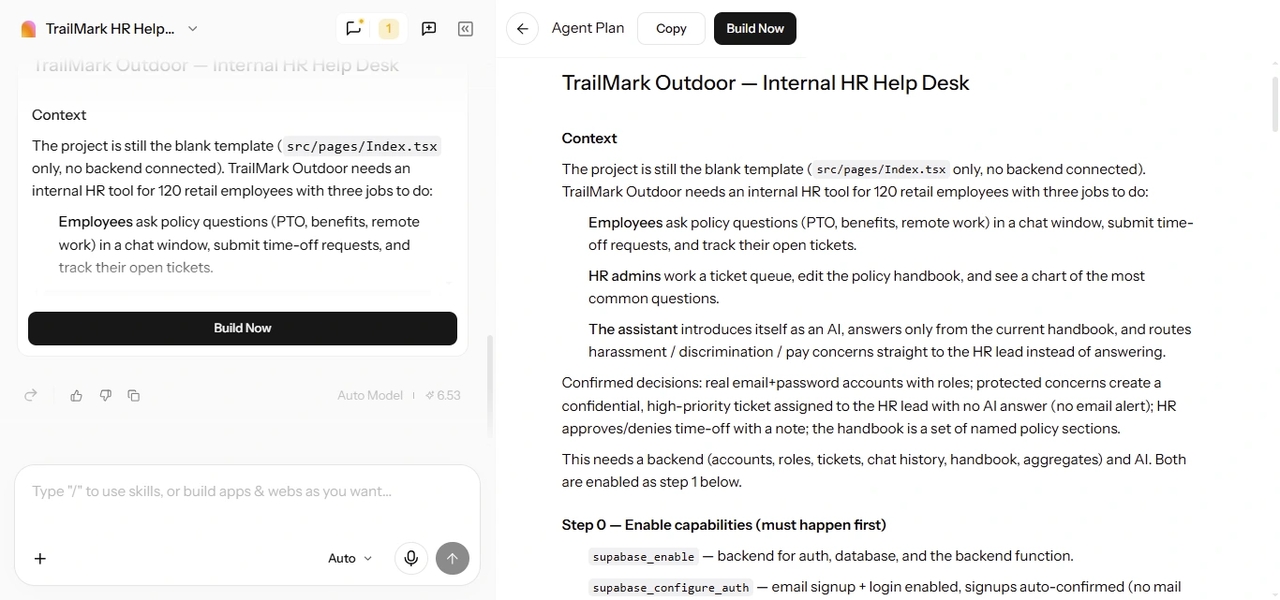
Enter Pro Agent Plan showing requirements, user roles, backend setup, and the Build Now button for TrailMark Outdoor's HR help desk.

Review the Plan and Generate Your HR Agent

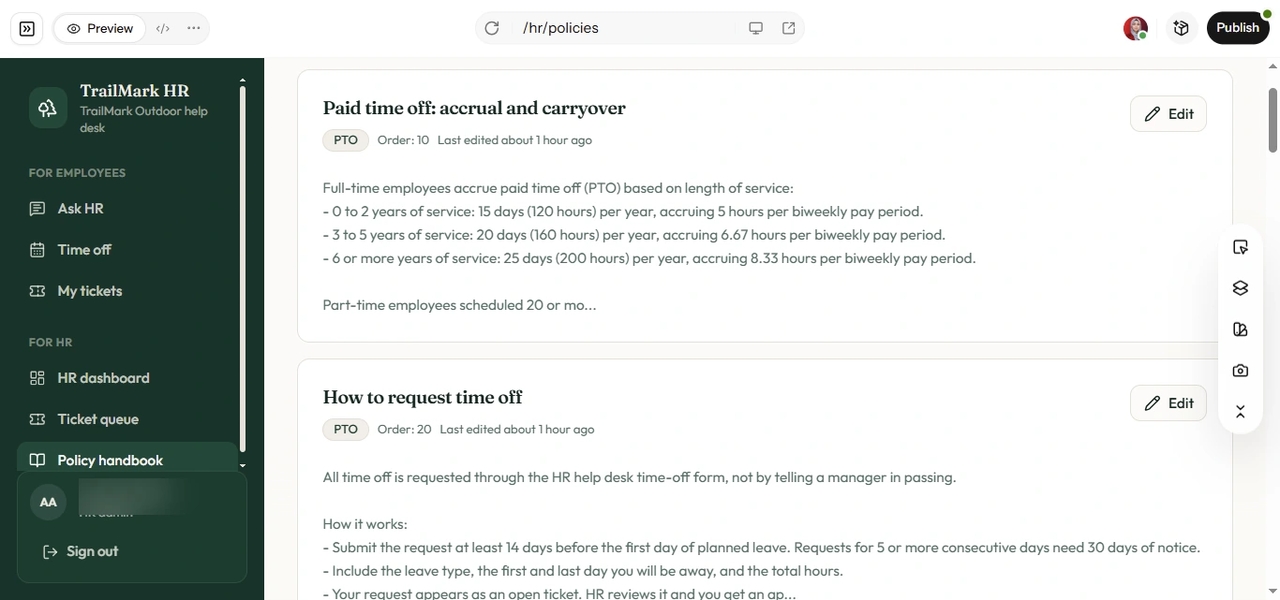
Based on your answers, Enter Pro drafts a plan with the pages, user roles, data tables, and builds steps. Read it the way you'd read a new policy before it goes out. If something is missing, such as a separate view for escalated tickets, reply with the change and the plan updates. When it looks right, click "Build now." Enter turns the plan into the first version of your HR agent and shows it in a live preview next to the chat.

Enter Pro HR policy handbook showing PTO accrual rules, time-off request guidelines, and editable policy sections in TrailMark Outdoor's HR app.

Connect Your HR Data and Customize the Interface

An HR agent is only as accurate as the policies behind it. Ask Enter to store your handbook, employee list, and tickets in Enter Cloud, the built-in backend with a managed database, login, and file storage. The agent then answers from your real policy text instead of general HR advice. Next, adjust the look. Use the chat for structural changes, for example: "Show escalated tickets at the top of the admin queue and add a status filter." For smaller tweaks, open the visual editor, click any element, and change its text, colors, or spacing until it feels like your company's own tool.

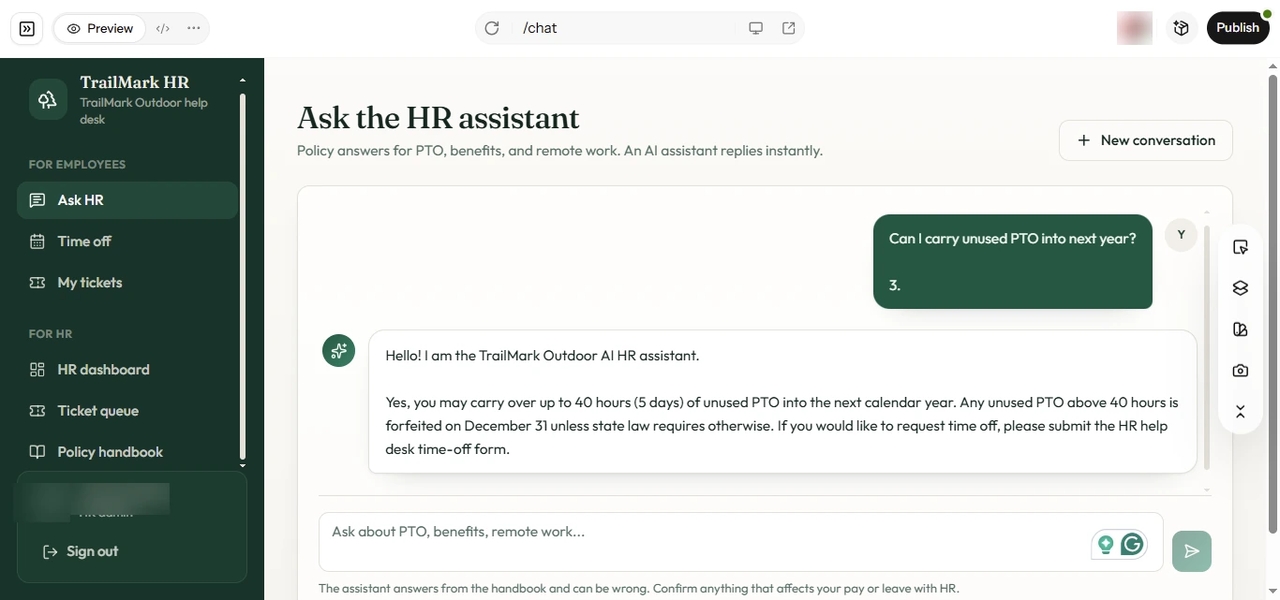
Enter Pro AI HR assistant answering an employee's PTO carryover question in the TrailMark HR help desk preview with the Publish button visible.

Test and Publish Your HR Agent

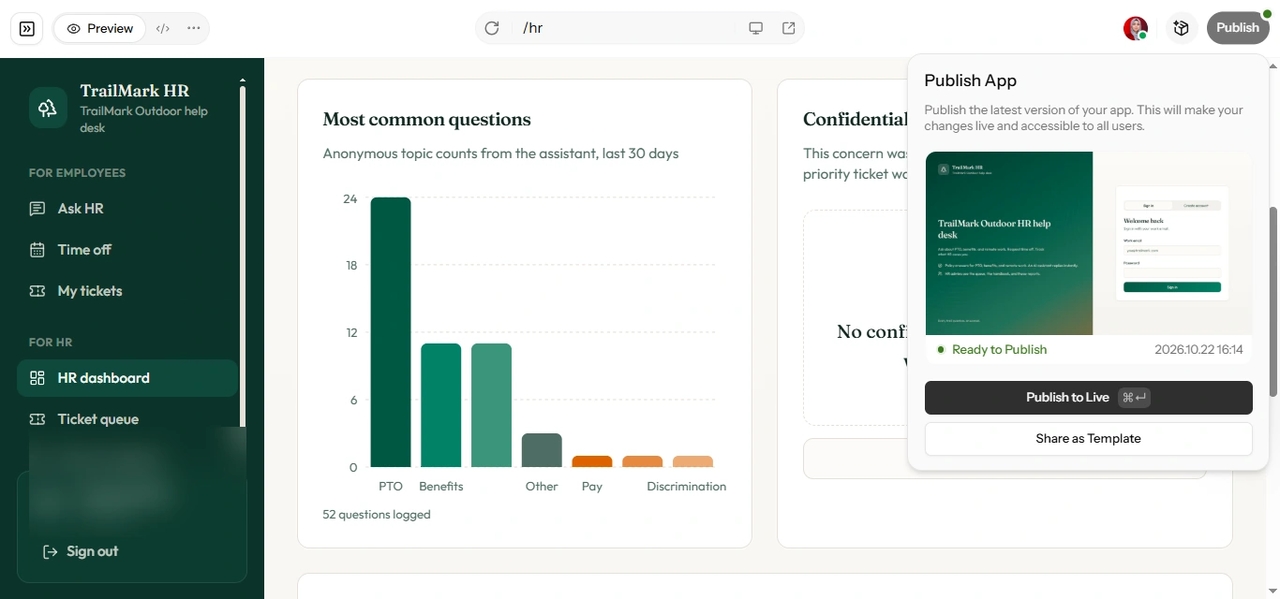
Before you share it, test the agent with two kinds of questions. Ask one with a clear answer, such as "Can I carry unused PTO into next year?", and check that it quotes the right policy. Then try something that should escalate, like a harassment report, and confirm it goes to a person instead of getting an AI reply. When both work, click "Publish" to get a shareable link. A quiet one-week trial with a small group of employees is a good idea before you announce it company-wide. If you want a branded internal address, you can also connect a custom domain from Project Settings.

Built-in Integrations Offered by Enter Pro

Stripe

Stripe

Enter Pro integrates with Stripe to enable secure payment processing within your applications. This is useful for handling payroll-related services, subscription-based HR tools, or any payment workflows required in your system..

Enter Analytics

Enter Analytics

Enter Pro includes built-in analytics to help you track website traffic, visitors, engagement, and custom events. You can monitor how employees and HR teams interact with your applications without setting up a separate analytics platform.

Supabase

Supabase

Enter Pro connects seamlessly with Supabase, providing a powerful backend infrastructure including databases, authentication, and real-time data handling.

Use Cases Where Enter Pro Stands out

AI Recruitment Assistant

AI Recruitment Assistant

Enter Pro helps you create an intelligent assistants that screens resumes, ranks candidates, and automatically schedules interviews, thus saving your time and effort.

Resume Screening

Resume Screening

You can create AI-powered resume screening tools that analyze large volumes of applications in seconds. These tools identify relevant skills, experience, and qualifications, ensuring that only the most suitable candidates move forward.

Employee Onboarding App

Employee Onboarding App

With Enter Pro, you can build onboarding applications that guide new hires through every step of the process. From document submission to training schedules, the app ensures a smooth and consistent onboarding experience.

HR Support Help Desk

Most HR inboxes fill up with the same questions about leave, benefits, payroll dates, and holiday schedules. With Enter Pro, you can build AI agents for HR support that answer those questions from your own handbook, log each conversation as a ticket, and hand sensitive cases to the right HR person by name. For a small team like TrailMark's, this is often the first agent worth building, because policy questions take up so much of the week.

Who These AI Agents for HR Are Best For?

These tools can help almost any HR team. Still, they fit some situations better than others.

1

HR Teams at Small and Mid-Sized Companies

Small HR teams answer the same questions every week, yet they rarely have the budget for an enterprise HR suite with prebuilt agents. Enter Pro lets them build one focused tool around their own policies without hiring developers. Start with the task that eats the most time, then add the next one once it's working.

2

HR Operations Managers

Teams using AI agents for HR operations can cut down on repetitive work like PTO requests, document collection, and ticket sorting. Because every request lands in one database, you also get a clearer view of what employees ask about most. That makes it easier to spot unclear policies and fix them at the source.

3

Founders and People Ops Leads Setting Up HR

Growing companies often build HR processes for the first time, and the handbook changes every few months. A custom HR agent gives new hires one place to get answers while the processes behind it take shape. When a policy changes, you update the handbook once, and the agent's answers follow.

Why Enter Pro Is One of the Best AI Agents for HR Software?

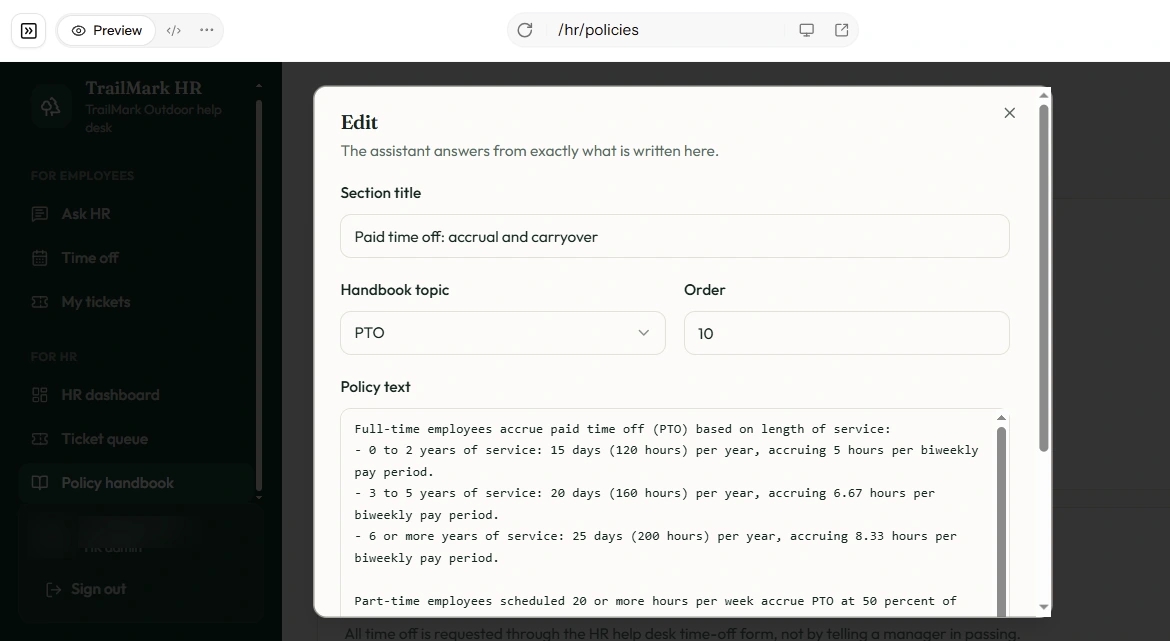
Enter Pro HR policy editor showing customizable PTO rules, handbook topics, and policy text for the TrailMark Outdoor AI HR assistant.

Built Around Your Policies, Not a Template

Many HR agents come with fixed workflows designed for large companies on a specific HR system. With Enter Pro, you describe your own policies, approval steps, and escalation rules, and the agent is built to follow them. If your process is a little unusual, the tool adapts to you, not the other way around.

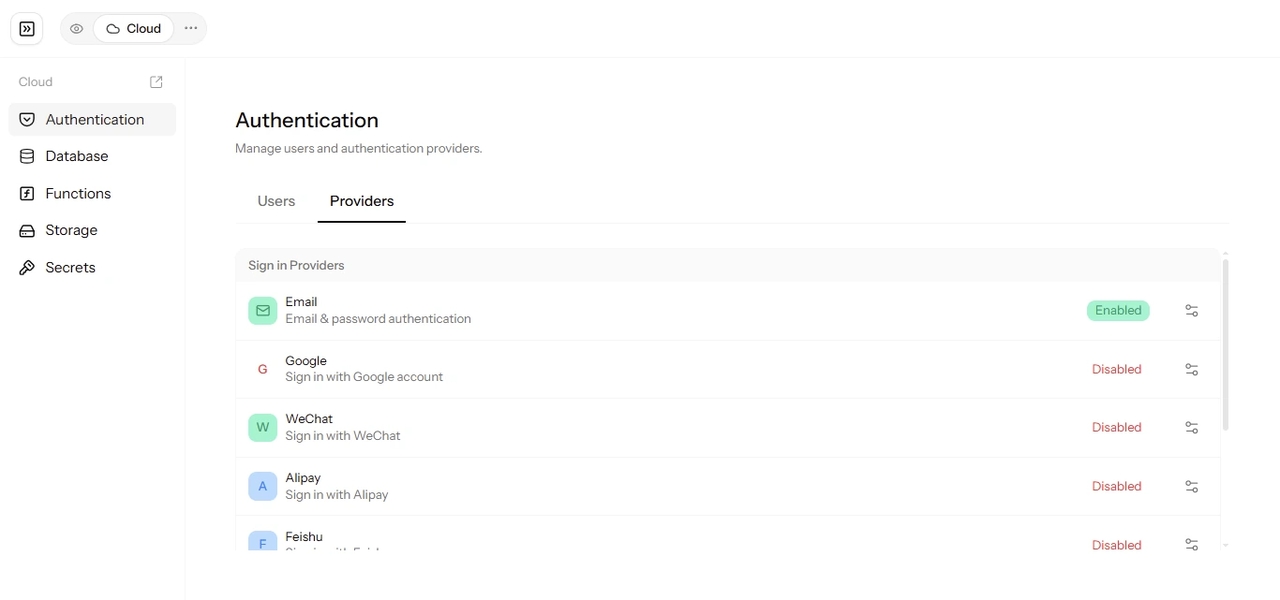
Enter Pro Cloud authentication dashboard showing built-in database, email authentication, serverless functions, storage, and backend settings.

Full Backend Included From Day One

Every HR tool you build comes with a database, login, and file storage through Enter Cloud. Employee records, tickets, and handbook files have a proper home from the first version, without stitching together extra services. You can also control which users see which records, and that matters a lot when HR data is involved.

Enter Pro Publish App panel showing the TrailMark Outdoor AI HR help desk ready for deployment with the Publish to Live option.

Launch in Days, Not Quarters

Enterprise HR rollouts often take months of setup and vendor calls. With Enter Pro, a small team can put a working HR agent in front of real employees within days and improve it as feedback comes in. You also own the code, so you can export it or sync it to GitHub if your needs change later.

FAQs

Ready to Start Building?

Your HR team shouldn't spend its week answering the same five questions. Describe the tool you need on Enter, approve the plan, and see your first HR agent working the same day. Building AI agents for HR around your own policies takes less time than most teams expect, and you can start with just one.