Build Custom AI Tools for Ecommerce With Enter Pro

Build a focused ecommerce app with Enter Pro. Plan the product journey, generate a searchable catalog, refine the interface, and connect an assistant that answers from your approved product information.

How Enter Pro Turns Generative AI into Working Ecommerce Software

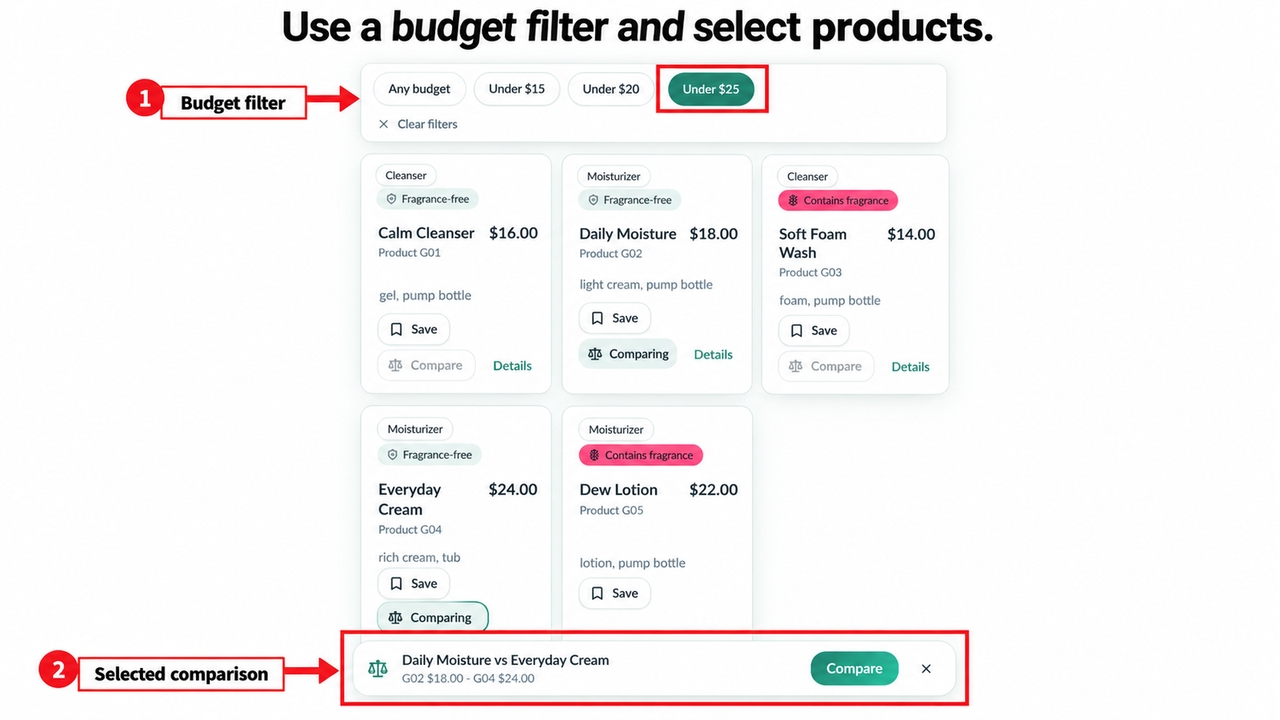
Figure 4. The budget-only filter shows five products under $25 and the comparison-selection controls.

Build the Interface, Logic, Data Flow, and APIs Together

Move beyond a mockup by connecting the visible experience to the logic and workflows it needs. GlowGuide’s budget-only filter shows five products under $25. The product pages and comparison use the same catalog attributes, helping shoppers check the information behind their choices.

Start for free

Start with Plan Mode, Not a Blank Canvas

Map pages, roles, data, rules, integrations, and customer journeys before generation begins. GlowGuide’s brief defines a six-product catalog, budget and fragrance filters, a two-product comparison, saved items, and an assistant restricted to approved product facts. That gives each generated screen a purpose.

Build Your Ecommerce App
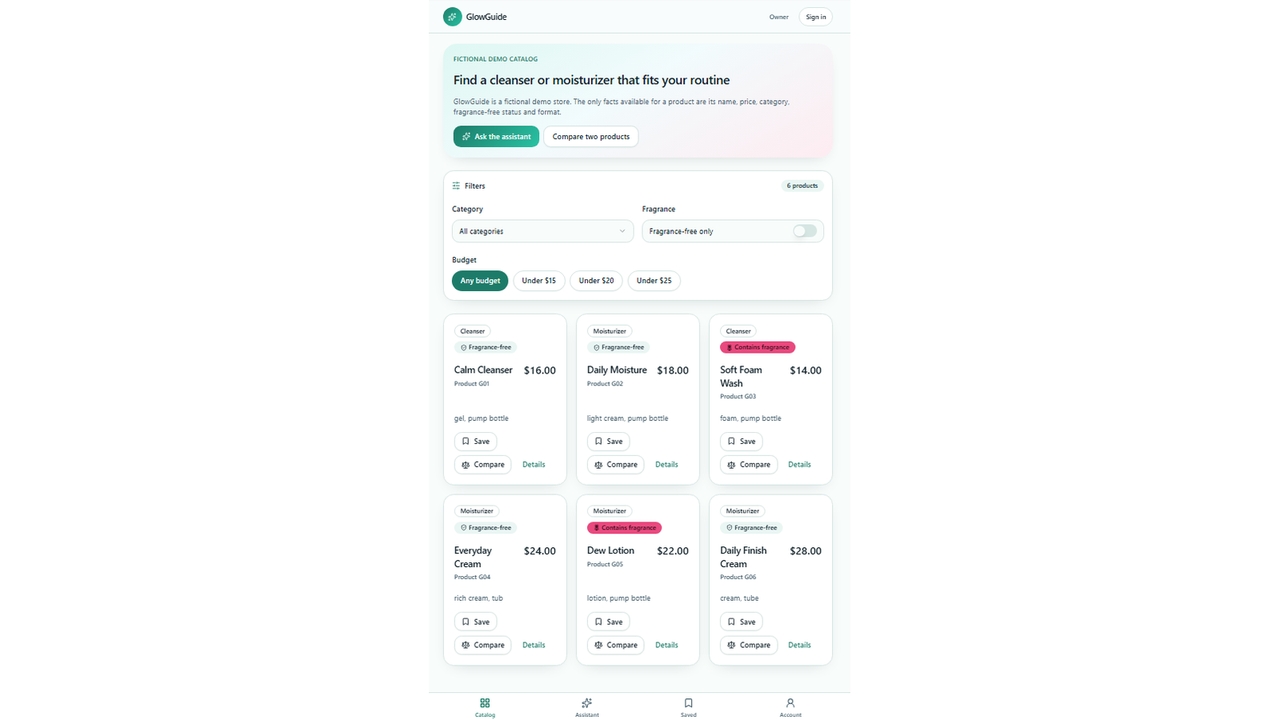
Figure 3. GlowGuide introduces its six-product demo catalog and product-discovery controls.
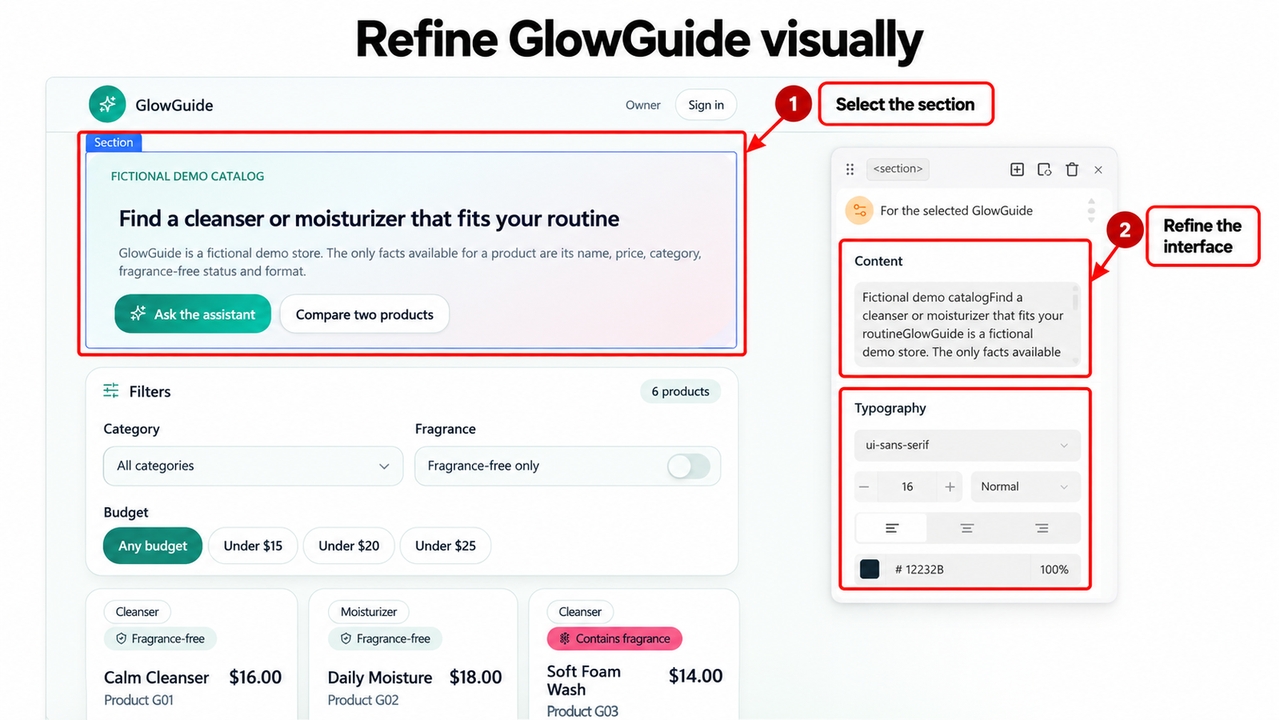
Figure 5. The Visual Editor selects the actual catalog hero section for refinement.

Refine Every Screen in the Visual Editor

Use the Visual Editor to adjust layout, styling, and text in context. GlowGuide’s selected catalog hero shows where to refine the introduction without changing product facts. Keep headings, filters, and prices readable around the shopper’s next action.

Try Enter now

How to Use AI for Ecommerce from First Prompt to Launch

A disciplined three-step workflow keeps the build tied to a business result.

1

Describe the Goal, Users, Data, and Workflow

Explain the desired action, required pages, data sources, permissions, and success measure. For example: “Build a skincare product-discovery app with six demo products, budget and fragrance filters, comparison, accounts, saved items, and answers grounded in the catalog.” Review the plan before generation.
2

Review the Plan, Generate the App, and Connect Services

Confirm the structure, then connect only the database, model, agent, or API capabilities the use case needs. Review a product detail and compare two entries. GlowGuide places Daily Moisture G02 at $18 beside Everyday Cream G04 at $24, with their fragrance-free attributes and different formats visible.

3

Refine, Test, and Publish

Polish the interface, then test account access, mobile layouts, errors, data accuracy, and agent responses. Check an expected match, an empty result, and an unavailable service separately. Verify saved items persist for the correct account before publishing the app for customers.

What Can You Build with AI Tools for Ecommerce?

1

AI Shopping Assistants and Customer-Service Agents

Build AI solutions for ecommerce around approved product guidance, support content, and task routing. Specify the data an assistant may use and when it should ask for human help. Keep its answers within the information and actions the business has authorized.

2

Ecommerce Operations Dashboards and Internal Tools

Build catalog, order, returns, vendor, approval, and performance interfaces for the team behind the store. Define role permissions, accurate records, and exception handling alongside the dashboard. These AI solutions for ecommerce can extend an existing operation around a specific workflow.

3

Campaign, Content, and Merchandising Workspaces

Turn generative AI for ecommerce into a repeatable application workflow for product copy, launch planning, merchandising, and approvals. Define approved inputs and review states before publishing. The same workspace can support a first launch, a conversion experiment, or an internal operating improvement.

What Ecommerce Teams Are Saying About Enter Pro

Building my online boutique was incredibly easy. The artificial intelligence generated beautiful pages instantly, helping me double my monthly sales without needing any technical skills.

Camila Morales

Founder

We launched our completely new digital storefront over the weekend. The automated inventory management system saved my small team hundreds of hours of exhausting manual labor.

Diego Herrera

CEO

Integrating payment gateways took only five minutes. Our customers love the smooth checkout experience, and we have seen a massive decrease in abandoned shopping carts.

Valentina Rojas

Store Owner

FAQs

Build the Ecommerce Software Your Business Actually Needs

Bring a storefront, workflow, dashboard, or ecommerce assistant to life with Enter Pro. Start with a clear problem, shape the experience visually, connect the services you need, and launch after reviewing the complete customer journey.