Build Your Startup With Enter Pro AI for Founders

Plan the first customer journey, generate the interface, and keep refining it as your startup learns.

Key Features of Enter Pro AI for Founders

Plan Your First Customer Journey

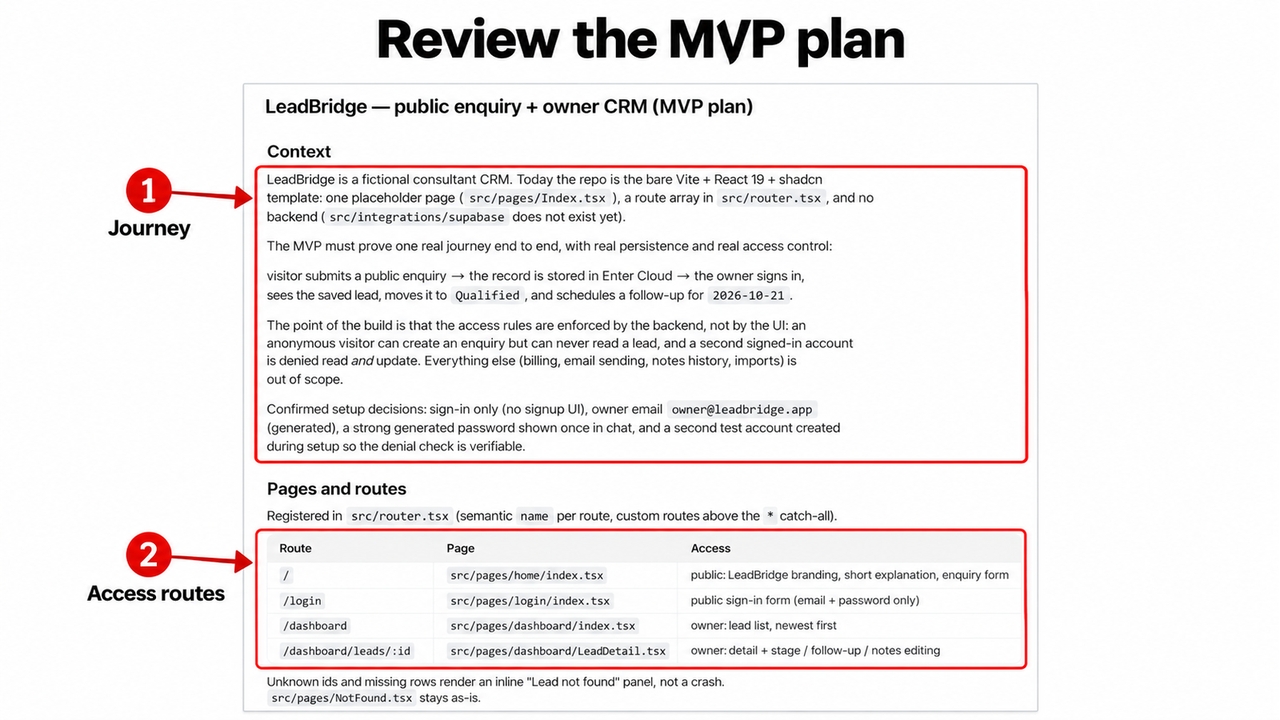
Use Plan Mode to turn an idea into a focused build brief. For LeadBridge, define the enquiry fields, dashboard, lead stages, and follow-up action before generation. Start on the dedicated AI for Founder page and describe the startup product you want to create. A focused brief gives the builder a clear relationship between the visitor, the information collected, and the owner’s next action. For LeadBridge, that means a public enquiry route alongside a private owner area.

Start for free
Figure 3. The generated LeadBridge plan separates public routes from the intended owner workflow.
Seamless integrations

Build With Enter Cloud

Enter Cloud brings database, authentication, storage, and backend functions into the project. Ask the agent to create LeadBridge’s lead records and private dashboard access, keeping the interface and backend work in one workspace. For a founder, the benefit is keeping a useful interface connected to the records behind it. Define who can submit an enquiry and who can read or change it. The public form can collect a request while the intended dashboard keeps customer information available to authorized owners.

Try Enter now

Refine Your Product Visually

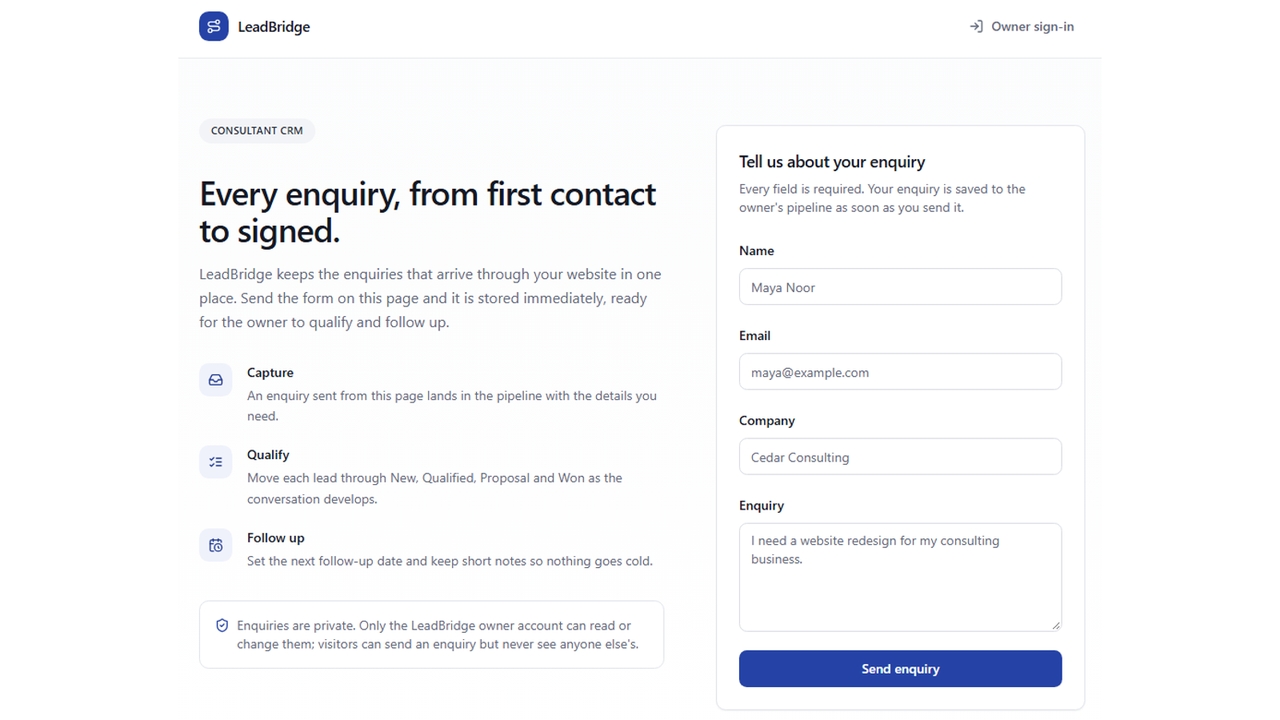
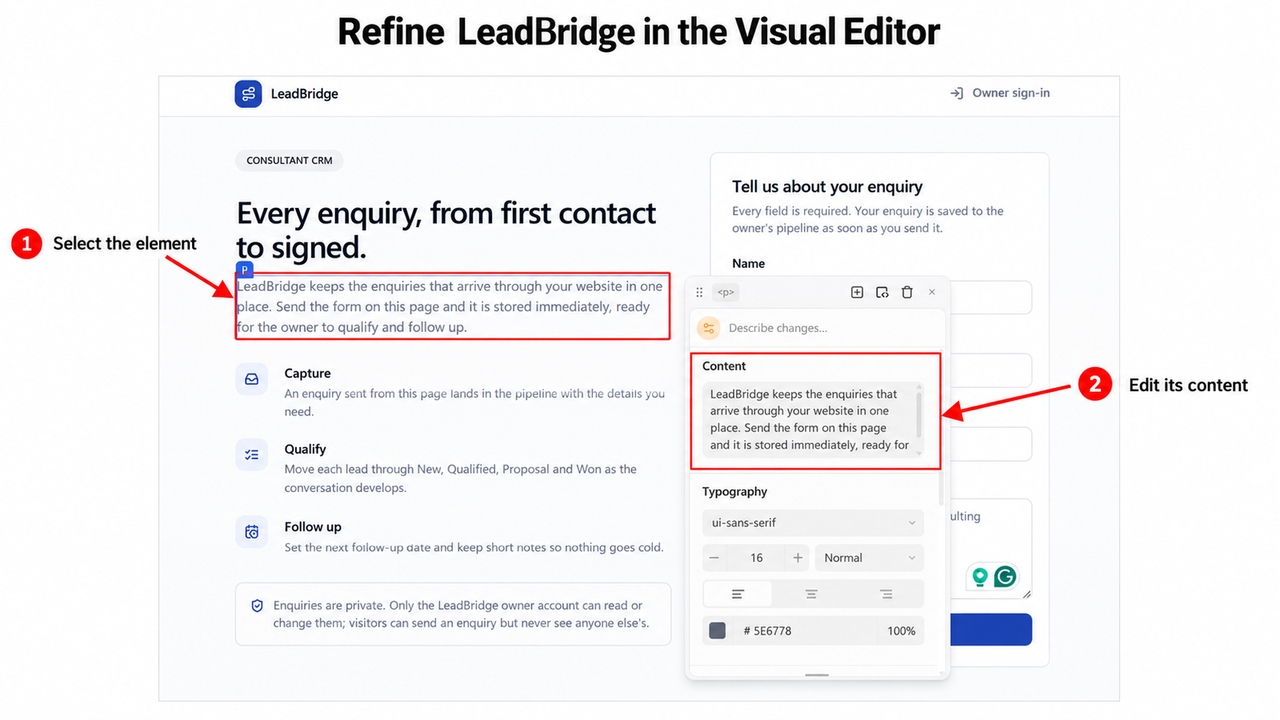
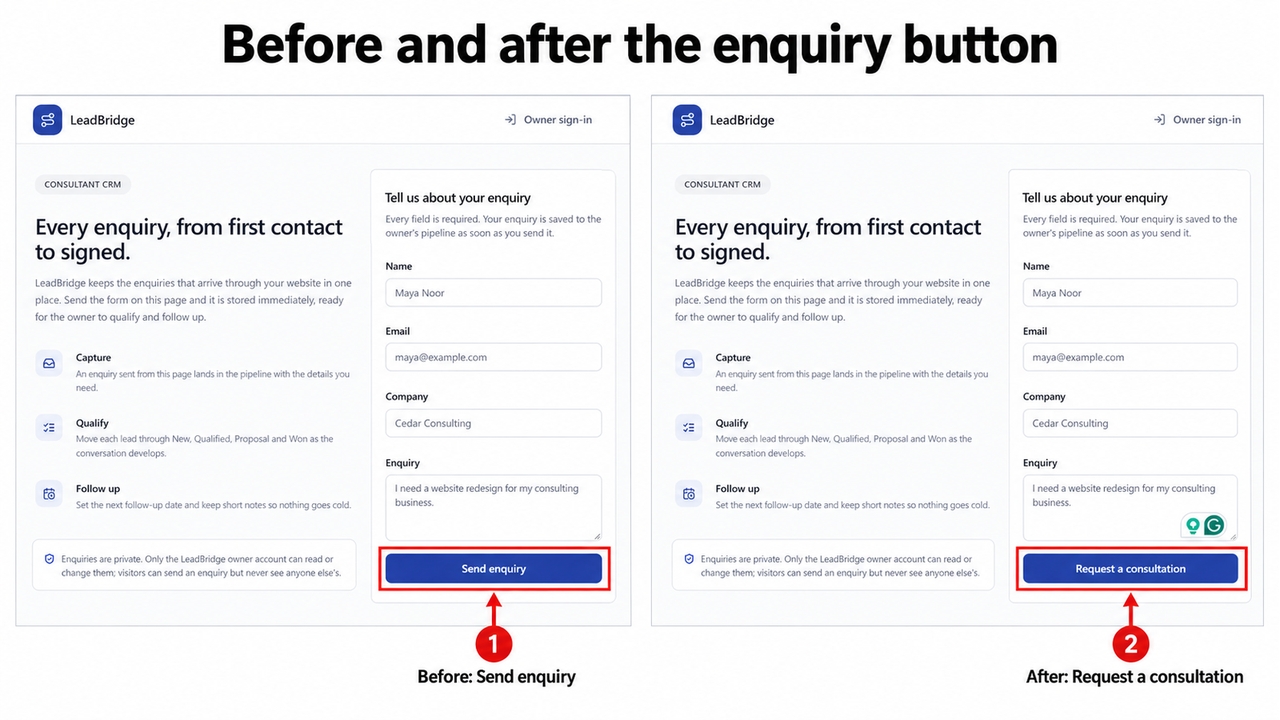
Use the Visual Editor to adjust LeadBridge’s field labels, card spacing, and enquiry action. Preview the change in context and use focused prompts when the underlying behavior needs updating. LeadBridge illustrates how a small edit can clarify the offer: the form action changes from Send enquiry to Request a consultation. The selected introduction paragraph also exposes Content and typography controls beside the preview, so wording and presentation can be reviewed together.

Start for free
Figure 5. The Visual Editor exposes content and typography controls beside the selected paragraph.
Figure 6. The enquiry button changes from Send enquiry to Request a consultation.

Keep Development Flexible

Keep your generated code available as the product grows. Connect GitHub for continued development and team review. These founder tools for AI development support a practical handoff.

Try Enter now

Why Choose Enter Pro for Your Startup

1

Start With a Focused MVP

Enter Pro AI for founders helps you turn a focused startup idea into an MVP that prospective customers can explore. Start with one useful journey, such as submitting an enquiry or requesting a service, and build the pages around it. A concrete product gives people something to respond to, helping you gather feedback before expanding the scope.


2

Keep Your Product Work in One Project

Keep planning, generation, Enter Cloud, and visual refinement connected to the same Enter Pro project. Define the customer journey, generate its interface, and request the records and account access it needs. This keeps the product’s visible experience and supporting workflow together, so you can review changes in context as your startup’s requirements develop.

3

Build Around Your Startup’s Processes

Build AI tools for founder teams around the information and actions your business actually uses. With Enter Pro, you can specify contact fields, lead stages, follow-up dates, and private dashboards that reflect how your team works. LeadBridge illustrates this flexibility through a focused enquiry journey that you can adapt as your sales process develops.

Build Your Founder MVP in Three Steps

1

Describe the Product

Give Enter Pro the LeadBridge brief: name, email, company, enquiry, lead status, and next follow-up date. Request New, Qualified, Proposal, and Won stages, with a public form and a private dashboard. Review the plan.

2

Generate and Refine

Generate the app, enable Enter Cloud, and connect the lead workflow. Refine the dashboard and form in the preview. Keep the first release focused on capturing a lead and assigning its next action.

3

Test and Share

Submit a demo enquiry, verify its saved record, update its stage, and check the follow-up date. After reviewing access and mobile behavior, publish a pilot and share it with a small customer group.

Startup Use Cases for Enter Pro

1

Founder Sales and Customer Follow-Ups

Build a custom pipeline like LeadBridge with your own stages, notes, and next actions. When comparing the best CRM with AI for founder-led startups, check whether the fields, stages, and next actions fit your actual sales process. A small custom pipeline can make the handoff from an incoming request to a follow-up easier to explain.

2

Product Demos and Early MVPs

Turn a customer problem into a focused interactive demo. Use Enter Pro AI for founders to make the proposed journey concrete before expanding the product.

3

Founder-Friendly AI for Investor Introductions

Adapt LeadBridge’s contact workflow to track investor contacts you already have, meeting notes, document requests, and follow-up dates.

What Users Are Saying About Enter Pro

Enter Pro helped me go from idea to a working MVP in under a week. What used to take months now happens in days. It removed all the usual bottlenecks in development.

Daniel Carter

Daniel Carter

As a non-technical founder, this completely changed how I build products. I launched my first app and got real users within days. The workflow is smooth and intuitive.

Ethan Walker

Ethan Walker

The speed is unreal. I can build, test, and iterate without waiting on developers or dealing with complex setups. Strongly recommended!!

Olivia Bennett

Olivia Bennett

FAQs

Build Your First Startup Product With Enter Pro

Use Enter Pro AI for founders to turn a focused brief into an editable MVP. Start with a LeadBridge-style workflow, refine it, and share the tested result.